

Closed (fixed)
Project:
Mollom
Version:
6.x-1.16
Component:
Miscellaneous
Priority:
Normal
Category:
Support request
Assigned:
Unassigned
Reporter:
Created:
12 Nov 2010 at 03:18 UTC
Updated:
27 Sep 2011 at 16:31 UTC
Jump to comment: Most recent, Most recent file



Comments
Comment #1
HS commentedChanging status as Mollom is not serving capture at the moment. Will upgrade Mollom to 6.x.1.15 now and confirm if this goes away.
Comment #2
sunThanks for reporting -- forwarded to the technical backend team at Mollom!
Comment #3
HS commentedRecent Mollom messages:
* All servers unreachable or returning errors. The server list was emptied.
* Server 'http://174.37.205.152' redirected to: false.
* Error '500' from 'http://67.228.84.11' for 'mollom.getImageCaptcha': 'Internal Server Error'
Data:
author_ip = '121.......7'
ssl = false
* Refreshed servers: 'http://67.228.84.11, http://174.37.205.152'
* All servers unavailable: 'http://67.228.84.11, http://174.37.205.152'
Last error: 1200 'Please try the next server in the server list.'
* All servers unreachable or returning errors. The server list was emptied.
* Server 'http://174.37.205.152' redirected to: false.
* Error '500' from 'http://67.228.84.11' for 'mollom.getImageCaptcha': 'Internal Server Error'
Data:
author_ip = '22.........26'
ssl = false
* All servers unavailable: 'http://67.228.84.11, http://174.37.205.152'
Last error: 1200 'Please try the next server in the server list.'
* All servers unreachable or returning errors. The server list was emptied.
Comment #4
sunThis problem should be resolved in the meantime.
Thanks again for reporting it!
Comment #5
HS commentedSeeing a lot more errors now.
All servers unreachable or returning errors. The server list was emptied.
----
Error '404' from 'http://67.228.84.11' for 'mollom.verifyKey': 'Not Found'
Data:
platform_name = 'Drupal'
platform_version = '6.14'
client_name = 'Mollom'
client_version = '6.x-1.15'
-----
Error '404' from 'http://67.228.84.11' for 'mollom.getImageCaptcha': 'Not Found'
Data:
author_ip = '1........0'
ssl = false
-----
Refreshed servers: 'http://67.228.84.11, http://174.37.205.152'
-----
All servers unreachable or returning errors. The server list was emptied.
-----
Error 0 from 'http://174.37.205.152' for 'mollom.getImageCaptcha': NULL
Data:
author_ip = '9.......30'
ssl = false
------
Error -111 from 'http://67.228.84.11' for 'mollom.getImageCaptcha': 'Connection refused'
Data:
author_ip = '9....30'
ssl = false
-----
There is a host of other errors too. Please advice
Comment #6
Patricia_W commentedI'm seeing similar errors:
Message Error -110 from 'http://67.228.84.11' for 'mollom.verifyKey': 'Connection timed out'
Data:
platform_name = 'Drupal'
platform_version = '6.19'
client_name = 'Mollom'
client_version = '6.x-1.15'
Comment #7
sunDo you still experience this issue? We had a temporary server hiccup in the past days, but that should be resolved by now.
Comment #8
ebeyrent commentedIn addition to "Error 0" and "Error -110", I am seeing entries in watchdog like:
Regarding this last message, "check your site for attacks" isn't very helpful or informative.
Comment #9
sunThe
Unknown session id ...error should technically never happen -- unless a malicious user tries to take over the user/form session of another user. The Mollom module is not able to do a security review of your site, so that's why the log message tries to make site operators aware of that.But regardless of that, do you still get 0 or -110 timeout/communication errors?
Comment #10
Patricia_W commentedI'm also seeing a message about the server ... redirected to:
Type mollom
Date Thursday, December 16, 2010 - 14:06
User admin
Location http://www.canadaparticipates.ca/admin
Referrer http://www.canadaparticipates.ca/?q=user
Message Server 'http://174.37.205.152' redirected to: 'http://67.228.84.11'.
Severity debug
Hostname 70.29.21.228
Operations
Is this a normal message or something I need to be concerned about?
Comment #11
dries commentedThis is a usability problem with the watchdog messages; it is simply not obvious what is going on. See also #1000690: Revamp and reduce log messages (was: Not clear that fail-over is working).
Comment #12
ebeyrent commentedI am not seeing any more -110 or 0 warnings. I am getting these though:
and similarly, this:
Comment #13
sun@ebeyrent: With the latest official module release, such errors should not appear. Did you update to 1.15?
Comment #14
ebeyrent commentedYes - I am running 1.15. More errors yesterday:
Comment #15
ebeyrent commentedAlso seeing this warning a few times:
Comment #16
sunThanks for reporting back, @ebeyrent -- I have forwarded that information to Mollom's development team.
Comment #17
ebeyrent commentedFYI - still getting -110 errors:
This was accompanied by:
I am surprised that I'm getting so many errors.
Comment #18
HenryLTV commentedGreetings,
We started seeing the same types of intermittent error messages last week as well and created support tickets in both Acquia & Mollom for this exact issue. At first they would happen once or twice a day, but now they are happening frequently enough to be alarming. To be honest, when I found this thread reported in the queue, i was somewhat relieved that we aren't the only ones experiencing this problem.
Our Specs:
Drupal Core 6.19
Mollom 6.x-1.14
We are planning an upgrade soon to Mollom 6.x-1.15, but it seems from this thread that even 1.15 is having the same errors!
When these "server unavailable" errors occur we are getting reports from our users that:
1. they cannot post (expected behavior since we default to disallowing all posts when Mollom servers unavailable since we average ~1000 spam posts a day).
2. they are intermittently getting broken CAPTCHA images served by Mollom from this url: xmlrpc2.mollom.com
We also noticed a dramatic drop in overall Spam/Ham numbers in our Mollom Statistics starting 12/17/2010 (attached screenshot). We originally attributed this to the holidays, but since we haven't seen a recovery at all, we think this might be tied to the same issue since we block all posts when the Mollom servers are unavailable.
Our Drupal logs DO show Mollom spam, ham, correct CAPTCHA, & unsure entries when the servers ARE available, so we can assume it's not a broken code issue. And when we go to the the Mollom Settings page, we do receive the message that Mollom server are communicating successfully.
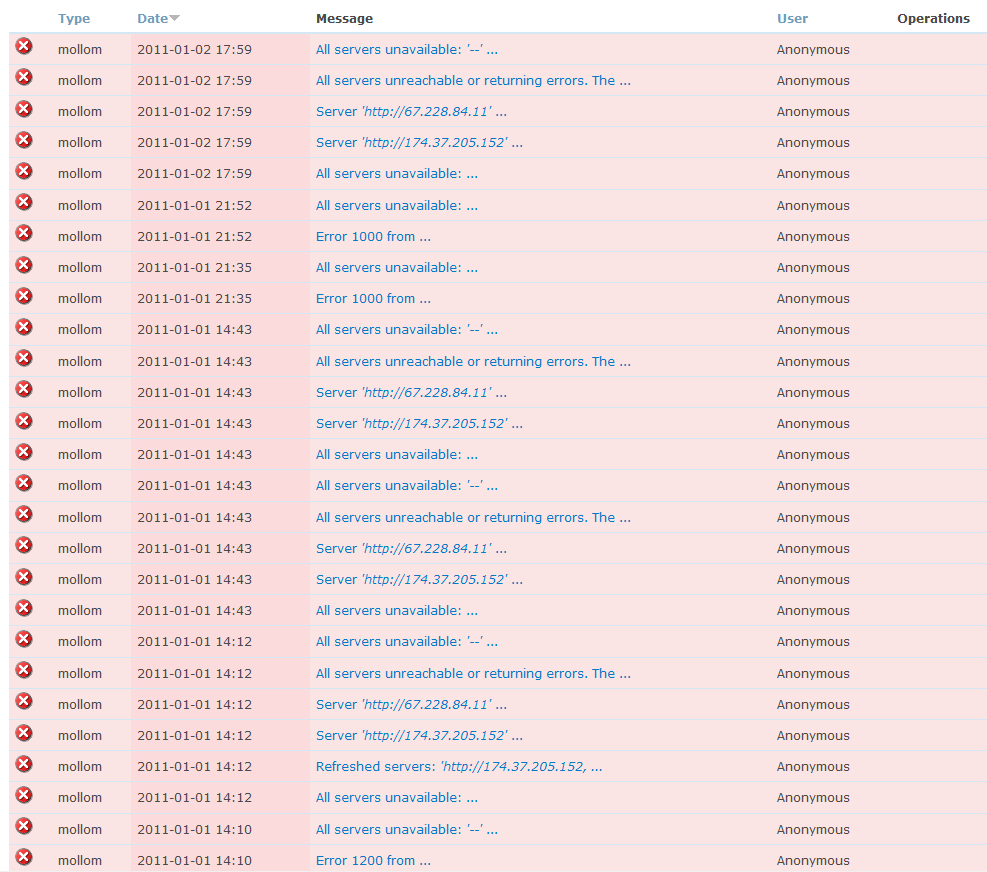
Sampling of Error Messages we repeatedly & intermittently receive in our Drupal Log daily, somtimes hourly (attached also):
After visiting the Mollom Blog to see if there were any updates that coincided with 12/17/2010 when we started noticing these issues, I saw Dries's latest post 12/14/10:
http://mollom.com/blog/mollom-gets-a-new-backend
Since this backend server change could potentially impact server availability,
which are the errors we are receiving, couldn't this be a possible cause of
our error issues AND statistical drop in ham/spam numbers?
Thanks!
Henry
Comment #19
HenryLTV commentedAfter opening a support ticket with both Acquia & Mollom, we received the following from the folks @ Mollom c/o Acquia (thanks to Michael Haag & Sun for the help):
Now, we know for a fact that the Mollom servers WERE actually unavailable since our users were complaining that they couldn't post intermittently and would receive the
message. Again, defaulting our Mollom settings to allow posts if their servers are unavailable isn't an option for us since we receive an average 1000 spam/day, with highs of 8000 in a day.
Both of our error symptoms have seemed to recovered:
We will keep monitoring and will update if there are any further issues, though we're optimistic that this seems to have fixed the problem. We just hope we haven't lost the confidence of our forum users during this 2.5 weeks of intermittent server availability. We were lucky that it happened during the Christmas & New Year holidays so perhaps the damage was minimal.
The backend Mollom upgrade and the latest 1.15 release are great steps forward, and we understand no release comes without bugs. We can only hope that these issues can be fixed in a timely manner.
So Despite the hiccup, keep up the great work Mollom!
Comment #20
Anonymous (not verified) commentedHas anyone experienced site outages related to this issue? We got a few hundred of these Mollom error messages that roughly, though not exactly, coincided with our site going down. The errors ceased before we brought the site back up. Thanks.
Comment #21
HenryLTV commentedNo site outages on our end, related or otherwise, sorry. but IMO it doesn't seem likely this issue would bring down your site. From our encounter the past 2 weeks, this issue would just trigger whatever failover option you have configured in your Mollom settings when Mollom Servers are unavailable. In our case users were unable to post.
Since you said "roughly" coincided, i'd check what exactly the last Drupal log error was at the time your site went down and troubleshoot from there. You might also want to check the Apache logs as well.
Comment #22
ebeyrent commentedThe only thing I can think of that might cause outages would be if you are not pruning watchdog and have millions of rows in that table. Conceivably, the large number of Mollom entries could have caused mysql to thrash.
I'm not saying that's what happened, but I've seen similar things happen before...
Comment #23
sunAs outlined above, we think that those communication errors should be resolved by now.
Comment #24
HenryLTV commentedHmm, it seems the Mollom error log messages are still happening, but the issue with our Ham/Spam numbers has been fixed after Mollom fixed the issue with the failover system.
These errors just randomly appear with no pattern, and then they just repeat for a minute or two, then stop. I've attached a snippet of these errors from today.
Does this quote cited from my Mollom ticket explain the following errors we are seeing almost daily now? Are they truly harmless status messages and not error messages we should be alarmed about?
If these messages are truly harmless status messages and NOT errors, and DO NOT impact our users being able to post messages, then I agree that a separate ticket should be created to improve the handling of these events in the Mollom module so that they don't appear as errors. But I would feel safer once Mollom verifies that these log messages are "normal". Then we can close this issue once and for all.
Thanks!
PS. There seems to be a related (duplicate?) issue out there as well: http://drupal.org/node/356704. Not sure which one should be marked as the duplicate.
Comment #25
ebeyrent commentedI'm also still seeing issues, even though I've been told the problem has been fixed.
However, if the stats are any indicator, Mollom appears to be performing much better, as the amounts of spam and ham have jumped impressively.
Comment #26
kebap commentedI'm getting the same problem since about 3 hours:
Comment #27
keith.smith commentedThere was an temporary, overnight issue with one of the servers that unfortunately went unnoticed for frame of time early this morning, leaving the other servers to pick up the slack. Everything should be back to normal now. We're enhancing notifications for this sort of thing so that people get alerted _much_ more aggressively.
Comment #28
liliplanet commentedsubscribe thx .. dblog filled with Server 'http://174.37.205.152' redirected to: 'http://67.228.84.11'.
* All servers unreachable or returning errors. The server list was emptied.
* Error 0 from 'http://67.228.84.11' for 'mollom.getImageCaptcha': NULL
Data:
author_ip = '196.214.159.90'
ssl = false
* Server 'http://174.37.205.152' redirected to: 'http://67.228.84.11'.
* All servers unavailable: 'http://174.37.205.152, http://67.228.84.11'
Last error: 0 NULL
update: for some strange reason the errors have stopped without doing anything on this side :)
Comment #30
wolv3rin3 commentedWe've been getting 100's of errors like the following for about a week on our network of sites. Ample spam getting through that correlates to the same timeframe.
Examples:
Comment #31
dries commentedWe'll investigate these things. Two notes:
- Not all of these messages are errors -- some are just informational. We might want to tweak the watchdog messages to make that more clear (if that is confusing).
- It would be helpful to get timestamps. Our internal records show that you should not have seen these messages 'for about a week'. It should have been limited to one day. If our internal records are correct, we might have to improve our monitoring or the error might have been in the network (beyond our control).
Comment #32
ebeyrent commentedI still get a bunch of entries in watchdog from Mollom as well, such as:
On 3/17 from about 6:35am to 6:50am, I got 35 of these messages.
Comment #33
torgospizzaWe're seeing a lot of these messages as well. It looks like the servers are mostly reachable but very slow to respond.
Comment #34
sunA small time-frame of unavailability on March 17th can be confirmed. However, it lasted a few minutes/hours only, and you should definitely not see these log messages by now anymore. Are you able to confirm this?
Comment #35
tjharman commentedI'm not a paying user so please don't think this is a complaint, just a "me too!" bug report.
Saw lots of errors last night when a user added a comment:
Mollom version 6.x-1.15
Comment #36
torgospizzaI can confirm that there are no recent server unavailable messages in our logs, just the following:
Server 'http://174.37.205.152' redirected to: 'http://67.228.84.11'.. Thanks, sun!Comment #37
stevieb commentedI got this today
Type mollom
Date Monday, March 28, 2011 - 16:38
Message Server 'http://174.37.205.152' redirected to: 'http://67.228.84.11'.
Severity debug
Hostname 212.185.233.236
my site has also disappeared in the last week twice and the index page and includes have had to be re-uploaded for the site to work (I'm using drupal 7)
Comment #38
sunWhenever the log message severity is "debug", "info", or "notice", you can happily and freely ignore them, as these are informational log messages only. Only warnings and errors are of interest.
Comment #39
smichel commentedI'm consistently getting these errors on my staging server on Acquia:
All servers unavailable: 'http://174.37.205.152, http://67.228.84.11'
Last error: NULL NULL
Severity is error; I'm using it for profanity protection and have it set to pass content when the servers are down (given the poor uptime track record on stage over the last two weeks, I can't do otherwise), so it's basically not doing me any good at all.
Comment #40
sunDebugging @smichel's issue turned out to be caused by something else: #1198198: Fallback mode is triggered on unexpected 'spam' => 0 response
Reverting to fixed.
Comment #41
attilahooper commentedType mollom
Date Sunday, September 25, 2011 - 14:35
User Anonymous
Location http://www.sedansandsports.com/WKJeepSuspension
Referrer
Message All servers unavailable: http://174.37.205.152, http://67.228.84.11
Last error: -110 Connection timed out
Severity error
Hostname 66.249.72.198
Comment #42
sun@attilahooper: If you continue to see that error, please file a support request on http://mollom.zendesk.com/ - thanks!
I'm going to close to comments on this issue now, since this issue is closed for a long time already.