

 Come together with the global Drupal community in Rotterdam, 28 Sept – 1 Oct 2026. Sessions, contribution, connection, and Early Bird savings until 8 June.
hi,
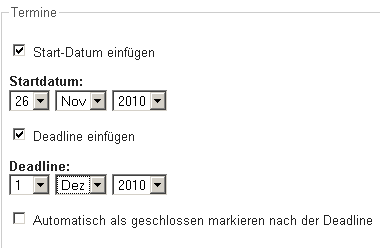
when i select a specify start date or deadline-date, e.g. 24.12., and click save, the date changes 1 day back to 23.12.!
if i select the 01.12. than it is changed to 30.11.!
i attached 2 screens.
| Comment | File | Size | Author |
|---|---|---|---|
| #2 | timezone.png | 12.38 KB | ragesoft |
| todo_displayed_date.png | 1.33 KB | ragesoft | |
| todo_selected_date.png | 5.84 KB | ragesoft |


Comments
Comment #1
AlexisWilke commentedThat sounds like a timezone issue...
You may want to make sure that your timezone is properly setup.
Is it changing every time you edit/save/edit/save/edit/save?
Thank you.
Alexis Wilke
Comment #2
ragesoft commentedeach time i save, the day get lower!
i attached the time-settings of the page!
Comment #3
AlexisWilke commentedRagesoft,
Could you tell me which timezone you're using? Germany? Are you in winter hours? (time saving)
I should be able to test with your time zone on a virtual box and try to determine how it needs to be fixed...
Thank you.
Alexis
Comment #4
ragesoft commentedyes, germany and winter time!
;) thx for the effort
Comment #5
jailleto commentedI confirm this bug.
The deadline date is saved minus one day .
To temporary fix this issue I have set the Timezone of the site to UTC.
Regards.
OJ
P.s. But all the rest of this module "ROCKS!" thank you.
Comment #6
AlexisWilke commentedYeah... it's a problem between time of day and UTC.
When creating the form, I do this:
In other words, I get the time as UTC from either now (time() call) or the node date as saved.
Then the date is being tweaked using the _to_do_fix_dates() function with something like this:
The form creates an array which I transform in a number and then subtract your timezone.
So the only place where I take your timezone in account is to convert the date you entered in UTC. The other way around, it is done by Drupal Core in format_date() call.
If you see the problem (should it be += $timezone?!) then that would definitively help much.
Thank you.
Alexis
Comment #7
jailleto commentedI think your are right.
What is the value of $timezone ?
If a change the user setting to UTC the saved date is correct.
I think $timezone contains a number that represent the difference in hour from UTC and when you set
$node->start_date -= $timezone;
It's remove days.
Comment #8
AlexisWilke commentedYou could try by commenting out that line:
and see what happens.
But I'm pretty sure that it should be done in some way.
From include/common.inc, the function I use to display the date:
I guess that looks like the opposite of what I'm doing:
What is going to be added in the format_date() is removed on my end.
One possibility, however, is that the mktime() call I use is affected by the local timezone or something of the sort. So instead of converting using UTC, it converts using the local server time and breaks all the computations.
Thank you.
Alexis
Comment #9
AlexisWilke commentedOkay, looking again at the date and time, when I setup my timezone in California, it should be UTC-8, however, in the summer I have to set it at UTC-7. I think there is a bug in Drupal Core in that regard... This means the format_date() function would not be taking the timezone daylight saving time in account... Let's see...
There you go:
https://drupal.org/node/346351
Darn! What a bunch of idiots! 8-P
Now we need to hunt for the correct version of format_date(). I'd bet that someone has a valid version somewhere. 8-)
Thank you.
Alexis Wilke
Comment #10
uv516 commentedI use version 6.x-1.4 and I have the same problem as #2.
My timezone is Europa/Copenhagen, summertime.
Each time I Save an item the date decrease 1 day.
In other modules with date-time the date works fine.
Comment #11
AlexisWilke commentedUv516,
I've seen the fix for the Core format_date() function. That's a big patch... it does more or less what Drupal 7.x is doing now. Use a timezone, not an offset. That would fix the problem. Right now the format_date() makes use of the timezone only in a few places and the mkdate() does not match 1 to 1.
Thank you.
Alexis
Comment #12
uv516 commentedI don't understand you.
But I have worked with date in cck computed field and found that field's datetime (CET) (Denmark) is convertet to UTC in the database. When you get the datetime field's date, youll get at timestamt of UTC and not CET. The date 2011-04-21 00:00 (CET) is convertet to 2011-04-20 22:00.
The "To do" do not convert the date back to CET when showing. Therefor you see the date before when you SEE the date. If you SAVE the date the "To do" truncate the hour and minut and save (2011-04-20 00:00) as 2011-04-19 22:00 and so on.
In to_do.module line 197 and 220 I have REM'ed the line as mentioned at #8, and now it works for me in Denmark (and I think in Berlin too).
Comment #13
AlexisWilke commentedAh! I see. I use mktime() instead of gmmktime(). We have to do the opposite of the format_date() function which has
Would you mind to try that instead of commenting?
Thank you.
Alexis
Comment #14
uv516 commentedWith gmmktime the date works correct in CET (Europe/Copenhagen).
Thank you
Comment #15
AlexisWilke commentedOkay, I checked this in as a I had another person confirm that this fix works.
Thank you.
Alexis Wilke