

Closed (duplicate)
Project:
Ubercart CCK Attribute
Version:
6.x-1.5
Component:
Code
Priority:
Normal
Category:
Support request
Assigned:
Unassigned
Reporter:
Created:
27 Nov 2010 at 00:51 UTC
Updated:
6 Feb 2011 at 05:40 UTC
Jump to comment: Most recent file

Comments
Comment #1
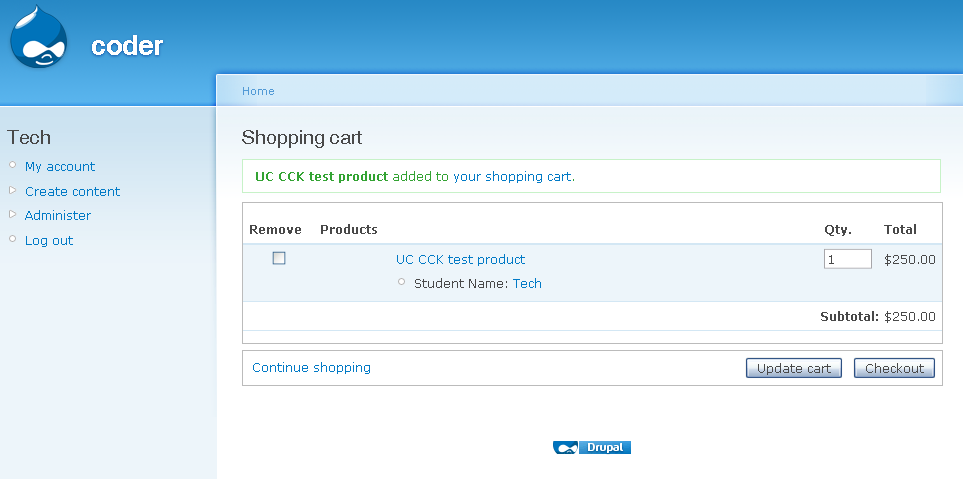
trungonly commentedI checked and seeing it still showing perfectly. Using teaser "Default", in Cart it shows an user name with link to user profile (I'm logged in as super admin user with permission to access user profile). Using teaser "Plain text", it shows only plain username in cart. Don't care Label. You can see a sample screenshot in project image. There is only one User reference field in this test.
In source code, the code for using teaser display settings is in line 319 (release 1.5).
$display_settings = $attributes_cck['display_settings']['teaser']['format'] ? $attributes_cck['display_settings']['teaser']['format'] : 'default'; // using teaserYour testing is a bit strangle? I've created a new Product Class (admin/store/products/classes), created a product with type Product Class, then no problem assigning CCK Attribute Field in that product. I think there is no difference between a product and a product class content type.
Please try & tell me how to reproduce your problem. If possible send me your SQL dump of your website (please try a minimize scratch) & list of module structure - to my email, I will check further.
Comment #2
todd zebert commentedThanks for this great module - it's going to solve a bunch of problems for me!
As Admin, user 1
Created new content type, UC CCK Attribute Test
added new CCK field
Field name: field_username_ref
Label: Student Name
Field type: User Reference
Widget type: autocomplete text field
Autocomplete matching:: starts with
size: 60
No default value
Number of values: 1
User roles that can be referenced: Student Role
User status that can be referenced: All Users
No: ADVANCED - USERS THAT CAN BE REFERENCED (VIEW)
Add content, "Product" (unchanged from default)
Name: UC CCK test product
Set sku, price, catalog
No attributes, options, no features
CCK attributes: check "UC CCK Attribute Test"
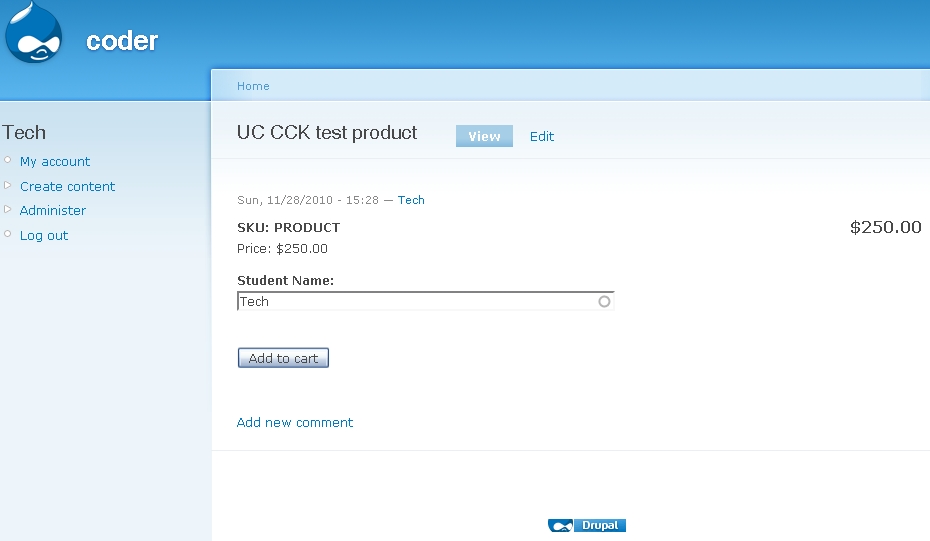
View UC CCK test product
Type in student name into "Student Name" and select from autocomplete list, works.
Add to cart
CCK Attribute does NOT show
----
What I meant about Product Classes is:
Store Administration > Products > Manage Classes
Edit/create Class
Attributes
add attributes form
There's NO mention of CCK Attributes in the "Attributes" list box.
So, a CCK Attribute needs to be added manually to each product?
----
As mine is a test environment, I have a large number of modules loaded and enabled - I have no idea which might be important to mention. I don't know how make a SQL dump nor how to minimize scratch, nor what semi-sensitive data might be revealed.
Thanks!
Comment #3
trungonly commentedI tested with a new "from scratch" Drupal 6.19 installation, copy & enable CCK 2.8, Ubercart 2.4, UC CCK Attribute 1.5 (Plus module Token 1.15 to enable Cart). All these modules put into
sites/all/modules.Follow your steps and it works fine. Please see attached screenshot.
I guess your installation is corrupted or some other modules affected the cart. Please try to do a newly Drupal installation & tell me if you still cannot see CCK attribute in cart.
Please specify more detailed steps, I'm not able to follow you, missed you somewhere in "add attributes form"...
Comment #4
todd zebert commentedI methodically disabled a couple dozen modules and found the culprit:
ECO (Extra Customization Options for Ubercart) (version 6.x-1.0-beta2) http://drupal.org/project/uc_eco
(I'm also using UC 2.x-Dev 2010-Nov-28)
Perhaps this has something to do with it? http://drupal.org/node/958518
I tried the the ECO 6.x-1.x-dev (2010-Nov-12) version and it still doesn't work.
---
What I'm getting at with the Product classes is that you can normally add Attributes to a Class, so products come predefines with those Attributes. This does NOT seem to be the case with CCK attributes.
If you go to example.com/admin/store/products/classes/accessories/attributes/add (where "accessories" is a Class you've created), you'll see a select box, but no mention of any CCK attributes.
Thanks!
Comment #5
todd zebert commentedI created an issue with UC_ECO, "ECO partially breaks Ubercart CCK Attribute module", http://drupal.org/node/985700
Comment #6
trungonly commentedI will try to check while the ECO breaks CCK Attribute. CCK Attribute uses Ubercart hooks and no hidden trick, so it should work well with other modules.
I see the issue CCK Attribute not shown in admin/store/products/classes/accessories/attributes/add. I will handle it soon.
Comment #7
todd zebert commentedThanks @trungonly for your help. I look forward to a resolution and extending the functionality to Classes.
Comment #8
todd zebert commented@trungonly just checking on extending the functionality to Classes.... I know it's a busy time of year. Thanks.
Comment #9
djween commentedI also have a similar issue. I have a required single select cck nodereference field (to represent product attributes) in my product form. When the user selects certain values for the cck field it does not show up in the cart under the product. While other attribute values when, selected, will show up in the cart. I thought my form wasn't validating or just not passing the value to the cart but in the page source I can see a hidden value with the attribute value that is just not rendering in the presentation layer. I can have multiple products in the cart with some having the cck attributes display and some not. Again, form is validating and data seems to be passed to the form submission but cart seems to be choosing what to display and what not to display.
Any thoughts?
--- fo'get 'bout it. Figured it out...My cck attribute value which is a referenced node title was unpublished so that was preventing it from showing up in cart. Weird, because before it was rendering it but just with a "unpublished" in paranthesis next to the value in the cart. Maybe I was seeing it that way when logged in as admin.
Comment #10
trungonly commentedBasically I see no bug here for a basic cck node reference field. Similar issue, please check that you can reproduce your problem in a fresh new Drupal installation. If you still see problem, I will look further.
Comment #11
planctus commentedI got this problem with cck_time, that is a simple text field made to store time values ( hours and minutes).
That "attribute" won't show in cart, indeed.
I'll try to see why this is happening.
Thanks,
Da.
Comment #12
nasheet commentedI using Ubercart CCK Attribute with the Date module. I want to use the CCK Attribute to display dates in a Product.
I have tested in on a new installation of Drupal, nothing is installed except the necessary modules (Ubercart, Token, CCK, Date, CCK Attribute).
When I create a content type with Date fields, then I enable them in the CCK Attribute area of the product, they show up on the product page.
When I choose a date and time and other attributes enabled using the Ubercart attribute, only the ubercart atttributes get added to the cart and are visible in the checkout. But none of the date fields show up.
I would appreciate any help in this area. Thanks a lot.
Comment #13
planctus commentedThis is getting worse, i'm using a bunch of cck field as attributes for some product classes so i didn't notice this immediately.
I can't see some of them in the cart, it seems that if i use two fields of the same type only one of them is shown in cart.
I have 4 location_cck fields and i see only one of them, i've two cck_time and i see only one of them.
I'll try to find out why...
Thanks,
Da.
Comment #14
planctus commentedMy last comment meets the http://drupal.org/node/1048814 issue.
The fields i'm not seeing are the ones i've shared between two content types.
Thanks,
da.
Comment #15
trungonly commentedPlease don't post multiple issues in one thread, that may cause my confusing to keep track. I will take care of all current issues. Duplicate #1048814: CCK attribute does not show up if the CCK attribute is a shared field to another Content Type.
Comment #16
todd zebert commentedTrung - I appreciate that planctus posted multiple issues on this thread, but the original issues - and proximal cause: the incompatibility with UC ECO - still remains.
Comment #17
trungonly commentedOke, I agree we could merge planctus problem here until everything will be solved.
Comment #18
nasheet commentedHi, what should I do with my issue that the Date attributes do not show up in the cart using CCK Attribute? Does it fit this thread? Do you need more information about my issue?
Thanks a lot.
Comment #19
trungonly commentedAs you see people are being able to use Date field. In your case please provide more info.