

 Come together with the global Drupal community in Rotterdam, 28 Sept – 1 Oct 2026. Sessions, contribution, connection, and Early Bird savings until 8 June.
The dialog asks a yes/no question, but the buttons in the dialog are "Cancel" and "OK". "Cancel" is not a valid response to "Do you want to reset?" Neither is "OK", literally. So, this is a bad default for the logout message.
Suggest changing to something similar to the the following:
"Your session is about to expire. Click OK to continue remain logged in."
(Note that I'm not sure it'd be OK to say "Click" here since a user need not click on a button to press it. Maybe "Press" is more proper.)
| Comment | File | Size | Author |
|---|---|---|---|
| #4 | Autologout Alert.png | 4.3 KB | roball |

Comments
Comment #1
threexk commenteds/continue remain logged in/remain logged in/ in previous comment.
Comment #2
levelos commentedThe dialog message is completely configurable, are you suggesting a better default? It's also relevant to remember that those who are using jquery_ui will have a very different experience since they are not limited to native browser confirm dialog and it's button choices.
Comment #3
threexk commentedYes, I'm suggesting a default that makes sense with the buttons in the browser's confirm dialog ("OK" and "Cancel"). I know it is configurable, but I think it is important to have sensible defaults.
I don't know what the buttons are in the default dialog if you are using jQuery UI.
Comment #4
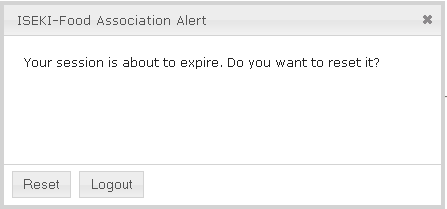
roball commentedThe buttons on my Autologout Alert screen are (per default) labelled with [ Reset ] and [ Logout ] (see attached screenshot).
Comment #5
izmeez commentedI don't have an issue with the default message and names of buttons.
Rest moved to new issue,
However, I have noticed that anytime the autologout module configuration is changed, even just checking or unchecking some boxes the text of the message to display gets extra<p> and </p>added even to the default text. I haven't a clue why this happens but it makes the message displayed messy.<p><p>Your session is about to expire. Do you want to reset it?</p></p>Gosh, I guess I should open this as a new issue :-(Comment #6
johnennew commentedI am marking this as fixed as I believe it now is in the 6.x-4.x and 7.x-4.x branches. The text on the buttons is translatable.
Feel free to reopen with more information if it is still a problem.