Closed (cannot reproduce)
Project:
Sheetnode
Version:
6.x-1.x-dev
Component:
Core
Priority:
Normal
Category:
Support request
Assigned:
Unassigned
Reporter:
Created:
9 Dec 2010 at 23:53 UTC
Updated:
3 May 2012 at 05:25 UTC


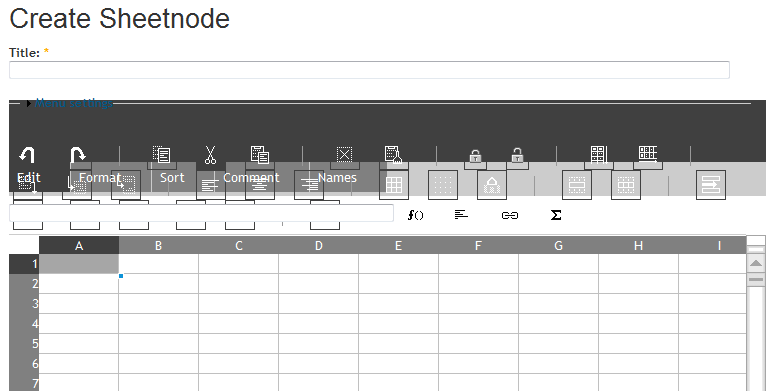
The control section of the spreadsheet is not rendering, but the spreadsheet looks fine. See attached screen shot.
| Comment | File | Size | Author |
|---|---|---|---|
| Sheetnode01.PNG | 20.01 KB | cwkelly3 |

Comments
Comment #1
infojunkieThis is likely a theme issue. What theme are you using?
If you can debug CSS, inspect the toolbar IMG elements for extra padding/margins. Once we find which CSS attributes are causing this, we will explicitly reset them in the Sheetnode CSS.
Comment #2
cwkelly3 commentedI am using Marinelli/Alagna (obscure, I know). When I zero in on one toolbar image element, I see this in the theme CSS:
#primary img {
margin-bottom: 0;
margin-left: 0;
margin-right: 15px;
margin-top: 0;
padding-bottom: 4px;
padding-left: 4px;
padding-right: 4px;
padding-top: 4px;
}
Attributed to the layout.css for the theme. Is that what you are looking for?
Comment #3
infojunkieCan you try to zero out the margin and padding values in Firebug, and see if the toolbar icons get properly aligned?
Comment #4
infojunkieComment #5
infojunkie