

This project is not covered by Drupal’s security advisory policy.
The Block edit module provides inline (on mouseover) editing capability for any block or node.
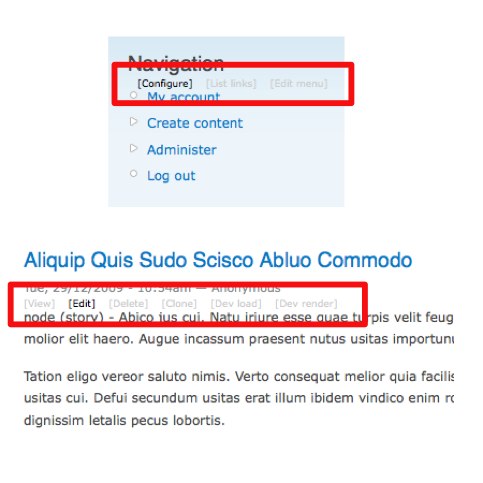
Configure block/menu/node settings directly by clicking a Views' style link above the block/node.
Where appropriate you are returned to the originating page so it provides a very simplified and intuitive workflow.
A full list of links and options provided by this module are listed below.
Links:
Blocks
- Configure - Configure the settings for the block.
- Edit menu - Edit the title and description of the menu.
- List links - Edit the links in the menu.
- Edit node - Edit the node generated by nodeblock module.
- Edit menu - Edit the links in the menu for menu_block and nice_menus menus.
Nodes
- View - View the node.
- Edit - Edit the node.
- Delete - Delete the node.
- Clone - Clone the node using node_clone module.
- Dev load - Display devel load using devel module.
- Dev render - Display devel render using devel module.
- Edit type - Edit the content type using CCK module.
- Manage fields - Manage fields for the content type using CCK module.
- Display fields - Display fields for the content type using CCK module.
Options:
- Switch node/block edit links for the entire site. Only want block edit links? No problem.
- Switch hover effect on/off.
- Choose which types of node links to show.
- Display node links on selected content types.
- Display node links on selected display modes (teaser, full page).
- Hide tabs on selected content types.
- Display block/node links on specific pages (works just like block visibility).
- Users will only be able to see links for stuff they have permission to:
- administer blocks
- administer nodes
- administer menu
- clone node
- access devel information
Integrates with:
- Block module
- Menu module
- Menu block module
- Nice menus module
- Views module
- Node module
- Node clone module
- Nodeblock module
- Devel module
Block edit module also fixes Views' edit links by setting their width to auto to avoid breaking the layout on hover.
Requirements:
Block edit links will only work out-of-the-box for themes where blocks are themed so that containing divs have class attributes in the form class="block" for blocks and class="node" for nodes. Most themes on drupal.org are done this way so it shouldn't be a problem.
Future plans:
Drupal 7: There probably won't be a port of this module to Drupal 7 as the functionality already exists in core as the contextual module!
Project information
 Seeking co-maintainer(s)
Maintainers are looking for help reviewing issues.- Maintenance fixes only
Considered feature-complete by its maintainers. - Project categories: Administration tools, Developer tools
 97 sites report using this module
- Created by irakli on , updated
 This project is not covered by the security advisory policy.
Use at your own risk! It may have publicly disclosed vulnerabilities.


