

 The 2026 Drupal Business Survey is open. Your response will help shape the future of the Drupal business ecosystem.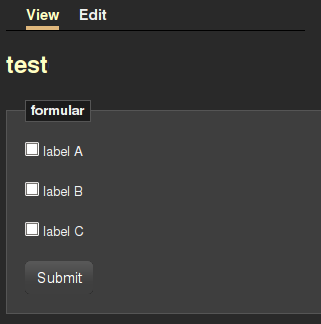
This project is not covered by Drupal’s security advisory policy.
Overview
This is a set of modules, which provide input elements for endusers with the power of cck.
This module hosts a set of fields to be used by the Content Construction Kit. Fields are used to create various content types. They appear as input fields when creating or editing a node. They are rendered to text, when shown to page visitors.
The difference for CCK Inputs is, that they are rendered as input elements to the visitor. This way you can build a webform using CCK.
CCK Input Elements do not provide any means to evaluate or store the data which users send back to your site, when hitting "submit".
Parts
So far the following input elements are available
Fields
- CCK Input Elements - Checkbox
- CCK Input Elements - Textfield
- CCK Input Elements - Hidden Field
Groups
- CCK Input Elements - Form Group
Dependencies
How to use
CCK input elements are fields for the content construction kit (CCK) module.
Enable the modules you need in your modules list. Every module mentioned in the parts section, is represented by one module.
To build the form shown in the screenshot, enable Checkbox and Form Group.
Go to your content types section and add a new content type, or edit an existing one.
To add a form to your content type, add a new group of type "Fieldgroup as form". Configure the group afterwards. Leave the target url blank, as there is no applicable target available for now.
To add a checkbox to your content type, add a new field of type "Checkbox Input". Configure the amount of checkboxes you need.
Make sure, the checkbox field is a child of the formgroup. Otherwise the checkboxes do not belong to the form and are therefore not submitted.
Now create a new node and configure the checkoxes.
If you submit and view the node, it looks similar to the screenshot above.
As mentioned earlier, there is no logic to evaluate or process the data submitted by this form. This has to be done by other modules.
Processing data
In order to get submitted data back into Drupal, another module is needed which implements data handling.
The reservation module uses cck inputs to build flexible reservation forms.
Basically you need:
- implement hook_forms for form handling (used to get the cck input fields, and add them to the form. otherwise they won't get recognized by the drupal form)
- add validate handler if needed
- add submit handler to process/store the data
- implement hook_form_alter to add settings per content type
- implement hook_fieldgroup_view to modify the form group, so the submitted data gets send to your module for processing
Project information
 13 sites report using this module
- Created by maulwuff on , updated
 This project is not covered by the security advisory policy.
Use at your own risk! It may have publicly disclosed vulnerabilities.

