

A plugin to easily create links to Drupal internal paths
This module is an extension to the CKEditor module.
It also supports CKEditor installed through the Wysiwyg module.
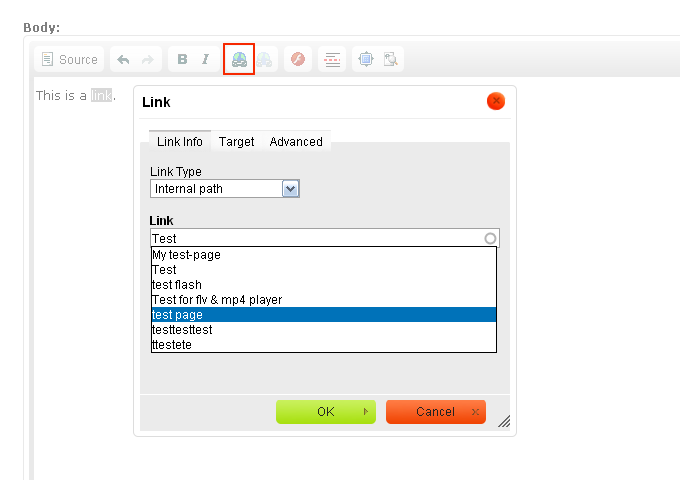
This module allows to easily create links to Drupal internal paths through CKEditor's Link button and dialog.
It is composed of 2 parts:
- A client-side CKEditor plugin that adds features to CKEditor's default Link plugin.
- A server-side input format filter that converts the raw paths added through the plugin into aliased and, if applicable, language prefixed URLs.
Features
- Integrates with CKEditor's default Link button and dialog (no separate button/dialog)
- Adds a new option Internal path to the Link Type select box, that gets selected by default
- When Internal path is selected, displays an autocomplete textfield: just type some letters to get a list of suggestions!
- Natively supports linking to nodes, taxonomy terms, and menu item paths
- Exposes hooks for developers who want to extend the module
- Full multilingual support
- Link paths added through the plugin respect the standard URL format:
/BASE/PATH/raw/internal/path - The input format filter CKEditor Link Filter converts these raw paths into aliased URLs.
- A lot more!
Extensions
The following modules extend CKEditor Link:
- CKEditor Link File adds support for linking to files.
- CKEditor Link User adds support for linking to users.
- CKEditor Link OG integrates CKEditor Link with Organic Groups.
Requirements and Compatibility
Currently, CKEditor Link needs the following to run:
- the CKEditor module or the Wysiwyg module
- the CKEditor editor
- Clean URLs need to be enabled.
Installation
Copy the ckeditor_link folder to your sites/all/modules directory.
Go to admin/modules and enable the module.
Set permissions
Go to admin/people/permissions and grant the CKEditor Link related permissions to the desired roles.
When using the CKEditor module
Go to admin/config/content/ckeditor and edit the desired profile.
Under "Editor appearance" > "Plugins", check the "CKEditor Link" box.
Save changes.
When using the Wysiwyg module
Go to admin/config/content/wysiwyg and edit the desired CKEditor-enabled input format.
Under "Buttons and plugins", check both "Link" and "CKEditor Link" boxes.
Save changes.
Set up CKEditor Link Filter
Go to admin/config/content/formats and edit the desired text format.
Check the "CKEditor Link Filter" box.
If you use other path converting filters like Pathologic or Path Filter, make sure that CKEditor Link Filter comes before them:
Under "Filter processing order", drag and drop CKEditor Link Filter before these filters in the list.
Save changes.
Configure CKEditor Link
Go to admin/config/content/ckeditor_link.
Change settings as desired.
Save changes.
Contact
This module is sponsored by Absyx.
If you like this module, please review Absyx.
Project information
- Project categories: Content editing experience, Multilingual, Administration tools
 12,140 sites report using this module
- Created by anrikun on , updated
 Stable releases for this project are covered by the security advisory policy.
There are currently no supported stable releases.

