

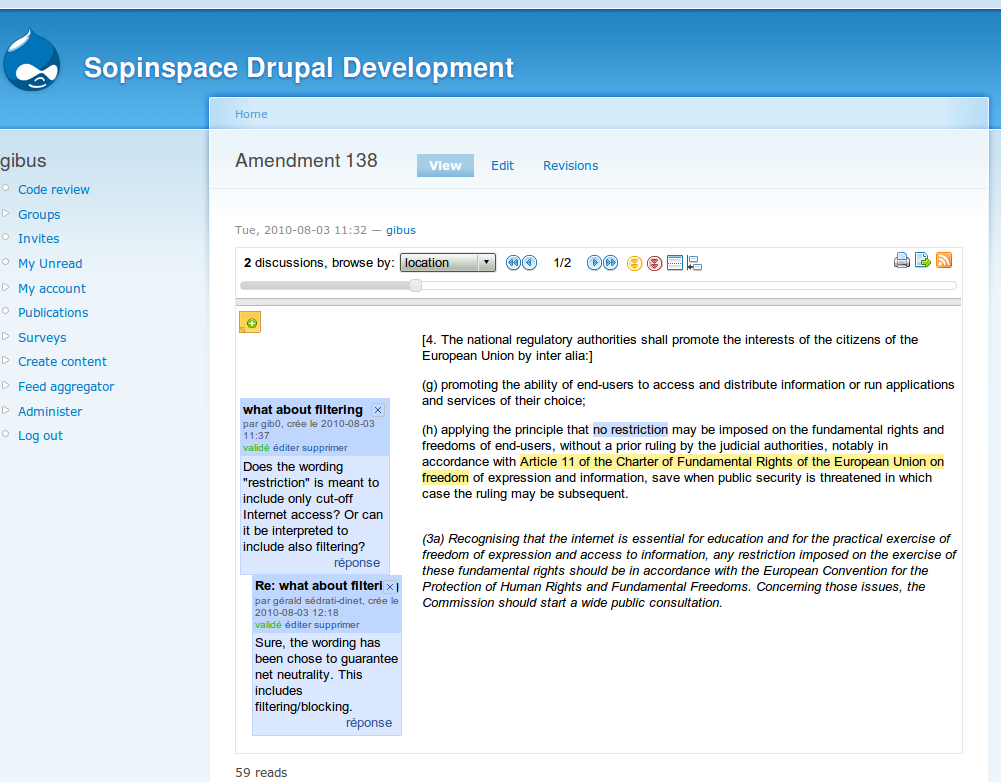
The co-ment module provides Drupal with an interface to co-ment®, a Web service/Free software for submitting texts to comments and annotations. When annotating a text in co-ment, you just select the word, sentence or chunk of text you want to comment, and your comment will appear in the left margin, being potentially available for a thread of discussion in response to this comment.
Drupal 7
The co-ment module takes full advantage of Drupal 7 Field API. This means that from release 7.x-1.0, you can add as many text fields opened to annotation with co-ment as wanted to any Drupal entity: node types, users, taxonomy terms, or even regular Drupal comments. All you need to do is to attach a filed of type Co-mentable text to the entity.
Also, a specific node type co-ment text is provided with a title and a text field opened to annotations with co-ment.
Requirements
You should either have an account on co-ment website, since co-ment is provided as a web service (see http://www.co-ment.com/ for details) ; or you can run your own instance of co-ment, since co-ment can also be download, installed and used as a Free software (see http://www.co-ment.org/ for details).
On your co-ment Workspace, you can create up to three users that will be used by Drupal to access your workspace. One user, acting as an Editor, will be able to create/edit/delete texts. A second user, acting as a Commentator, will be able to comment texts. Finally, a third user, acting like an Observer, will only be able to view texts and comments (but not to post comments herself).
Usage
Creating/editing/deleting co-ment texts (or co-mentable text fields for D7) is done as for any content in Drupal. The only particularity of a co-ment text (or co-mentable text field in D7) is that you have an option to keep (default) or delete comments not affected by the edit, when you're updating such a content. Also, comments left without scope during an update can be detached or deleted. co-ment texts (or co-mentable text fields in D7) are also fully compatible with Drupal core revisions mechanism, allowing to access to successive revisions of a content and to revert to a specific revision.
But, the main interest of co-ment module is when viewing texts (or co-mentable text fields in D7). Users in roles with the post comments on co_ment_text nodes permission for D6, or co-mentable text fields: Post comments for D7, will be able to comment any text in your co-ment workspace and reply to existing comment threads. Annotations in co-ment are linked to a word, a group of words or letters, a sentence, in short to any chunk of text that is selected with mouse pointer. Annotations can be displayed in a left margin and are opened to discussion threads.
Upload legacy documents
From revisions 7.x-1.2 and 6.x-1.15, the co-ment file upload module allows to convert documents in legacy formats into co-mentable text fields in D7 and body of co_ment_text nodes in D6.
To use this feature, the co-ment file upload module has to be enabled, and users creating/updating co-mentable text fields in D7 and body of co_ment_text nodes in D6 should have the permission to use Full HTML input format. Then, a file upload field is enable below each co-mentable text fields in D7 and below the body of co_ment_text nodes in D6.
Be carefull that when you upload a document in a legacy format, contents of co-mentable text fields in D7 or body of co_ment_text nodes in D6 will be overwritten.
Allowed extensions of documents in legacy format are: odt, doc, docx, rtf, latex, tex, ltx, html, htm, shtml, xhtml, xht, asc, txt, text.
Updating contents
When an existing text is edited, it may happen that some chunks of text where comments were attached to are deleted. In other words, these comments are left without any scope. In this context, you can choose to keep these comments and they will still appear in the new revision, but detached from the text. Or you can choose to delete these comments in the new revision of the text.
Theme and API functions
The following functions are provided in D7:
theme_co_ment_field: Theme function for displaying a co-ment iframe.theme_co_ment_last_comments: Theme function for displaying an ordered list of last comments for co-mentable fields.co_ment_bundles: API function to retrieve all bundles where co_mentable fields are attached.co_ment_fetch_comments: API function to fetch comments from co-ment.
The following functions are provided in D6:
theme_co_ment_body: Theme function for displaying a co-ment iframe.co_ment_fetch_comments: API function to fetch comments from co-ment.
Please, see the source code of the module for documentation about input/output parameters for these functions.
The co-ment Drupal module interacts with the co-ment server through a REST API.
This module is sponsored by Sopinspace.
Project information
- Created by gibus on , updated
 Stable releases for this project are covered by the security advisory policy.
There are currently no supported stable releases.

