

 |
If you are looking for a "true WYSIWYG experience" with CKEditor5, we recommend you take a look at CKeditor Details Accordion, see below under Similar modules. |
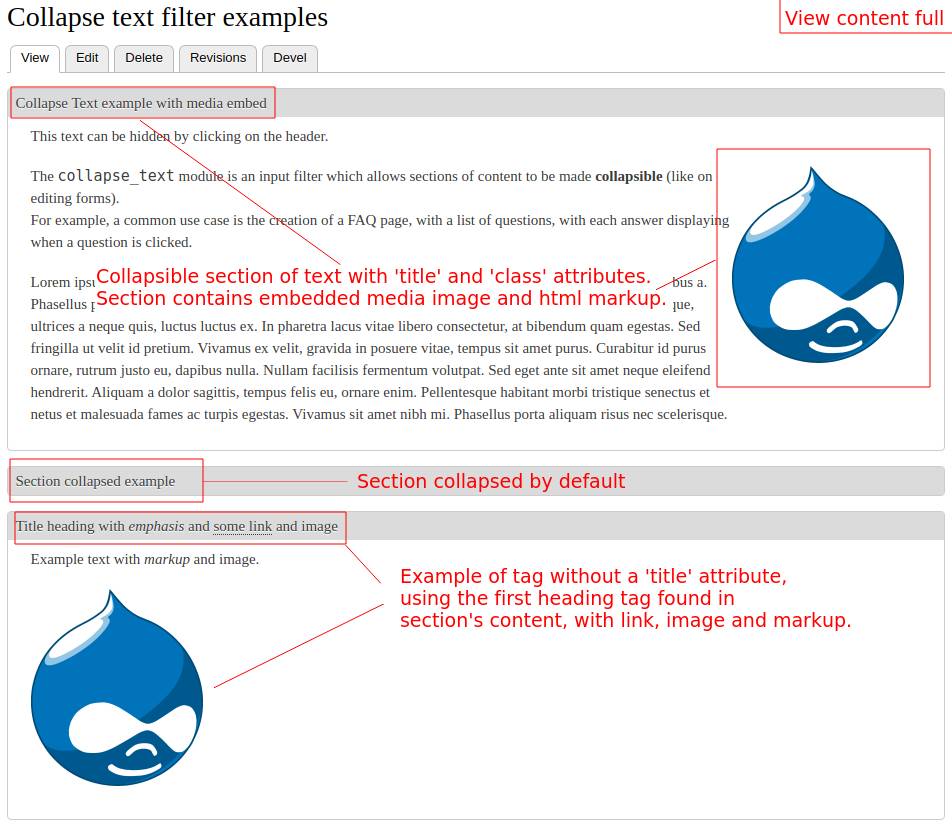
The Collapse text module is an input filter which allows sections of content to be made collapsible (like on editing forms).
For example, a common use case is the creation of a FAQ page, with a list of questions, with each answer displaying when a question is clicked.
Table of Contents #
- Installation and configuration
- Usage
- Theming
- Known issues
- Similar modules
- Support and maintenance
- Download!
All this information could also be found in module's documentation page.
Installation and configuration #
1 - Prerequisites:
Requires the Core Filter module to be enabled.
2 - Installation:
Install with composer or download the module and copy it into your contributed modules folder (for example, /modules/contrib/) and enable it from the modules administration page (requires the filter module to be enabled).
More information at: Extending Drupal: Installing Modules.
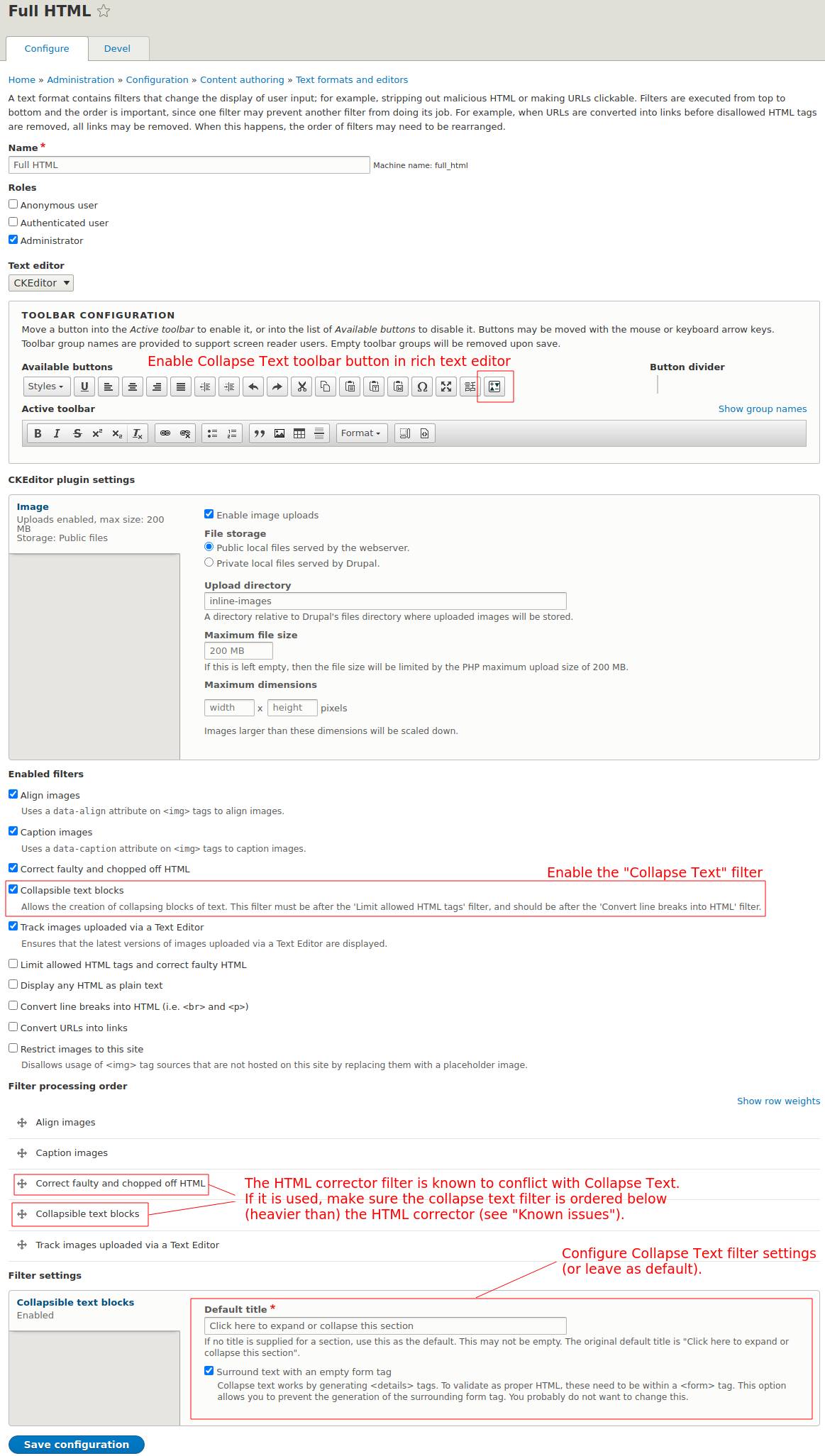
3 - Configuration (see screenshot on the right):
After successful installation, browse to the Text formats and editors admin overview page (admin/config/content/formats) and edit the format for which the filter should be enabled, for example, Full HTML (admin/config/content/formats/manage/full_html).
- Check
Collapsible text blocksin the list ofEnabled filters. - Configure the
Collapse Textfilter after theHTML Corrector, if it is enabled, see Known issues below. - (Optional) Configure filter settings (at bottom of the form) or leave as default.
Usage #
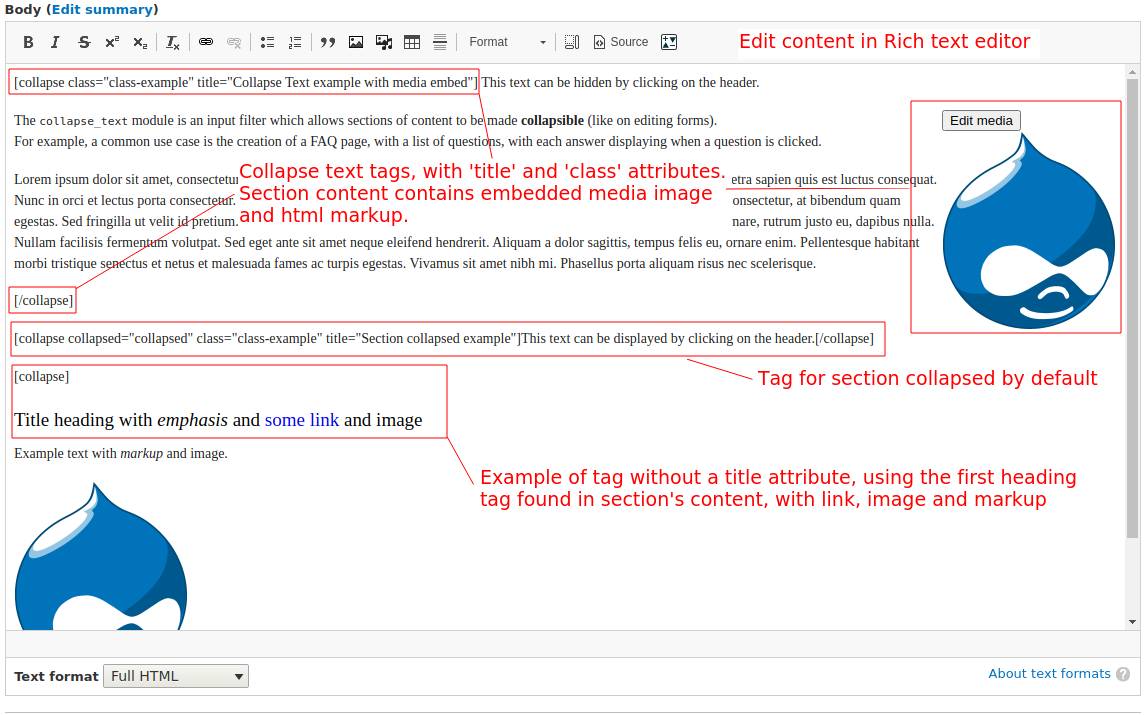
Surround a section of text with [collapse] and [/collapse] to make it collapsible. [collapse] tags can be nested within one another.
The [collapsed] tag can be used to make the section display initially collapsed and is a shorter alias for [collapse collapsed] (also valid).
The parameters may be combined in (almost) any order. The collapsed parameter must come right after the tag word collapse. If it is not specified first, it should be declared as an attribute collapsed="collapsed", for example:
[collapse title="Section title" collapsed="collapsed" class="example-class1"]
Angle brackets may also be used instead of straight brackets to surround the
collapse tag: <collapse> (turned into [collapse] and work the same way).
1 - The 'title' of the section
The title of the section may be specified in two ways:
- As a
title=attribute in the opening tag, as follows:
[collapse title="collapsible section title here"]
Titles should be surrounded by double-quotes and can include HTML entities, such as"or&.
However, currently HTML tags in the title attribute are not supported.
To include nested tags (such as<em>or<a>), see the next point.
- If a title attribute is not specified in the
[collapse]tag, the filter will attempt to look for a title in the content of the section and will select the first HTML header (<h1>,<h2>, ...,<h6>) to be used as the title.
In this case, the selected header tag will be removed from the content upon display to prevent duplication. Any HTML tag nested in the header will then be carried over in section's title. For example:[collapse] <h1>Title heading with <em>emphasis</em> and <a href="#">some link</a></h1> <p>Some text</p> [/collapse]
Lastly, if a title attribute is not specified and no header tag is found as replacement, the default title configured in text format's settings form will be used (see under 'Filter settings').
2 - The 'class' attribute
Additional CSS classes can be added to the section with the class= attribute,
as follows: [collapse class="class1 class2 class3"].
Classes should be surrounded by double-quotes, and separated with spaces.
3 - Examples
The following code examples will create collapsible text sections:
[collapse class="class-example" title="Collapse Text example"]
This text can be hidden by clicking on the header.
[/collapse]

[collapse collapsed="collapsed" class="class-example" title="Section collapsed example"]
This text can be displayed by clicking on the header.
[/collapse]

[collapse]
<h1>Title heading with <em>emphasis</em> and <a href="#">some link</a></h1>
<p>Example text with markup.</p>
[/collapse]
Theming #
The module provides two theme functions that can be overridden if required:
theme_collapse_text_details()renders the actual details.theme_collapse_text_form()renders the enclosing form.
Known issues #
1 - Integration (with other modules)
Other filters, such as the HTML corrector (Correct faulty and chopped off HTML), media, entity_embed and probably many other filter modules are known to cause issues with collapse text.
If other conflicting filters are enabled, it is important to configure collapse text to run after them, by ordering it below (heavier than) other filters, under Filter processing order, see screenshot and configuration steps from section Installation and configuration above.
2 - Conflicts with the string '[collapse'
Since the filter relies on the pseudo tag [collapse, any occurrence of the string will be interpreted by the module as a collapsible section. Therefore, if for some reason the actual string needs to be displayed (in the content), it should be escaped by prefixing it with a backslash: \[collapse.
The first backslash before any instance of [collapse will be removed from the
final displayed text, so for example, \\[collapse] will display \[collapse and so forth.
3 - Legacy attributes
For backwards compatibility, the module supports a few variations which should not be used going forward.
The class= parameter used to be style= and the style= and title= parameters did not require quotes. For this to work, the parameter style= must come before the title=.
Similar modules #
- CKEditor Accordion: Similar features, but creates accordions instead of collapsibles.
- CKeditor Details Accordion: CKEditor plugin which allows inserting "Details/Summary" markup sections directly in CKEditor.
Support and maintenance #
Releases of the module can be requested or will generally be created based on the state of the development branch or the priority of committed patches.
Feel free to follow up in the issue queue for any contributions, bug reports, feature requests. Create a ticket in module's issue tracker to describe the problem encountered, document a feature request or upload a patch.
Any contribution is greatly appreciated.
Credits: Thanks to Pukku who is the original owner of the module.
Project information
 Minimally maintained
Maintainers monitor issues, but fast responses are not guaranteed.- Maintenance fixes only
Considered feature-complete by its maintainers. - Project categories: Administration tools, Content editing experience, Content display
 3,166 sites report using this module
- Created by pukku on , updated
 Stable releases for this project are covered by the security advisory policy.
Look for the shield icon below.


