


Conditional Fields is an admin user interface with the ability to modify fields appearance and behavior on certain conditions when viewing content defined by dependencies between fields based on their states and values.
Details
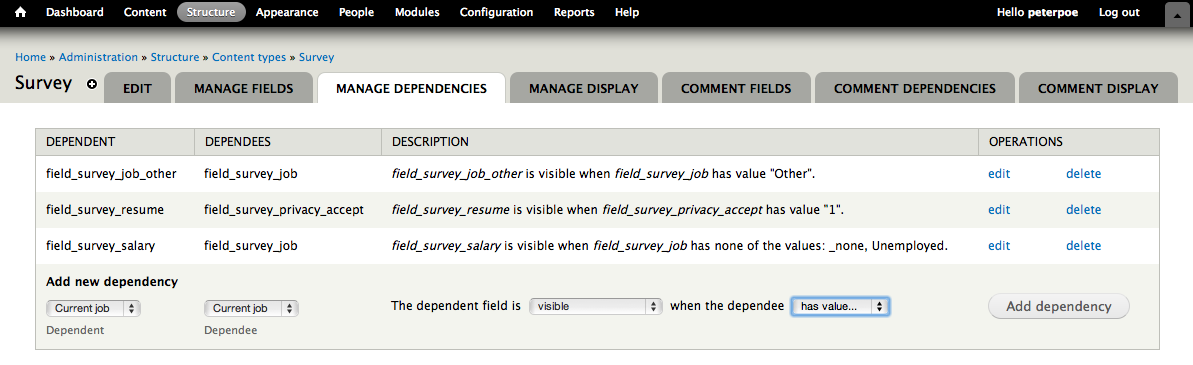
Conditional Fields allows you to manage sets of dependencies between fields. When a field is “dependent”, it will only be available for editing and displayed if the state of the “dependee” field matches the right condition. When editing a node (or any other entity type that supports fields, like users and categories and custom entities like build by ECK), the dependent fields are dynamically modified with the States API. A simple use case would be defining a custom “Article teaser" field that is shown only if a "Has teaser" checkbox is checked. Or a boolean field, which if checked, makes another field invisible. But much more options are available.
Reach out at us on Drupal Slack #conditional_fields.
Installation and Usage
The dependency definitions can be made under admin/structure/conditional_fields and in case to entity type Node (Content type) an additional tab "conditional fields" is avaible under "Manage Display". For custom entities it is recommended to use the default admin/structure/conditional_fields admin settings path.
Requirements
Conditional fields has no third-party dependencies and works with core State API. But since it works on fields, some field and entity types need to be enabled.
Any help for the upcoming final 4.0 release is welcome: #2830988: [meta] 4.0.0 release roadmap
Active maintainers
Similar Modules
- Business Rules: There is some overlap with this module, but the architectures and designs are quite different. For more information, see #2913096: Business Rules module's "Dependent fields" feature: overlap discussion.
- Field States UI which rather works directly on the field form widget under the settings wheel icon on each field. These settings can behave complicated since these forms introduce different ajax states and it misses a good overview of all field groups with dependencies like conditional_fields provide under admin/structure/conditional_fields
Reach out at us on Drupal Slack #conditional_fields.
Project information
- Project categories: Administration tools, Content display, Site structure
- Ecosystem: Conditional Fields
 72,073 sites report using this module
- Created by peterpoe on , updated
 Stable releases for this project are covered by the security advisory policy.
There are currently no supported stable releases.
Releases
Development version: 4.x-dev updated 19 Sep 2026 at 07:00 UTC


