




This project is not covered by Drupal’s security advisory policy.
Drupal + Selenium = Drulenium
Pronunciation: dru-lee-nee-əm
Visual/CSS regression testing
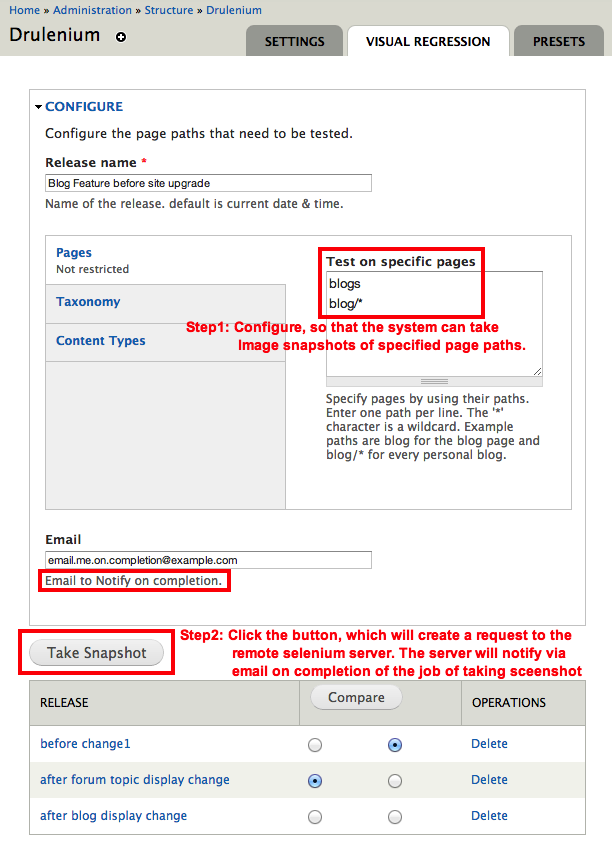
The sub module drulenium_visual_regression helps in Automating Visual/CSS regression testing.
Concept:
- The system takes Image screenshots of web pages, before you make changes like site upgrades to your site.
- The system takes another set of Image screenshots of web pages, after you make changes
- The system calculates the difference of image pixels that changed and generates an animated GIF to look at
Sample GIF:
More information at http://drulenium.org/
Screenshots taken by Drulenium.org are sponsored by 
Video Demo: https://youtu.be/Q88uYdTCR1c
If you have any questions on using Drulenium, Chat with us at https://drulenium.slack.com/.

Drush Installation steps for running tests locally:
Module installation :
drush en drulenium drulenium_local_selenium -y- Download blockly library for creating advanced tests
drush vr-download-blockly drush vr-download-webdriver
Install ImageMagick http://www.imagemagick.org/script/binary-releases.php :
- Mac:
brew install imagemagickhttp://brew.sh/ - Ubuntu:
sudo apt-get install imagemagick --fix-missinghttps://help.ubuntu.com/community/ImageMagick
Installing selenium locally using npm package https://www.npmjs.com/package/selenium-standalone :
- Install nodejs if you haven't already https://nodejs.org/en/
-
npm install selenium-standalone@latest -g
selenium-standalone install</li>
selenium-standalone start
Module Configuration:
- Configure at /drulenium/settings . Choose Local server for screenshot & Image server
- Run visual tests at /drulenium/vr
Using Docker:
- Get docker at https://www.docker.com/products/overview#/install_the_platform
- Follow the installation steps at https://github.com/TechNikh/docker-drulenium
How drulenium_hosting_client submodule works without installing selenium locally?
- The Configuration (like site domain & pages to test, user name, password & email...) are sent to Remote Drulenium server through XML-RPC
- Remote server uses the Configuration to process the request, takes snapshots and generates Comparison reports which are fetched by local Drulenium module
More instructions at http://drulenium.org/installation
Project information
- Project categories: Developer tools
- Created by technikh on , updated
 This project is not covered by the security advisory policy.
Use at your own risk! It may have publicly disclosed vulnerabilities.


