

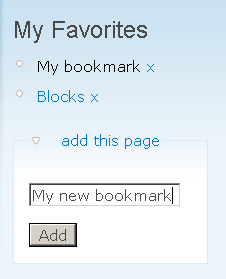
Favorites provides a tiny block that allows users to easily bookmark any content of the site.
Features
- Easy to install and easy to configure.
- Add and delete favorites with few clicks.
- Have as many bookmarks per user as desired.
- Enter custom names for each bookmark.
- Also saves search results etc. by storing the query string (other than similar modules).
- Now also works for anonymous users (cookie based).
Installation
- Install the module.
- Activate it.
- Place the User favorites block in a region or panel of your choice (remember to configure the block, if necessary).
- Set the user permissions to determine which users may have their custom favorites block.
- Done.
Simple usage
- Add a favorite: Open the block's add this page form, optionally customize the page title, click add - done.
- Recall a favorite: Well, just click it!
- Delete a favorite: Click the related x.
- Edit a favorite: Just recall, delete, save again.
Similar modules
The flag module covers a similar functionality, but with a different storage approach (node/entity based). If you need to store arbitrary URLs with varying queries, favorites is your choice. If you need deep integration with common contrib APIs, rather check out flag.
Roadmap
- Drupal 8
- Thanks to madan879, we have a draft which still needs review but looks promising. Please support by testing and commenting.
- Drupal 7
- 2.x is the stable D7 branch.
- Drupal 6
- Bug fixes as long as Drupal 6 is officially supported, end of support afterwards.
Credits
- Pre 6.x-1.3 by Ezra Barnett Gildesgame of Growing Venture Solutions.
- Recent 6.x and 7.x by David Herminghaus of HiRN GmbH.
Project information
- Project categories: Content editing experience, Site structure, Developer tools
 146 sites report using this module
- Created by jjeff on , updated
 Stable releases for this project are covered by the security advisory policy.
There are currently no supported stable releases.


