Adds the Google Adwords Remarketing web statistics tracking system to your website.
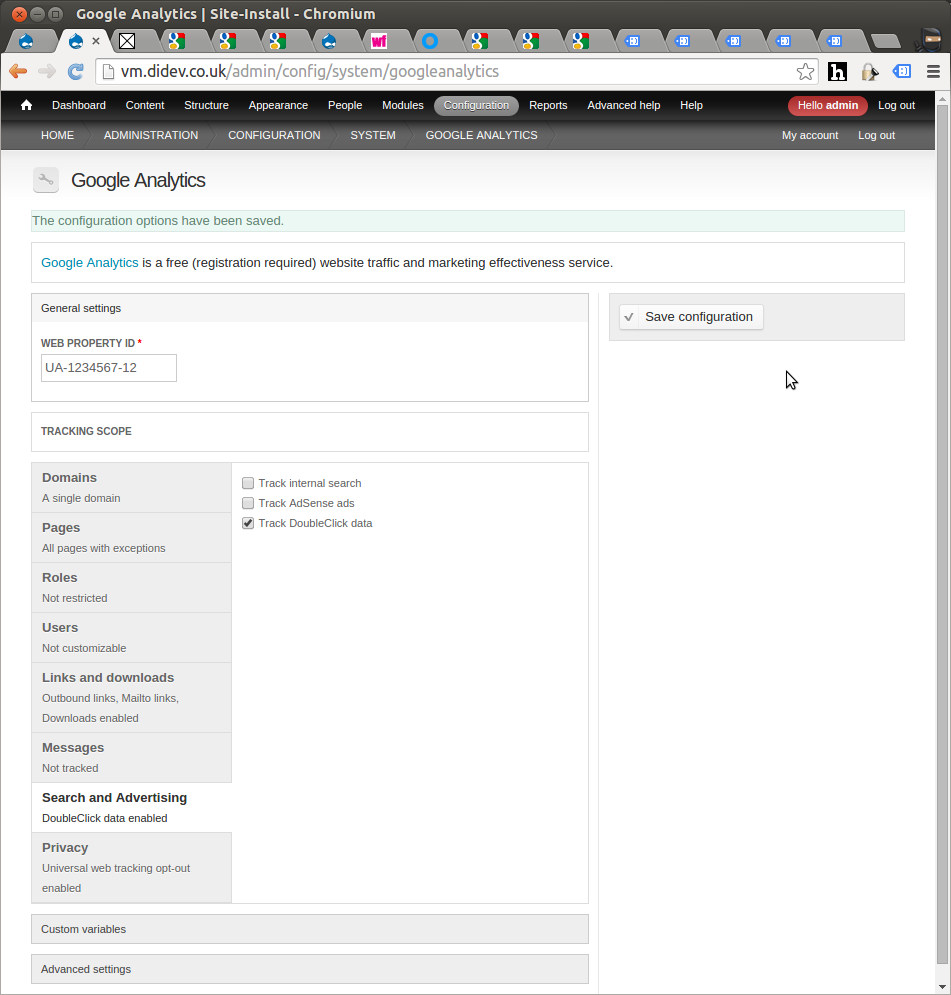
NB - Google now has another (easier) method for using Remarketing tags. If your Adwords account is linked to your Google Analytics account you can enable the tag by installing the Google Analytics module ( https://www.drupal.org/project/google_analytics ) and ticking a tick box under the Google Analytics Drupal admin page - see attached image.
This tick box causes a slight alteration in the GA tag which is needed by Google Remarketing. Process is described here:
https://support.google.com/analytics/answer/2444872
This module uses the older method by adding a larger block of JavaScript and can work independently of the Google Analytics module. It is the 'older' way of adding the Remarketing tag - described here:
| Attachment | Size |
|---|---|
| turn_on_remarketing_tag_code.png | 118.66 KB |
Project information
 135 sites report using this module
- Created by chriscalip on , updated
 Stable releases for this project are covered by the security advisory policy.
There are currently no supported stable releases.