

 The 2026 Drupal Business Survey is open. Your response will help shape the future of the Drupal business ecosystem.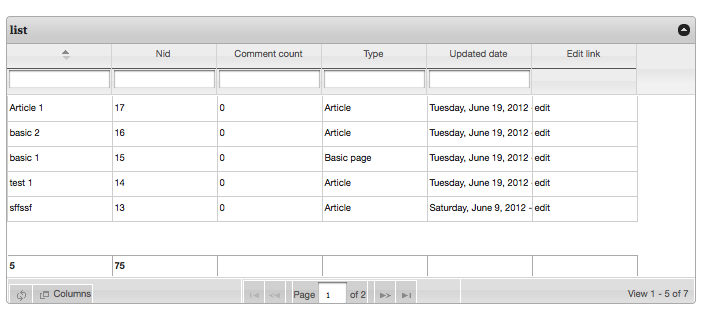
JQGRID - views integration for the jqGRid jQuery plugin
This module provides views integration for the jqGRid jQuery plugin, which
provides advanced interaction controls to HTML tables such as dynamic
pagination, on-the-fly filtering, and column sorting.
For full documentation and examples, visit the jqGRid jQuery plugin page:
-----------------------------------------------------------------------------
CURRENT FEATURES
-----------------------------------------------------------------------------
* Cross browser. Supports for IE 6.0+, FireFox 2.0+, Safari 3.0+, Opera 9.2+
and Google Chrome.
* Basic Grid
- Paging / Ajax support.
Just enable Ajax in your View Settings / Advanced / Use Ajax
- Resizable Columns.
- Sorting
- Auto loading data when scrolling.
This feature allows you to load data without paging
and using only the vertical scrollbar.
- Footer support with SUM, MAX, MIN, AVG and count.
* Cell Editing
- supporting: text, date picker and select
* Searching and Filtering
- single field searching in toolbar
You can specify which columns can be searchable.
* Export : through the views_data_export module
-----------------------------------------------------------------------------
REQUIREMENTS
-----------------------------------------------------------------------------
The following modules are required:
* views (7.3) with Chaos tools
* libraries
* jquery_update (tested with jquery 1.5.2)
-----------------------------------------------------------------------------
INSTALLATION
-----------------------------------------------------------------------------
1. Download the jqgrid plugin from http://www.trirand.com/blog/?page_id=6
This module is tested with the master branch (2012-05-29) (jqGrid 4.3.2)
2. Unzip & copy the directory into your sites/all/libraries directory
3. Rename it to "jqgrid".
4. Enable the module & you should have a new view style "jqgrid".
-----------------------------------------------------------------------------
USAGE
-----------------------------------------------------------------------------
1. Create a new view at admin/build/views/add
2. Add fields to show in the table.
3. Select jqGRid as the view style and configure your grid
-----------------------------------------------------------------------------
RECOMMENDED MODULES
-----------------------------------------------------------------------------
* Views data export module (http://drupal.org/project/views_data_export)
Install this module if you want to export data from the grid.
Attach an export view & the export button will appear.
Development sponsored by Marique Calcus and written by Calcus David. For professional support and development services contact Marique Calcus.
Project information
 36 sites report using this module
- Created by targoo on , updated
 Stable releases for this project are covered by the security advisory policy.
There are currently no supported stable releases.

