

This project is not covered by Drupal’s security advisory policy.
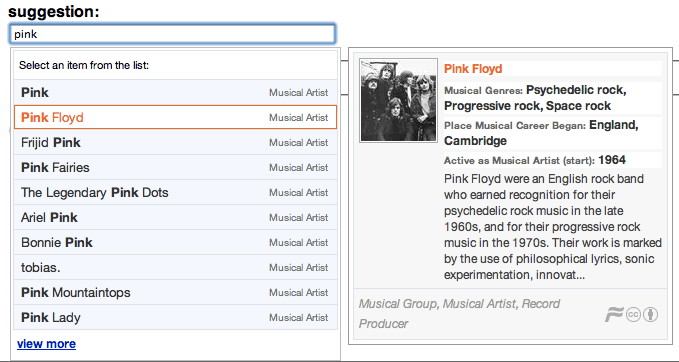
This module offers module developers to add the Freebase Suggest functionality to form text fields.
Freebase provides millions of pieces of semantic data in an organized way, so it's good ad predicting categories of things. You can say that you expect a 'food' to go into a field, and Freebase will guess what food you mean!
Requirements
Works with
- CCK to add an autocomplete feature to text fields
Installation
- Copy the 'jquery_freebase' module directory in to your Drupal sites/all/modules directory as usual
- Download the files suggest.min.js and suggest.min.css from Freebase, and place them into your libraries folder at
sites/all/libraries/freebase_suggest - Check your Drupal jquery version for compatibility - it needs jquery 1.3.2 or higher, which means you need jquery update 6.x-2.x or higher
- Enable jquery_freebase under admin/build/modules
- Check your site status page to see whether the libraries are being found correctly
- See the README for troubleshooting.
Usage
This module enhances CCK text fields with an additional widget that will autocomplete, based on the suggested rage of content expected.
It also provides the libraries for other modules who implement forms to add Freebase suggest to it.
Examples can be found on the freebase suggest website as well as in the examples delivered within the package.
Example code:
if (module_exists('jquery_freebase')) {
  jq_add('freebase');
  drupal_add_js(
    "$(document).ready(function() {
       $('#edit-artist').freebaseSuggest( {ac_param:{type:'/music/artist'}} );
       $('#edit-track').freebaseSuggest( {ac_param:{type:'/music/track'}} );
     });
    ",
    'inline'
  );
}
Project information
- Created by toemaz on , updated
 This project is not covered by the security advisory policy.
Use at your own risk! It may have publicly disclosed vulnerabilities.


