

This project is not covered by Drupal’s security advisory policy.
Introduction
This module enables the jsMath script for displaying mathematical expressions. Users can enter arbitrary mathematical expressions in their drupal content by using the standard TeX syntax, including LaTeX and AMSLaTeX. jsMath renders this on the client's browser when the page gets displayed.
The jsMath script has been developed by Davide P. Cervone. For more information about jsMath see jsMath: A Method of Including Mathematics in Web Pages.
What is jsMath
The jsMath package provides a method of including mathematics in HTML pages that works across multiple browsers under Windows, Macintosh OS X, Linux and other flavors of unix. It overcomes a number of the shortcomings of the traditional method of using images to represent mathematics: jsMath uses native fonts, so they resize when you change the size of the text in your browser, they print at the full resolution of your printer, and you don't have to wait for dozens of images to be downloaded in order to see the mathematics in a web page.
Because the TeX is rendered on the user's browser, this module does not require the installation of any TeX executables on your server. If however you don't mind installing executables then you can also use one of the other TeX modules available for Drupal.
Latest changes to the 3rd party jsMath library.
Other solutions?
I have found MathJax which looks absolutely excellent. It is also a free JavaScript solution for math, but without all the trouble of jsMath. It would be nice if someone was to create a Drupal module to make MathJax readily available under Drupal 6.x+.
MathJax accepts LaTex and MathML as input.
1.x to 2.x upgrade
Because of http://drupal.org/node/854402 the 1.x branch was abandoned (and the Drupal 5.x version!)
If you were using 1.x and wanted to upgrade to 2.x, then all you have to do is add the jsMath filter to your Input format(s).
To avoid the Security problem, do NOT put that filter in all the Input formats. Limit it to 100% trusted people. See below for an additional advisory.
Installation instructions
Accurate installation instructions are on the sponsor website.
Writing jsMath expressions
By default, most of the usual jsMath delimiters are recognized. You can change that in the jsMath global configuration screen. With a WISYWIG editor, it is advised that you use the [math] and [display] tags.
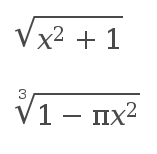
Example: [math]\sqrt{x^2+1}[/math]
The following page describes all the possibilities of jsMath with all the characters and instructions understood:
http://www.forkosh.com/mimetextutorial.html
Security Advisory
Security advisory http://drupal.org/node/854402 is now fixed.
Read more about security issues and other problem & solutions.
Now remember that the module runs the jsMath library against entire pages. I will try to fix that as you can specify a tag and only parse what appears within that tag (it would at least eliminate the blocks.) But the auto-load does not allow you to do that by default.
At least, version 2.x-dev reduces the loading of the module to pages using the jsMath filter. HOWEVER, if it may appear in a list (/node or a view) or if you have blocks on the sides of a page using jsMath, then those teasers and blocks must not contain ANY data from unknown users... For instance, your "Last Forum Posts" represents a risk. Note: this is only if jsMath has a security issue.
If you have any question in that regard, feel free to ask. In the meantime, if unsure either: DO NOT USE THE MODULE, or turn off ALL the blocks on the pages using jsMath.
Project information
- Project categories: Content display, Content editing experience
 5 sites report using this module
- Created by gustav on , updated
 This project is not covered by the security advisory policy.
Use at your own risk! It may have publicly disclosed vulnerabilities.


