

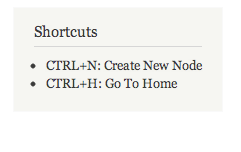
The Keyboard Shortcut Utility module enables you to create keyboard shortcuts on your website. You can create a shortcut to go to a page (internal or external) or call a JavaScript function.
Features:
- Lets you easily create new keyboard shortcuts and associate them to url's or javascript functions
- Provides a block with the information of all the shortcuts available
ToDo:
- Restrict shortcuts by pages or any other rule
- Add core actions, like create node, save node, cancel and go back to destination, etc.
7.x-2.x version
- Keyboard shortcuts are now exportable objects and not nodes.
- The actual key binding functionality is handled using the Mousetrap JavaScript library.
- Shortcut actions are implemented as plugins. The module comes with two actions: "Go to URL" and "JavaScript callback".
Please understand that the 7.x-2.x branch should NOT be used on a production site. Also, while this branch is in alpha, there will be no database upgrade support.
7.x-2.x installation
- Download the Mousetrap library and extract it in the libraries directory. Once extracted the path to mousetrap.js should be sites/all/libraries/mousetrap/mousetrap.js
- Download and install Keyboard Shortcut Utility, Ctools and Libraries API.
- To create a key binding, go to Configuration and click on "Keyboard shortcuts".
Try out 7.x-2.0-alpha1 on Simplytest.me
Credits
- Currently maintained by Ivan Zugec and sponsored by Web Wash.
- First developed by Nestor and sponsored by Up and Running Software.
Supporting organizations:
Project information
 61 sites report using this module
- Created by nestor.mata on , updated
 Stable releases for this project are covered by the security advisory policy.
There are currently no supported stable releases.


