

This project is not covered by Drupal’s security advisory policy.
This module is no longer maintained or supported.
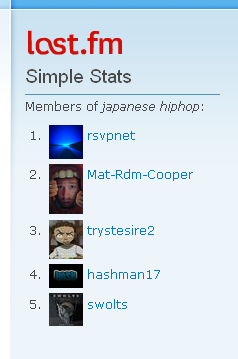
This is a simple module which allows you to embed Last.fm statistics for a user inside a node. The module has an own block, which can show the statistics in multiple form, such as links, plain text or flash. The module is able to fetch multiple sorts of feeds from Last.fm API 2.0. Feeds are cached in the database and updated on request or using Drupal cron on a customisable interval. Checking is done intelligently using If-Modified-Since and Expires headers.
The module requires profile and services modules. This version of the module supports the new Last.fm API 2.0, instead of the first API version. There are some restrictions, because the new API provides the actual statistics, not cached ones. This means the module can make only 5 requests / sec from one IP. This is why most of the statistics are cached locally for a week and new requests should wait in a request line. Please be patient and wait for the statistics. Last.fm also have some restrictions for the Last.fm logo, so if you want to change anything on the block, do it only for your own responsibility.
More info about the Last.fm API 2.0:
Last.fm API 2.0
This module supports the following statistics:
User statistics:
- Weekly album chart
- Weekly artist chart
- Weekly track chart
- Recent tracks
- Top albums
- Top artists
- Top tracks
- Top tags
- Loved tracks
- Friends
Group statistics:
- Weekly album chart
- Weekly artist chart
- Weekly track chart
- Members
In-site statistics (generated by the module, comparing the Drupal site's users):
- Neighbours
- Same albums
- Same artists
- Same tracks
FLASH
-----
If you want to use the Flash block type, then you must download the Flash binary, because
it is not included in the module package.
lastfmsimpleflash.zip (broken URL)
In this zip file you will find the SWF Flash binary and the FLA source too. If this link
not works, please warn me on email.
You can change the Flash extension as you want (except the Last.fm logo).
After downloading and unpacking, copy the swf file to your default files directory. By
default it is under /sites/default/files.
For the communication between Flash and Drupal, you must enable the services module with
AMFPHP and the provided lastfmsimple_service.
SERVICES
--------
To set up the lastfmsimple_service you must turn on the services module and enable the
system service. Then copy the lastfmsimple_service directory (which you can find in the
Last.fm Simple Stats module package) to the services directory in your installed services
module's root dir. Enable it as a normal module.
You will need a server too to the services module. Download the latest AMFPHP (amfphp.org) and copy it to the AMFPHP module.
Read the AMFPHP Drupal module's readme for further information!
Notes
-----
- This module uses the module's own Last.fm API key. With changing the code, or the key, you will risk the module's general access for the Last.fm Web Services, not just yours.
- Think before you change the cron update time. In a site with many users the module can generate very high traffic towards Last.fm.
- For now, it has only been tested by the developer. Further tests are needed.
Version 3.0 is running on the demo site for developing and testing. It is also recommended, but still needs testing.
Project information
 Unsupported
Not supported (i.e. abandoned), and no longer being developed. Learn more about dealing with unsupported (abandoned) projects- No further development
No longer developed by its maintainers.  1 site reports using this module
- Created by dietr_ch on , updated
 This project is not covered by the security advisory policy.
Use at your own risk! It may have publicly disclosed vulnerabilities.

