

This project is not covered by Drupal’s security advisory policy.
Purpose
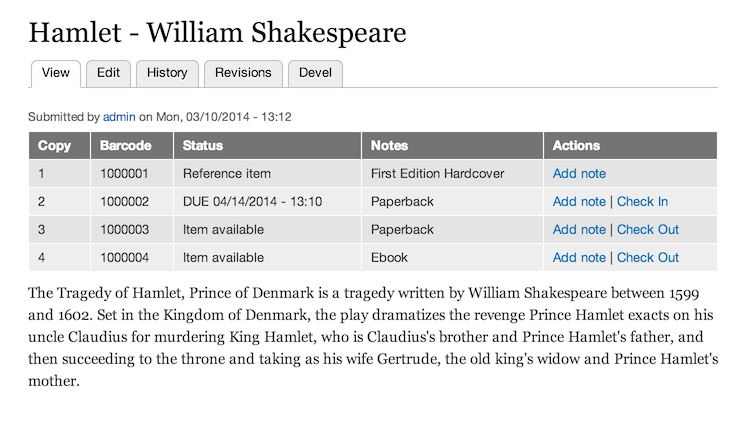
This module helps you to manage a small library catalogue of nodes with checkin / checkout functionality for Drupal users.
Description
The library module allows users to manage the availability of nodes as assets.The module supports multiple copies of a library item associated with one node, and each copy may be individually made available or unavailable.
The module allows administrators to define their own library actions. Library actions may make an item available, unavailable, or not change an item's status. Every transaction is associated with a Drupal user.
Release - 8.x-1.x
The beta release is usable but might need some patches or manual workarounds, see the issue queue for more details.
Release - 7.x-1.x
This release represents the direct port to Drupal 7, upgrades from 6.x-2.x should be possible since the data structure is unchanged but this has not been verified with a large collection yet.
Project information
 Unsupported
Not supported (i.e. abandoned), and no longer being developed. Learn more about dealing with unsupported (abandoned) projects- Obsolete
Use of this project is deprecated.  103 sites report using this module
- Created by jastraat on , updated
 This project is not covered by the security advisory policy.
Use at your own risk! It may have publicly disclosed vulnerabilities.


