Millennium Integration

janusman - January 14, 2008 - 22:24
millennium_module_node_0.jpg

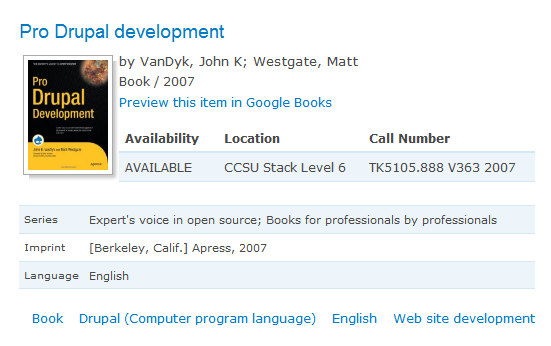
This module imports bibliographic information from the Millennium WebOpac (library catalog) and generates biblio type nodes, which can include real-time holdings information.

Requirements

  • III WebOpac/WebPacPro with XRECORD requests enabled in wwwoptions.
  • Drupal 6 version: PHP5, MySQL and allow_url_fopen setting in php.ini
  • Drupal 5 version: the above, plus the Bibliography Module

DRUPAL 6 VERSION NOTES

Switching from the D5 to D6 version

  • If you are upgrading your site to D5 and D6, CURRENTLY there is NO DIRECT upgrade path for imported Millennium nodes, since another module (Biblio) is not yet ready for production. This means you can't have biblio-type content in a D6 site (yet). An option is to "simply" re-import all your nodes from Millennium using the manual queue option in /admin/settings/millennium/queue_add . Also, you should--as always--run /update.php to make sure your database tables are updated.
  • If your are just starting out with a Drupal 6 installation, there should be no problem =)

Changes from version 5.x-1.x to version 6.x-2

  • Removed dependency on Biblio module. For now bibliographic data is written into the node's body and teaser; this later be changed to choosing between the node body, mapping to CCK fields, or Biblio fields (when that module's 6.x version is ready).
  • Requires specifying the Content Type to import records into. Imported items inherit the publishing options set for that Content Type (e.g.: Promoted to home page, Published, Stickyness)
  • New general.pot file for translation
  • Links to view MARC version of item from within Drupal
  • Items in RSS feeds include book jacket and bibliographic information

Features

  • auto-crawl or manual import of items with each Cron.php run
  • support for external book jacket image services, with Views integration
  • imports Library of Congress book description and Table of Contents along with item, available for searching
  • choose between real-time holdings information or just a link to the original item in your WebOpac
  • maps MARC fields to taxonomy vocabularies for navigation and RSS
  • Google Books links for items available online

Quickstart

  • Your PHP installation must have the allow_url_fopen setting (in php.ini) active
  • Your WebOpac installation must allow xrecord=XXX requests (in wwwoptions)
  • Install and enable the Taxonomy (core) and Millennium modules.
  • For the Drupal 5 version, you also need to install the Biblio module.
  • Set up free tagging vocabularies, that will map to certain MARC fields in records. I recommend at least these:
    • Subject
    • Document type
    • Year published
    • Language
  • (Optional, Drupal 6 only) Set up a new content type to import items into.
  • Go to /admin/settings/millennium on your site and set up the module.
    • Set up your WebOpac URL
    • Enable Automatic Crawl
    • Type in the first record number to import from (say, 100000) and check the "Start Over" checkbox. You can determine this item number from within Millennium; test with your OPAC's record= URL (e.g.: http://example.com/record=i100000)
    • Set the MARC-to-vocabulary mappings
    • For now, set the cover image URL to http://images.amazon.com/images/P/!id.01._SX140_SCLZZZZZZZ_.jpg
  • Now, run /cron.php a few times to get some records into your Drupal site. You can check /admin/logs/watchdog for error messages.

If you are testing this module, please send me your site's URL to take a peek!

Releases

Official releasesDateSizeLinksStatus
5.x-1.42008-Aug-1337.48 KBRecommended for 5.xThis is currently the recommended release for 5.x.
Development snapshotsDateSizeLinksStatus
6.x-2.x-dev2009-Apr-1859.85 KBDevelopment snapshotDevelopment snapshots are automatically regenerated and their contents can frequently change, so they are not recommended for production use.
5.x-1.x-dev2008-Nov-1937.55 KBDevelopment snapshotDevelopment snapshots are automatically regenerated and their contents can frequently change, so they are not recommended for production use.


Drupal is a registered trademark of Dries Buytaert.