

 The 2026 Drupal Business Survey is open. Your response will help shape the future of the Drupal business ecosystem.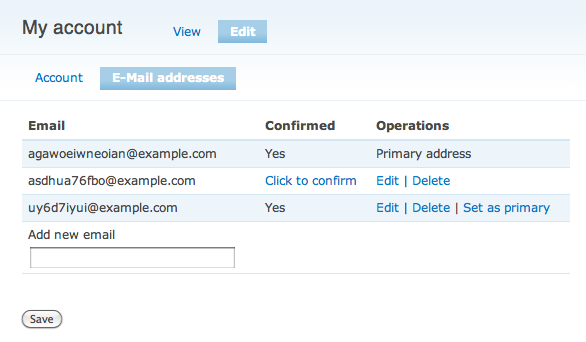
The Multiple Email module allows users to register additional e-mails for their user accounts. Only one e-mail address is considered to be the "primary" email address, and will continue to behave as normal. Non-primary accounts are mostly functionally meaningless, except that during user registration any e-mail address registered to a user cannot be used to create a new account.
Users may select any confirmed e-mail address to become their primary e-mail address. This means that the user account edit page's email address field will not change the user's e-mail address. The default settings for the module will actually disable the e-mail address field on the user account edit page.
Once the module is installed, administration settings are available under Site Configuration -> Multiple E-mail Settings. The configuration options are rather straight-forward at this point and are documented in the field descriptions.
The module will create a menu item in the User Edit page called 'E-mail Addresses' that links to the user's e-mail management page.
Upon adding a new address, an email will be sent to that address with a link to confirm it. The user must be logged in to confirm the address. Unconfirmed e-mail addresses will expire after a configurable number of days.
Supporting organizations:
Paid contrib time
Project information
 Seeking co-maintainer(s)
Maintainers are looking for help reviewing issues.- Project categories: Administration tools, Site structure
 56 sites report using this module
- Created by Josh Benner on , updated
 Stable releases for this project are covered by the security advisory policy.
There are currently no supported stable releases.
Releases
3.0.0-alpha1
released 2 January 2026
Works with Drupal: ^11.3
Install:
Development version: 3.x-dev updated 6 Sep 2026 at 01:40 UTC
2.0.0-alpha2
released 24 May 2026
Works with Drupal: ^9.3 || ^10
Install:
Development version: 2.x-dev updated 23 May 2026 at 22:01 UTC


