

 The 2026 Drupal Business Survey is open. Your response will help shape the future of the Drupal business ecosystem.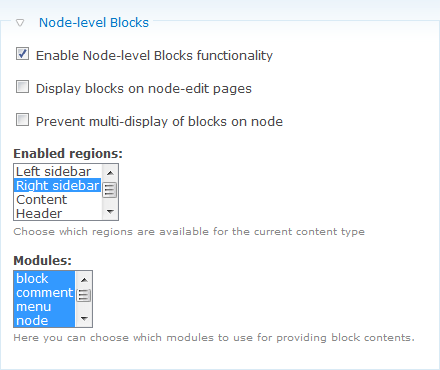

This module allows node editors to assign blocks to regions on a node base. In the node edit form a fieldset will be added in which the blocks can be dragged into a desired region. The blocks will be added to the blocks already present in the region.
Installation:
After enabling the module (admin/build/modules), the Node-level Blocks functionality can be enabled for each content type separately. Navigate to admin/content/node-type/[TYPE_NAME] to configure this functionality.
Usage:
While editing a node (node/[nid]/edit), a fieldset will be available in which each enabled region and available blocks are ready to be dragged.
Nodeblock integration
Very often you have a view and on this view you want to allow users to change the blocks as well. But the view is not a node... In the dev version there is now integration between this module and Nodeblock. A nodeblock can now set node level blocks as well.
Path-level Blocks
Thanks to a sponsorship of MrHaroldA there now is a Path-level blocks functionality that allows you to set blocks on a path basis.
Update problems
If you update from 7.x-1.x to 7.x-2.x and you have Node level blocks on your frontpage then you might run into update problems. You can solve this by putting $conf['site_frontpage'] = 'admin'; temporarily in your settings.php.
Supporting organizations:
Project information
 Seeking new maintainer
The current maintainers are looking for new people to take ownership. No further development
No longer developed by its maintainers.- Project categories: Content editing experience, Content display
 118 sites report using this module
- Created by skilip on , updated
 Stable releases for this project are covered by the security advisory policy.
There are currently no supported stable releases.


