

 The 2026 Drupal Business Survey is open. Your response will help shape the future of the Drupal business ecosystem.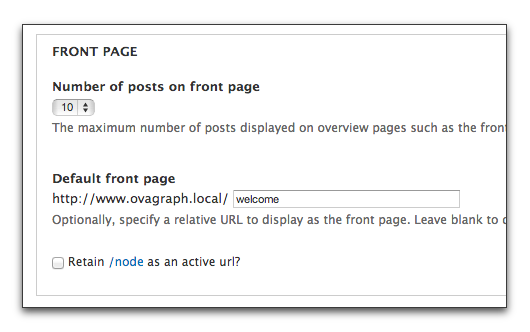
Summary
Allows easy UI access and disabling of the path /node when not used. This was inspired by a security consideration in the Production Check Module.
Requirements
- You only need this module if your front page is other than
/nodeAND you do not wish for/nodeto be an active path.
Installation
- Download and unzip this module into your modules directory.
- Goto Administer > Site Building > Modules and enable this module.
- If your
site_frontpageis not/nodethen/nodewill be deactivated when this module is enabled. /nodepage visiblity will be returned to its default when you disable this module.
Configuration
- Visit
admin/config/system/site-informationand you will find a new checkbox below Default front page called "Retain /node as an active url?" - After changing your site frontpage from blank or
node, uncheck this box and the url/nodewill be disabled when you save this form. - Disable this checkbox when you frontpage is NOT set to node and it will no longer be available as a valid path
Support the Development
If you would like to make a donation to support this work, please click here.
Similar Projects
Project information
 Minimally maintained
Maintainers monitor issues, but fast responses are not guaranteed.- Maintenance fixes only
Considered feature-complete by its maintainers.  1,827 sites report using this module
- Created by aklump on , updated
 Stable releases for this project are covered by the security advisory policy.
There are currently no supported stable releases.

