

Screencast
- Demo showing how much time you can save creating structured nodes with this module
- Demo of the keyboard shortcuts functionality provided via jwerty integration
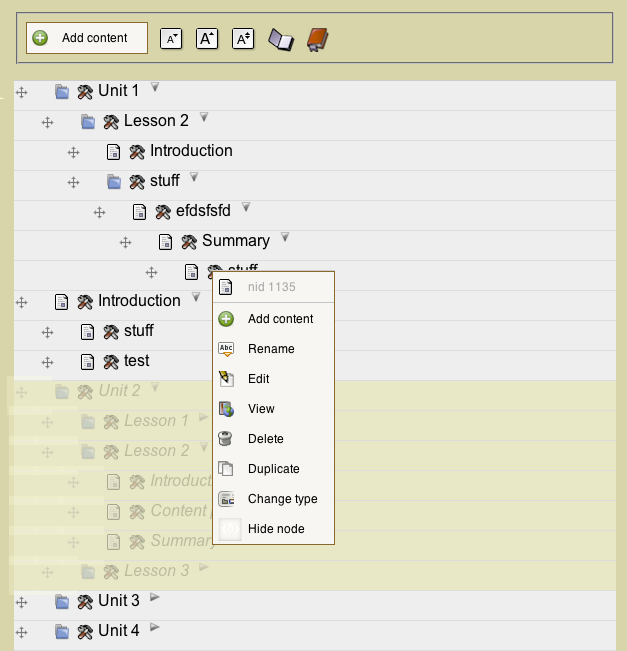
The Outline Designer is a user experience module that makes book management more intuitive. Essentially it overlays on the admin book outline page so that you can use AJAX to build and edit site outlines much faster then Drupal traditionally allows.
Modules implementing Outline Designer
- Hidden Nodes - Hide single nodes or entire branches with optional recursion for hiding content.
- Book Copy - Duplicate parts of the sub-structure, this has been abstracted from the core OD package (use 2.x version of book copy).
- Book Title Override - Override the title of book pages as they are presented in navigation / menus
Here is what the core Outline Designer API provides
- Reorder content via drag/drop with AJAX updating
- Collapse branches for easier viewing as well as set default state of collapse on load
- Set theme / skin of content menu
- Collapse / Expand All branches
- A flexible API for hooking in other operations into the outline designer context menu
- Support for non-book "tableDrag" items
Here is a comprehensive list of the features the outline_designer_book module provides
- Context menu with buttons Add child content, Edit and View Shortcuts, Rename, Duplicate branches of content, Delete branches of content, change node type
- Rename content inline
- icons on settings page per content type
- context menu permissions per role
- iterative duplication with additional token
- permission structure that will allow normal users to outline parts of books
- Plays nicely with Book Manager module
- Keyboard based shortcuts if you have librarires API and jwerty installed.
 This project has been created as part of the ELMS initiative at Pennsylvania State University.
If you think this module rocks, let other people know with a Tweet
Roadmap: The 2.x branch will accept patches for integration with views (draggableviews), taxonomy, menu or other implementations.
Supporting organizations:
Developed, Implemented
Developed, Implemented
Project information
- Project categories: Content editing experience, Developer tools, Site structure
 368 sites report using this module
- Created by btopro on , updated
 Stable releases for this project are covered by the security advisory policy.
There are currently no supported stable releases.

