

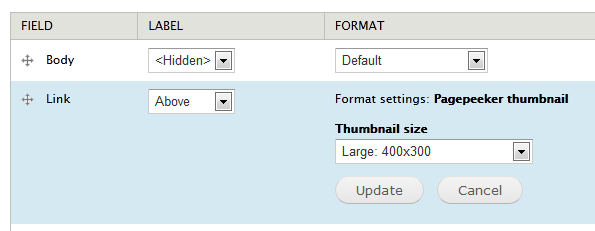
The PagePeeker Screenshots module uses the PagePeeker.com service to fetch and display thumbnails of web pages.
The module works very smoothly with the Link module. Simply go to the display management page and select the "Pagepeeker thumbnail" format. Same formatter works in Views as well. There is an additional option to choose the screenshot image size.
The module provides function theme_pagepeeker_image() to request and display web pages screenshots. The theme function could be executed as follows:
<?php
$options = array(
  'url' => 'http://drupal.org', //URL of the site
  'size' => 'l', // size of the generated screenshot.
  'image_options' => array(
    'attributes' => array('class' => 'my-class') // image "class" attribute
  ),
  'url_options' => array(
    'attributes' => array(
      'class' => array('class1 class2'), // link "class" attributes
      'title' => 'this is the URL title',
      'target' => '_blank'
    )
  )
);

echo theme_pagepeeker_image($options);
?>
There are free, link-back and paid versions of the service available, and all of them are supported by this module. For more info, see http://pagepeeker.com/free-thumbnails/ and http://pagepeeker.com/site-thumbs-pricing/.
Additional information (e.g. possible sizes of the generated screenshots) is available at http://pagepeeker.com/website-thumbnails-api/.
The ShrinkTheWeb thumbnails module provides similar functionality and could be used as an alternative source for web page screenshots.
Project information
 80 sites report using this module
- Created by geobaev on , updated
 Stable releases for this project are covered by the security advisory policy.
There are currently no supported stable releases.


