Profile Location

Bacteria Man - April 5, 2009 - 21:05
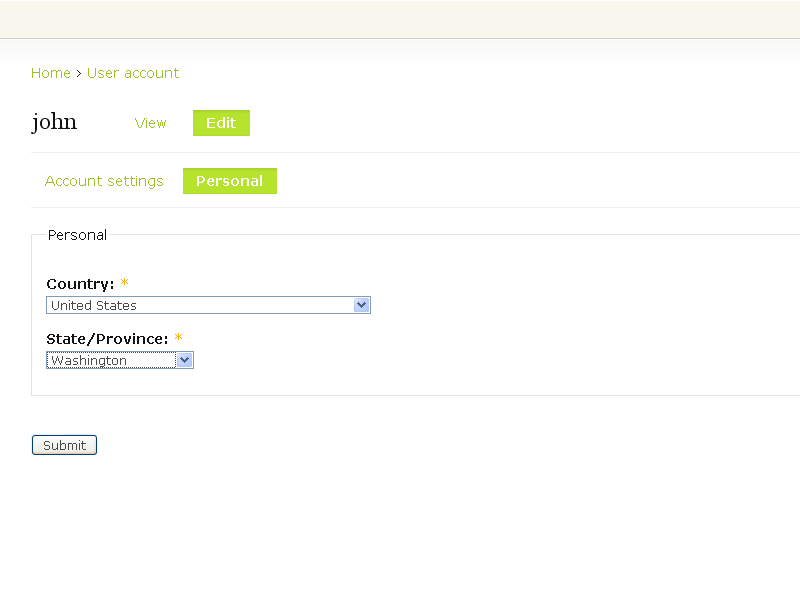
Profile location user edit page.

Profile Location provides dynamic country and state/province dropdowns to the core profile module without the need of CCK-dependent third-party modules such as Node Profile (Drupal 5) or Content Profile (Drupal 6).

The state/province dropdown will dynamically show/hide depending on if the value of the country dropdown equals the primary or secondary countries (US and CA).

Configuration

1) Enable core profile module.
2) Install/enable profile_location module.
3) Goto to admin/user, select Profiles
4) Create a profile list selection field for country:
4a) The category can be whatever you want. Exp. Personal
4b) Title can also be whatever you want, but you should pick a label that makes sense. Exp. Country
4c) Form name should typically correspond with the title using the profile_ prefix. Exp. profile_country
4d) The rest of the settings are up to you particularly making the field required and also visible on the registration page. Note you do not have to enter any Selection options, as profile_location will do this automatically.
5) Repeat steps 4a-d and create a new list selection field type for state:
5a) Use same category as used for country
5b) Title should be contextual for both state and province. Exp. State/Province.
5c) Same as 4c, only for state. Exp. profile_state
5d) Same as 4d
6) Goto to admin/user, select Profile location settings
7) Select default country selection that appears on the registration (if enabled) or account edit page. Exp. United States
8) Select the profile list selection field for both county and state/province.

Usage Notes

-All profile field settings and entries are respected (weight, visibility, etc.) Only the Selection options are overridden by Profile location.
-If you don't see populated country and state/province dropdowns when creating or editing an existing users profile, you have not defined the Profile Location settings in step 8.

Design & Technical Notes

This module was designed first and foremost with North America in mind, namely the United States and Canada. As a result only states and provinces are supported respectively. However many countries all over the world recognize separate parts of their country as states, provinces, regions or territories. If you intend to use this module in another part of the world and would like to change the primary and secondary countries with the corresponding states/provinces/regions/territories, here's how.

1) The easier part: in profile_location.module on lines 10 and 11 change the primary and secondary ISO country constant values as desired.
2) The trickier part: replace the data in the database table profile_location_state using the format:

name: full state/province name. Exp. Alabama
abbrev: 2-letter capitalized state/province abbreviation. Exp. AL
iso: 2-letter capitalized iso abbreviation for corresponding country. Exp. US

ISO data is available from a variety of sources on the web.

This module is dependent on a small inline snippet of JavaScript (jQuery) to perform its show/hide magic and does NOT degrade for users who have JavaScript disabled in their browser. If degradation is important to you, please do not use this module.

Note: it is no longer necessary to create a custom user_profile.tpl.php template file in order to display the full country and state names on the user account view page. The module now does this automatically (via hook_profile_alter).

Releases

Official releasesDateSizeLinksStatus
6.x-1.22009-Oct-0613.47 KBRecommended for 6.xThis is currently the recommended release for 6.x.
5.x-1.32009-Oct-0613.47 KBRecommended for 5.xThis is currently the recommended release for 5.x.


Drupal is a registered trademark of Dries Buytaert.