

 Come together with the global Drupal community in Rotterdam, 28 Sept – 1 Oct 2026. Sessions, contribution, connection, and Early Bird savings until 8 June.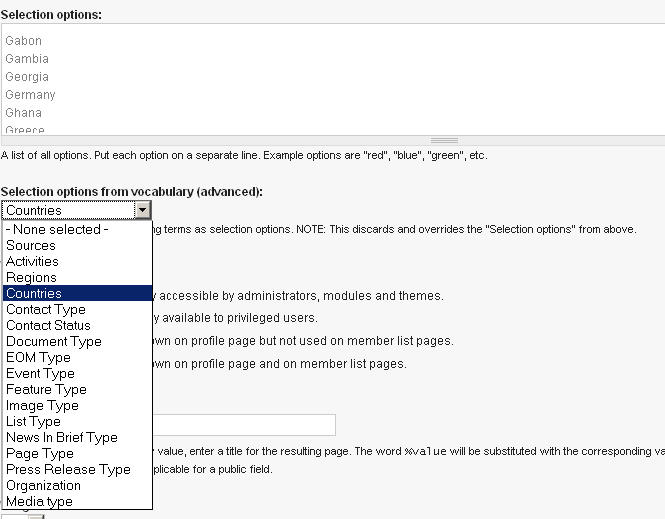
This project is not covered by Drupal’s security advisory policy.
Profile Taxonomy enables the assignment of taxonomy terms to user profiles. Site administrators can reference a vocabulary from a list selection user profile field. Then users can choose the populated taxonomy terms from the user profile pages or registration form.
This module builds on top of the list selection profile field making its data source, i. e. option list, dynamic by referencing taxonomy terms. This elegant masquerading makes Profile Taxonomy compatible with various themes and other modules, e. g. Views, Apache Solr Search Integration or other user profile related modules.
If you found this module useful, please help me to keep maintaining by donating and/or contact me for professional paid support.
This module is developed in scope of the OSCE 3.0 website and CMS relaunch.
Recommendations
- Profile Checkboxes: Associate multiple terms with a profile list selection field
- Profile Role: Restrict visibilty of user categories (and their contained fields) by user roles
Limitations
The list selection profile field can only store term names, but not the term ids. When updating taxonomy terms its names have to be unique within a vocabulary, otherwise already selected terms won't be refreshed correctly.
Important D7 note
There's no need to continue this module in Drupal 7. Profile2 module is a more than a worthy successor, as explained here.
Supporting organizations:
Development and maintenance
Project information
 Minimally maintained
Maintainers monitor issues, but fast responses are not guaranteed.- Maintenance fixes only
Considered feature-complete by its maintainers. - Project categories: Site structure, Access control
 14 sites report using this module
- Created by gnindl on , updated
 This project is not covered by the security advisory policy.
Use at your own risk! It may have publicly disclosed vulnerabilities.


