

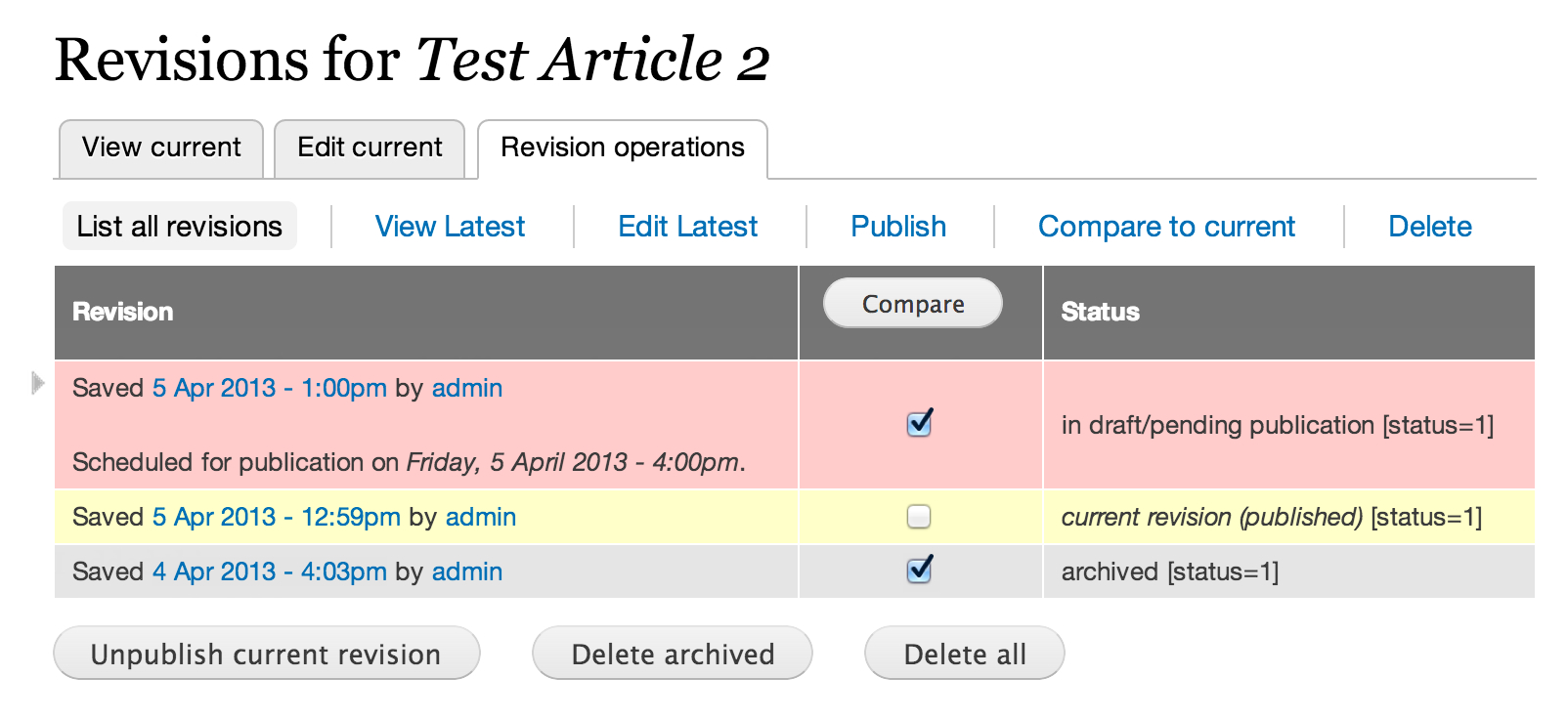
Revisioning is a module for the configuration of workflows to create, moderate and publish content revisions.
You use it in scenario's like this:
- Authors write content that prior to being made publicly visible must be reviewed (and possibly edited) by moderators. Once the moderators have published the content, authors should be prevented from modifying it while “live”, but they should be able to submit new revisions to their moderators.
- We shouldn't have to grant these roles “god-like” powers (e.g. D6's "administer nodes" permission) to implement this.
For the majority of use-cases configuration is straight-forward. The tricky bit are the permissions. To get you up and running quickly (D6 or D7), follow the steps described here: Revisioning at its simplest.
In realising the functionality in the bullet points above we initially looked at the Revision Moderation module, but found that the additional functionality that our customers required could not be implemented via a simple patch.
- In the RM module the permissions to 'edit' vs 'revert/publish' content are lumped together, so that it isn't possible to enforce separation of these responsibilities by role. Revisioning allows you to assign distinct permissions for authors (to only create and edit content) and moderator roles (to review, publish, revert, unpublish and optionally delete content).
- Permissions to view and/or publish revisions may be set per content type, so that authors, editors and moderators may or may not share their work.
- For D7: with the "Administer content" permission being less far-reaching in D7 than D6, you can now give certain roles the permission to opt-in or opt-out of content moderation on a per-edit basis. So, for instance, if the content type Article has been configured on your site not to be subject to moderation by default, these roles may, at any point, decide to switch moderation on, simply by clicking a checkbox on the Article content edit form.
- The Revisioning Scheduler submodule allows the moderator to enter an optional publication date and time when they decide to publish a pending revision or revert to an archived one. Note: requires cron or Poormanscron (D6)
- With Workflow in the mix you will also get for each piece of moderated content a history of all the state changes that content went through, so you always have a full audit trace of who changed, published or unpublished what and when.
- One of the nice features of the module is the "pending revisions" block. Configurable like any other Drupal block this can be placed in the corner of a moderator's screen to automatically alert them the moment new content is submitted for their attention. A simple click on the title brings up the latest revision which may then be published or rejected.
- You may fork, that is you can edit and save the same original twice, thus producing two pending revisions. Normally, this is not what you want, so a warning appears when you're about to edit a revision when a more recent one exists. To further minimise the chance of editing the wrong revision, the module may be configured to always load the latest revision when you click a link to view or edit content, regardless of where that link appears on your site. See Site configuration >> Revisioning.
- With Views enabled, a new item, Content summary, appears in your navigation menu. This is a view that you may use as is, or as a base for customised views of pending, current and archived content on your site.
- Revisioning is frugal with disk space. By default, a new copy of a revision is created only when you update a current or previously published revision. When you update a pending revision (i.e. a work in progress not yet visible to the public), all edits are saved to the same copy, until it is published. You can switch this feature off though, in which case a new revision is created with every save, thus allowing authors to compare editions prior to moderation. See Content management>>Content types>>edit.
Documentation
These step-by-step tutorials will teach you everything you'd want to know about revisioning.
o Revisioning at its simplest
o Revisioning with categorised content (e.g. departments).
o Revisioning with state-based content access control
o Revisioning with taxonomy access and workflow (by lelilondo)
Once you know this module a bit better, which won't take long, and are comfortable with the vanilla version, you may want add some more flavour to your revisioning life by adding some of the following to the mix:
- Jammer: allows you to remove page elements from the content edit form, if required, for instance the Revision information fieldset.
- Diff and Diff Different provide color-coded side-by-side content comparisons, allowing you to determine in a snip what was changed between revisions.
- Pathauto: auto-generates user-friendly and SEO-friendly aliases, based on patterns, like the title of your content. Example: if your content title about-us, then Pathauto might generate
content/about-us to use instead of node/123. - Extended Path Aliases: auto-generates and auto-displays user-friendly path extensions, like content/about-us/revisions, user/rik/, doing away with those ugly numbers appearing in links and tabs and allowing extended aliases and wild-cards to be used when specifying block-visibility, as in *about-us*
- Workflow: further segregate author and moderator roles, see Revisioning with state-based content access control.
- Rules: when Triggers won't do, use the event-condition-action paradigm of Rules. More complicated to set up than Trigger, but very powerful. Revisioning adds its own events and conditions to Rules, for example "content is about to be published" and "content has pending revisions".
- Panels: use your page like a canvas to "drag" block-like panels on it. The integration between Revisioning and Panels is maturing, with basic Panels functions working. To avoid interference with Revisioning's "Edit latest" tab, disable "Node add/edit form" in Panels.
Dependencies
D7: No dependencies.
D6: Revisioning has been programmatically decoupled from Module Grants, so you can now use Revisioning with the Module Grants module disabled -- you still need to download the Module Grants package as Revisioning does require the Node Tools submodule it contains. However you would be mad to not enable Module Grants, because you will have to put up with core's permission quirks that Module Grants navigates around. For starters you'll find that, unless your users are granted the far-reaching “administer nodes” permission, they won't have access to pre-published content. Therefore on the Content management >> Content types page, section “Workflow settings” you must tick the “Published” check-box for the types you want to moderate, so that content is auto-published upon creation. This of course defeats the purpose of moderation, which is to approve new content before it is made publicly visible. Also, without Module Grants, you can only employ at most one module for content access control. If your configuration uses two or more, access grants will not behave as expected.
For programmers
You can invoke Revisioning functionality from your PHP code by setting flags on a node object you have loaded and then saving it. Example:
  $nid = ...
  $node = node_load($nid);
  $node->title = ....
  $node->body = ...
  $node->revision = TRUE; // create a new revision upon saving
  $node->revision_moderation = TRUE; // make the new revision pending review
  node_save($node);
After the call to node_load several other useful attributes are available:
  $node->num_revisions; // number of revisions associated with this node
  $node->is_current; // whether the revision loaded is the current one
  $node->current_revision_id; // vid of the current (as opposed to pending) revision
  $node->is_pending;
  // whether the node has a pending revision, i.e. a revision newer than the
  // currently published one or a single revision that hasn't been published yet
Useful forum threads
Revisioning tips, tricks and solutions supplied by the community:
o #1343546: "Display author and date information" displays date of last revision instead of current revision (published) date
o Use Revisioning with Views PHP for even more control over your Views: #1081804: Direct link to pending revision via Views and #1963850: Display body of pending revision in views.
o #1189854: Message when user tries to publish a revision that is already published.
o #1229520: Assign publish permission by category
Roadmap
There are no plans outstanding to add significant chunks functionality to this module for D6 or D7.
However we're open to requests for useful features.
Original version sponsored by Internet Business Systems, Melbourne, Australia.
Initial version of Revisioning Scheduler submodule by Adam Bramley.
Revisioning UX submodule (from 7.x-1.5) by Greg Anderson.

Project information
 Seeking co-maintainer(s)
Maintainers are looking for help reviewing issues.- Maintenance fixes only
Considered feature-complete by its maintainers. - Project categories: Content editing experience, Access control, Content display
 1,946 sites report using this module
- Created by rdeboer on , updated
 Stable releases for this project are covered by the security advisory policy.
There are currently no supported stable releases.

