

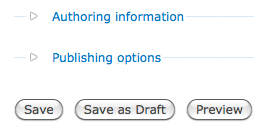
Save Draft adds a 'Save as Draft' Button to the node_form for content types, allowing the user to click the 'Save as Draft' button to save the node as a draft.
Drupal 8 has this UX feature in the core!!
This helps improve usability, as the content creator no longer has to search for the published checkbox to publish or unpublish a node, as they can just click the 'Save as Draft' Button.
If you require more than just a simple way to publish and unpublish node then you may want to check this module out http://drupal.org/project/draft
To install:
1. Download, unpack and place in sites/all/modules/
2. For Drupal 6: Enable the module using Administer -> Site building -> Modules (/admin/build/modules) and for Drupal 7, go to admin/modules
3. Now when you create a new node, a 'Save as Draft' button will be added to the form.
Note: Once the module is enabled, all the content types have "save draft" button enabled and the published checkbox in the node create form will be hidden.
Project information
 Minimally maintained
Maintainers monitor issues, but fast responses are not guaranteed. 2,662 sites report using this module
- By rooby on , updated
 Stable releases for this project are covered by the security advisory policy.
There are currently no supported stable releases.


