

 The 2026 Drupal Business Survey is open. Your response will help shape the future of the Drupal business ecosystem.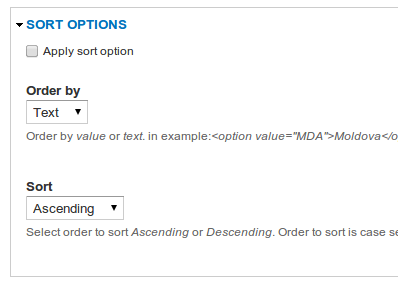
About
This module allows us to sort the elements of a field which has the select list
widget.
Usage
For example:
We have a field called Months, which is a "List (text)" field with the "Select list" widget. In the "Allowed values list" for this field we have the following values:
    January|January
    February|February
    March|March
    April|April
    May|May
    June|June
    July|July
    August|August
    September|September
    October|October
    November|November
    December|December
In the "SORT OPTIONS" fieldset:
- Check "Apply sort option";
- Choose "Order by" - order by text or by the selected value;
Explanation: If we will inspect (using FireBug or else) the Months element
from the form, we will have the following:
    <select id="edit-field-months-und" name="field_months[und]"
            class="form-select">
        <option value="_none">- None -</option>
        <option value="April">April</option>
        <option value="August">August</option>
        ...
        <option value="November">November</option>
        <option value="October">October</option>
        <option value="September">September</option>
    </select>
Based on the code above, the "value" for an option will be "_none"
and the text will be "- None -".
- Choose "Sort" - Ascending or Descending.
In our given form, we will be able to see the elements sorted by the chosen
criteria.
Furthermore, it is possible to add 2 new attributes for the custom created
forms: "#sort_order" and "#order_by".
"#sort_order" - may contain values as "asc" or "desc" and
"#order_by" may contain values as "text" or "value".
For example:
$form['selected_my_data'] = array(
     '#type' => 'select',
     '#title' => t('Selected Integer'),
     '#options' => array(
       'zero' => t('Zero'),
       'one' => t('One'),
      ...
       'seven' => t('Seven'),
       'seven' => t('Six'),
       'two' => t('Two'),
     ),
     '#default_value' => 'nine',
     '#order_by' => 'text', // May contain values as "text" or "value".
     '#sort_order' => 'asc', // May contain values as "asc" or "desc".
    );
As specified in the code above, the options for this element will be ordered by
text and ascendingly sorted.
For more details, please view this video: http://www.youtube.com/watch?v=7eYkUA28gvw
Note
At the moment a select list with the "Check boxes/radio buttons" widget cannot be sorted.
Thanks.
Project information
 Minimally maintained
Maintainers monitor issues, but fast responses are not guaranteed.- Maintenance fixes only
Considered feature-complete by its maintainers. - Project categories: Content editing experience, Content display
 22 sites report using this module
- Created by vladimir-m on , updated
 Stable releases for this project are covered by the security advisory policy.
There are currently no supported stable releases.

