

This project is not covered by Drupal’s security advisory policy.
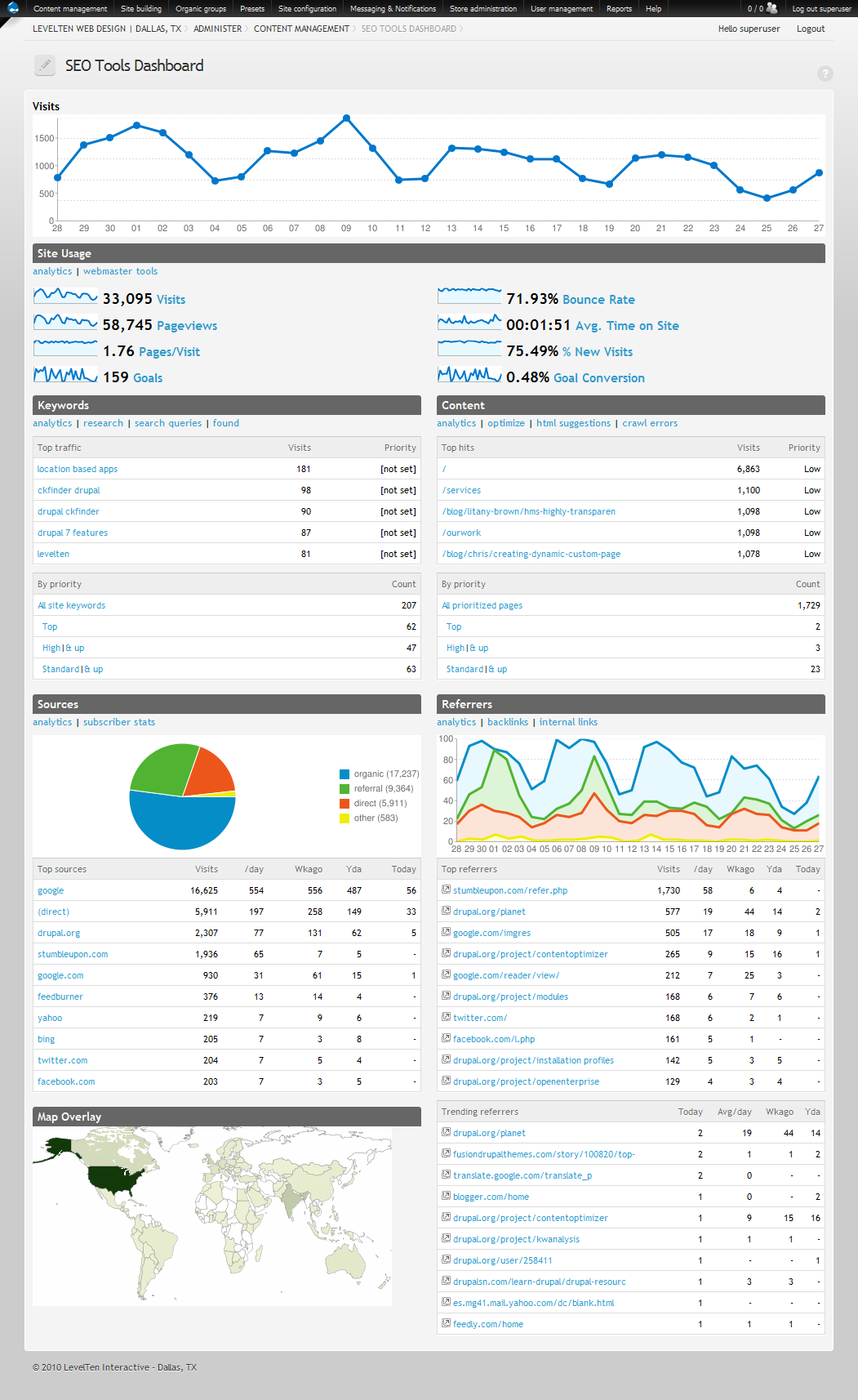
The Drupal SEO Tools module seamlessly integrates a sophisticated all-in-one suite of search engine reporting, analysis and optimization tools into your website. It provides a dashboard that integrates analytics reports with links to webmaster tools and vital Drupal SEO modules.
To get a better idea of what this module does, checkout the demo video
The SEO tools suite integrates:
- Keyword research
- Keyword management
- Keyword extraction
- Content optimization
- Content reports (via SEO Friend)
- Content tagging
- Link management
- Content autolinking
- Cornerstone content & silo management
- Drupal SEO architectural enhancements
- Page titles
- Metatags
- Path & Pathauto
- Global redirect
- Path redirect
- XML sitemap
- Google Analytics w/ API integration
- Google Webmaster Tools
To learn more visit the Drupal SEO Tools Homepage
Installation
The module provides a setup wizard to help streamline installation and optimal configuration of the extensive list of critical modules required for proper Drupal SEO. It stores the base configuration as a Feature so it can be ported and version controlled. Advanced settings are streamlined as Presets (Drupal 6) or Apps configuration (Drupal 7).
Drupal 6 installation
Install the SEO Tools module and look at the dependencies on the admin > modules page (there is a list of dependencies below also). Go to admin > Presets > SEO Tools and follow the instructions to complete installation.
Drupal 7 installation
- Install the module and dependencies. There are three ways to install using Drupal 7:
- Do a traditional install by downloading all the modules from Drupal.org and follow instructions
- One click install via the LevelTen Apps Server. You must install the apps connector modules first.*
- Start your site with the Open Enterprise Drupal distribution. The apps server connectors are included - along with a lot of other great stuff.*
*Using the apps server greatly streamlines the process.
- Launch the wizard. If you installed via Apps, you will automatically be taken to the setup wizard. If doing a traditional install, go to admin > config > search > seo tools and click the + setup wizard quick link.
- Start optimizing your site. The wizard provides recommendations on where to start.
Requirements, recommendations & related
The module has four dependencies to install (see dependent modules). After the main SEO Tools module is enabled, it will walk you through enabling the required modules.
Dependent modules:
Recommended/required modules:
To achieve full functionality from the SEO Tools suite, all modules should be installed. However, modules may be left out if the specific functionality is not needed.
- Alchemy
- Chart API
- Content Analysis
- Content Optimizer
- Country Codes API
- Global Redirect
- Google Analytics
- Google Analytics API
- Intelligence
- Keyword Research
- Meta Tags
- Page Title
- Pathauto
- Path Redirect
- SEO Friend
- Tutorials
- Wordstream
- XML Sitemap
Related modules:
If you just need the essential SEO modules, checkout the Drupal SEO Essentials
For information on additional search engine optimization modules, see the complete list or the resources hub for help & tutorials.
Drupal 7 notes
The analytics dashboard features for SEO Tools have been significantly enhanced and has been moved into its own project, Intelligence.
You can install SEO Tools from Drupal.org and download all the modules individually or install via the LevelTen apps server to stream line downloading. Once you have the module installed, go to the setup wizard by clicking the SEO Tools "Configure" link on the module page and clicking the "+ setup wizard" contextual tab link.
Many of the required modules are the same as D6 but some have changed. The D7 dependencies are in the module info file. If you download you can see the dependencies listed on your sites modules list page.
Sponsorship

This module is sponsored and developed by LevelTen Interactive. LevelTen is a full service interactive agency focused on building online brands by integrating digital strategy, Drupal development and internet marketing. Feel free to connect with us on Twitter and Facebook
If you would like to learn how to build smarter marketing website with Drupal, checkout the Drupal Site Success! ebook
Project information
 Minimally maintained
Maintainers monitor issues, but fast responses are not guaranteed.- Project categories: Administration tools, Content editing experience, Site search
 396 sites report using this module
- Created by TomDude48 on , updated
 This project is not covered by the security advisory policy.
Use at your own risk! It may have publicly disclosed vulnerabilities.


