


This project is not covered by Drupal’s security advisory policy.
The shared edit module helps to the author of a node to provide edit access for other users. Simply shared edit module enables edit access to individual nodes to be on a per user basis. This operates in a similar manner to the CVS access on drupal.org.
Drupal 7: Installation Instructions
- Download and unzip the Shared Edit module into your modules directory.
- Go to Administer > Modules and enable Share Edit.
- Go to Administration > People > Permission and enable a role to use the Shared Edit permission.
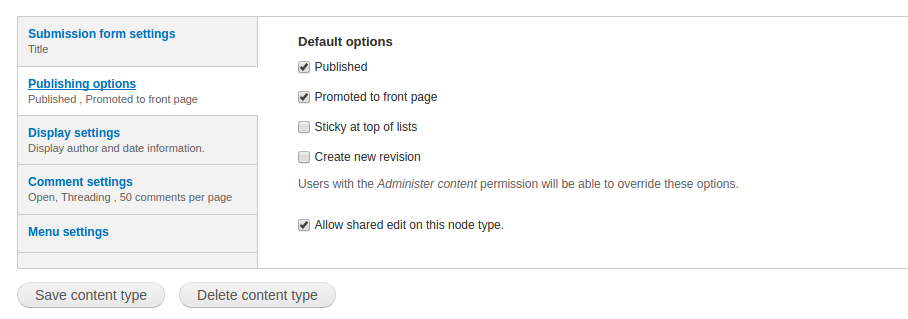
- Go to Administration > Structure > Content types > CONTENT TYPE and enabled shared access on the node types you want it on under Publishing option tab.
Drupal 6: Installation Instructions
- Download and unzip the Shared Edit module into your modules directory.
- Go to Administer > Site Building > Modules and enable Share Edit.
- Go to Administer > Users > Permission and enable a role to use the Shared Edit permission.
- Go to Administer > Content > Types and enabled shared access on the node types you want it on.
Assigning Users(Shared Editors):
After creating each node there is an additional tab "Edit Access" will available for each author.
Under Edit access authors able to add new additional editor for specific node.
This module was created by Innovating Tomorrow for Mustardseed Media.
Supporting organizations:
7.x version development and maintanance
Project information
 Maintenance fixes only
Considered feature-complete by its maintainers.- Project categories: Administration tools, Access control
 1 site reports using this module
- Created by mfer on , updated
 This project is not covered by the security advisory policy.
Use at your own risk! It may have publicly disclosed vulnerabilities.


