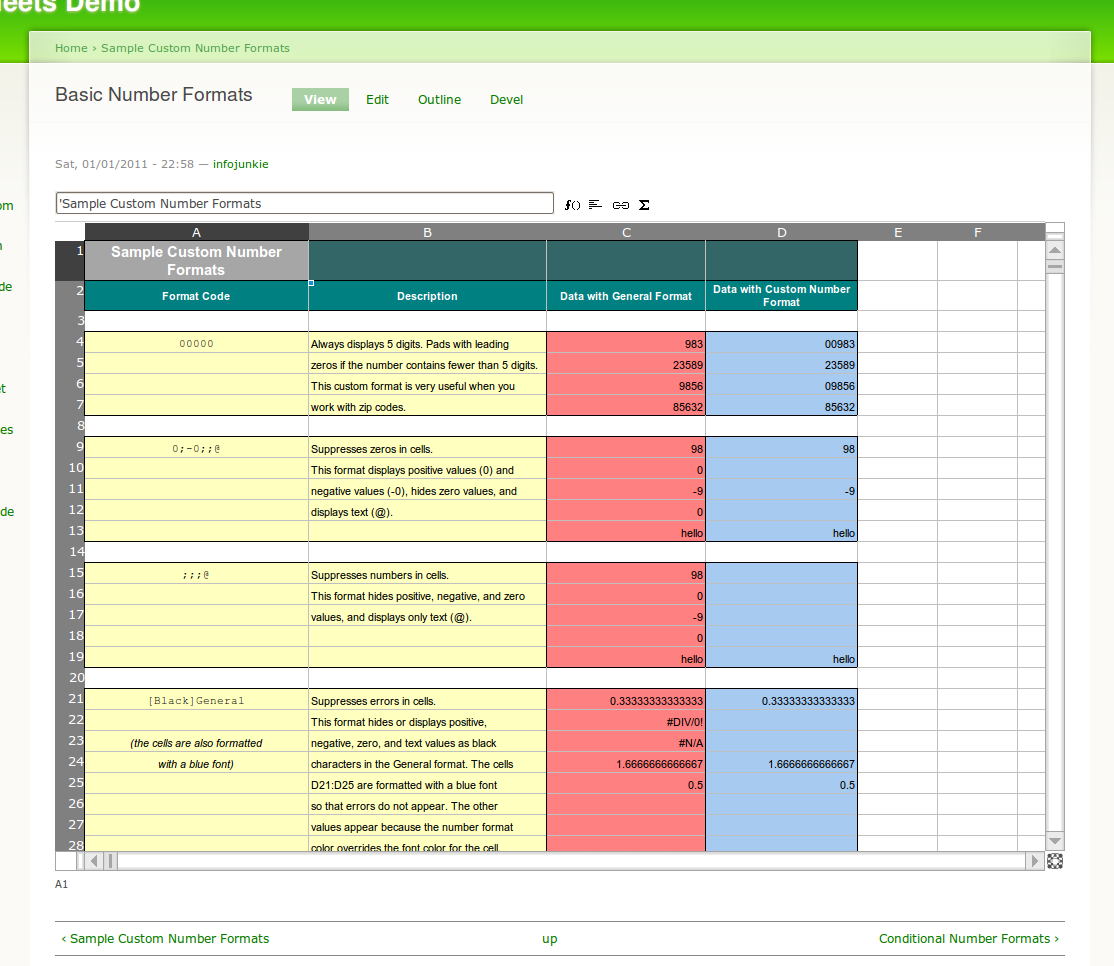
Sheetnode integrates the JavaScript spreadsheet engine SocialCalc as a new node type in Drupal. SocialCalc was written by Dan Bricklin, co-author of the original VisiCalc spreadsheet app in 1979, and is used in the OLPC XO laptop and the SocialText Collaboration Platform.
Need a new feature for your business? Please drop me a line.
Contributors/co-maintainers wanted! Please drop me a line.
TABLE OF CONTENTS
- News
- What can you do with it?
- Quick How-To: Create a new Sheetnode
- Quick How-To: Spreadsheet View
- Installation
- FAQ
- Credits and Sponsorship
- Roadmap
NEWS
- No more Java required!! I've finally gotten around to using PHPExcel to import/export XLS, XLSX, OOCalc, etc., so no more struggling against PHP/Java Bridge and other Java fiends.
- No more patching required! I've forked the original SocialCalc code on GitHub, so make sure to update to the latest code as per the instructions below.
WHAT CAN YOU DO WITH IT?
- Create nodes that are spreadsheets, complete with formulas and formatting
- Create CCK fields that are spreadsheets
- Refer to cells in other spreadsheet nodes
- Use the standard Drupal search to find content inside cells
- Save sheets as templates that can be reused when creating new spreadsheets
- Import from Microsoft Excel (.xls and .xlsx) and OpenOffice.org Calc (.ods) files
- Import from Google Docs spreadsheets
- Export to Microsoft Excel (.xls and .xlsx), Adobe Acrobat, and more
- Create views that show results in spreadsheets, complete with formulas, formatting and result expansion
- Create views that let you export their data to Microsoft Excel and other supported format
Check the Roadmap below for upcoming features.
QUICK HOWTO: CREATE A NEW SHEETNODE
- Install this module (only Sheetnode module needed)
- Create content > Sheetnode
- Enjoy your first online spreadsheet!
QUICK HOWTO: SPREADSHEET VIEW
- Install Views and this module (only Sheetnode module needed)
- Create a new view of type Node (for example)
- In Basic settings > Style, select "Spreadsheet"
- Click "Update default display" to use the default Spreadsheet settings
- Select a few fields to display in the view
- Create a Page display to render the view on a page, and give it a URL
- Save the view
- Navigate to the chosen URL
- Enjoy your first Spreadsheet view!
- Later on, you can edit the view to specify a spreadsheet template instead of the default
- If you enable the Sheetnode PHPExcel, you can also create Feed displays in the view that are attached to the Page display and that allow you to export the resulting spreadsheet to XLS and other output formats.
INSTALLATION
Sheetnode module
- Go to the
sheetnodefolder. - Delete the existing
socialcalcfolder if it exists. - Download the latest SocialCalc tarball from the GitHub repo (you can use this link directly).
- Extract the downloaded tarball and rename the extracted folder to
socialcalc.
Sheetnode Google Spreadsheets import/export module
- Upgrade your PHP installation to 5.2.4 or later as this is the minimum requirement for the Zend Framework.
- Download Zend Gdata Framework 1.9.x or higher.
- Extract to a folder of your choice.
- Configure Sheetnode Google Spreadsheets settings by entering the full path of the Zend Gdata up to but not including the subfolder Zend (typically /path/to/ZendGdata-x.y.z/library).
Sheetnode PHPExcel import/export module
- Download PHPExcel 1.7.4 or later.
- Extract to a folder of your choice.
- Configure Sheetnode PHPExcel settings by entering the full path of the PHPExcel folder root up to but not including the subfolder Classes.
- Check the Drupal status report to ensure that PHPExcel is found by the module.
Sheetnode CKEditor module
- Download CKEditor 3.5.2 or later.
- Extract to a folder named ckeditor inside sheetnode/modules/sheetnode_ckeditor.
FAQ
What format should text tables have to be properly imported by sheetnode_text?
Cells should be separated by at least two whitespaces to be recognized.
How can I refer to external data from my cells?
- To refer to cells in other sheetnodes, use ="nid"!cell-ref or "node-title"!cell-ref. For example: ="719"!L3.
- To refer to node fields, use =ORG.DRUPAL.FIELD(field-name, [oid, entity-name]), e.g. =ORG.DRUPAL.FIELD('title', 719, 'node'). You can also omit the nid and type-name if you want to refer to the current node.
- To include tokens, use =ORG.DRUPAL.TOKEN(token, [oid, entity-name]).
CREDITS AND SPONSORSHIP
The following organizations have provided financial support for Sheetnode:
Thank you all for your generous support.
If you feel this module is useful to your business, please consider the following:
Thanks!
ROADMAP
Functionality
- Support Google Spreadsheets formatting info
- Export to Google Spreadsheets
- Integrate with PHPExcel (done)
- On-page controls to insert/remove rows/cols, format cells, etc. (done)
- Export/import from CSV, XLS (done), ODS (in progress), Google Docs (in progress), etc.
- Template system to save and reuse spreadsheet layouts (done)
- User-defined functions including Ajax functions for backend processing (done for CCK fields)
- Cell references to other sheetnodes (done: syntax is "Node title"!CellRef or "nid"!CellRef)
- Fullscreen mode (done: click on the SocialCalc icon in the bottom-right corner of the sheet)
- Charts
- SUMPRODUCT function (done)
- Collaboration features
Drupal integration
- Passing arguments (done) and exposed filter values to views in cell references
- Referencing node fields (done)
- Packaging as CCK field (done)
- Integration with theming system
- Integration with Search module (done)
- Cell-level permissions (done)
- Revision history with user information (done)
- Create a book and place all imported sheets inside it (done)
- Packaging as Views style plugin (done)
- Export Views to XLS, ODS (done)
Issues & limitations
- ajax_ui.module interferes with Sheetnode and prevents it from saving the spreadsheet data.
- No import of charts or images
- No export of Wiki text cells
- Only one sheet can be displayed on a single page at any time (in progress)
Project Information
- Maintenance status: Actively maintained
- Development status: Under active development
- Module categories: Content, Filters/Editors, Third-party Integration
- Reported installs: 642 sites currently report using this module. View usage statistics.
- Last modified: July 7, 2011