

TVI Overview
The TVI (Taxonomy Views Integrator) module allows selective overriding of taxonomy terms and/or vocabulary with the view of your choice. Using TVI you can easily create custom views to output all terms in specific vocabularies.
TVI will try not to interfere with views or taxonomy/term page displays if no TVI views exist for the current page request.
Usage scenarios:
Let's say you have a vocabulary defined for events, news items, and blogs. If you want to have a calendar view for all term displays in events, a node view for all news items, and you want to have standard taxonomy displays for blogs, this is where TVI shines.
So what?
Using TVI you can customize the look and feel of any and all terms in a vocabulary with only one view. Since you are using individualized views, you can modify the display plugins, sorting order, and more, giving you greater flexibility in re-working your term displays to your specifications.
How to use:
- Enable TVI module (requires taxonomy and views)
- Set permissions regarding TVI administration
- [optional] Define a new view, clone taxonomy/term/* view, or you may use a view from code. Be sure the View selected has a 'no results' behavior defined.
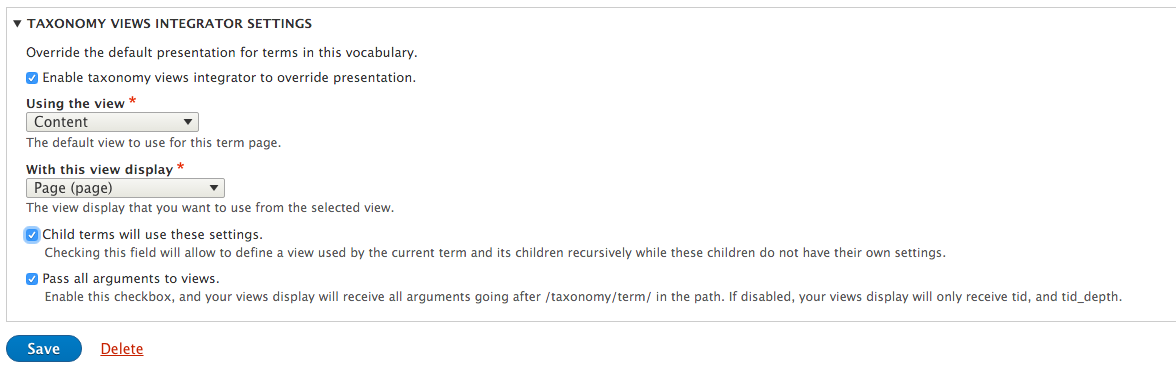
- After you know what view you want to use on a vocabulary or term, simply visit the term or vocabulary edit page that the view should be applied to. Then select the view that you wish to use using the drop-down select list, select the view plugin, and save your changes.
Originally developed by http://CollectiveColors.com and http://DesignLab.net.
Drupal maintenance and work done by Velir
Project information
- Project categories: Content display, Developer tools, Site structure
 21,925 sites report using this module
- Created by derekwebb1 on , updated
 Stable releases for this project are covered by the security advisory policy.
Look for the shield icon below.


