

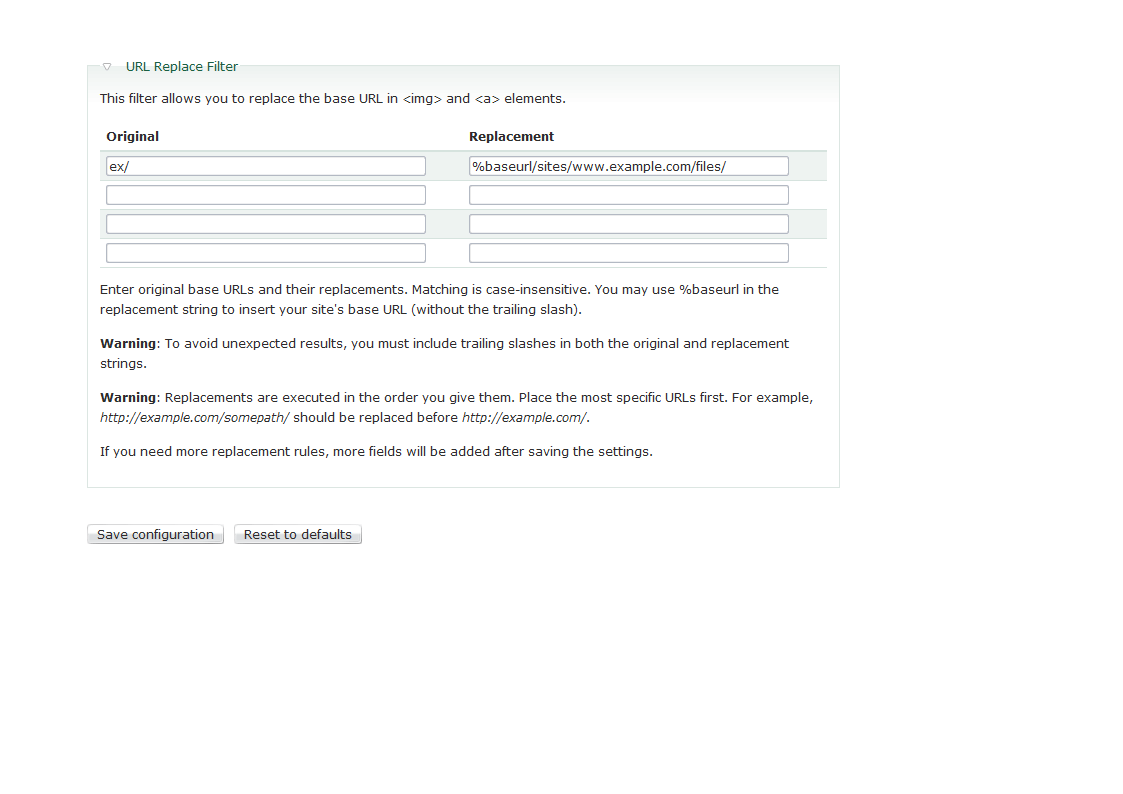
Allows administrators to replace the base URL in <img> and <a> elements.
Users tend to create links and images in their content with absolute URLs. This can be a problem if the site moves to another domain (perhaps between development and production sites) or is behind a proxy, with a different address for authenticated users.
Some replacement examples:
Before: <a href="http://example.com:8080/somepath>Some link</a>
After: <a href="/somepath>Some link</a>
Before: <img src="http://dev.example.com/files/image.jpg" alt="Some image" />
After: <img src="/files/image.jpg" alt="Some image" />
You can setup such replacements in the URL Replace Filter settings as follow:
Original: http://example.com:8080/
Replacement: %baseurl/
Original: http://dev.example.com/
Replacement: %baseurl/
%baseurl is a token for your site's base URL. The above examples assume a site located in the domain's root directory (in which case %baseurl is actually empty).
Drupal versions
The module is available for Drupal 10, 9, 8, 6, 5, and 4.7. In most cases, Drupal 7 has better alternatives.
See also
- Pathologic (for most D7 cases a better option than URL Replace Filter)
- Pathfilter
Project information
 Minimally maintained
Maintainers monitor issues, but fast responses are not guaranteed.- Maintenance fixes only
Considered feature-complete by its maintainers. - Project categories: Content editing experience
 217 sites report using this module
- Created by david lesieur on , updated
 Stable releases for this project are covered by the security advisory policy.
Look for the shield icon below.
Releases
released 17 June 2024
Drupal 10.3 / PHP 8.3 support. Drupal 9 EOL.
Development version: 8.x-1.x-dev updated 8 Sep 2024 at 10:43 UTC


