

This project is not covered by Drupal’s security advisory policy.
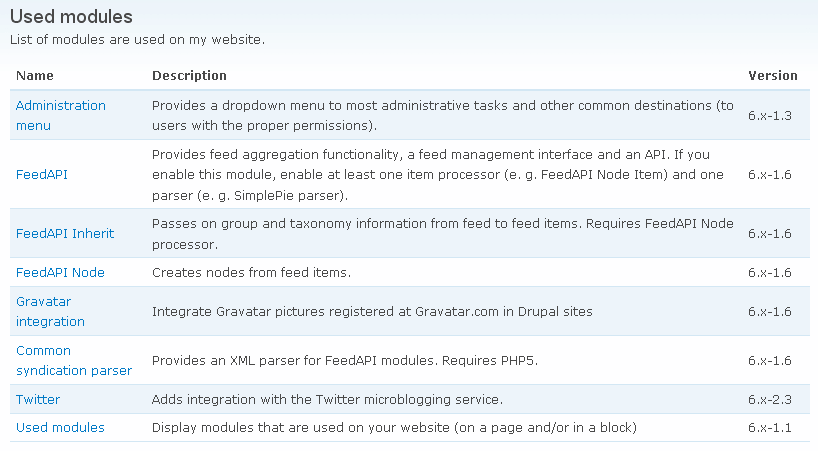
Used modules displays as a table, within a block or a page, all the modules installed on a Drupal site.
Features
- add a block who list installed modules
- add a page who list installed modules
- add a description on the top (for the block and the page)
- displays or not the description for each module (for the block and the page)
- displays or not the version for each module (for the block and the page, not recommended - disabled by default)
- add link to module/project page (drupal.org)
How to activate the block?
The Used modules block is available at http://example.com/admin/build/block. By default it is disabled and is called "Used modules".
How to activate the page?
The Used modules page is automatically generated by the module and available through a menu item at http://example.com/admin/build/menu-customize/navigation. By default the menu is active and is called "Used modules" (bottom of the list of menu items).
You can access it through http://example.com/modules/used.
How can you get involved?
- Write a review for this module on drupalmodules.com
- Help translate this module at localize.drupal.org
- Report any bugs, feature requests, etc. in the issue tracker
Alternatives modules
- Enabled Modules: provides lists of all enabled modules (using Views, supports D7)
- Views System: extends the Views module and allows to create customized listsof modules (and more)
Project information
 Unsupported
Not supported (i.e. abandoned), and no longer being developed. Learn more about dealing with unsupported (abandoned) projects Maintenance fixes only
Considered feature-complete by its maintainers.- Project categories: Developer tools
 4 sites report using this module
- Created by Narno on , updated
 This project is not covered by the security advisory policy.
Use at your own risk! It may have publicly disclosed vulnerabilities.

