

 The 2026 Drupal Business Survey is open. Your response will help shape the future of the Drupal business ecosystem.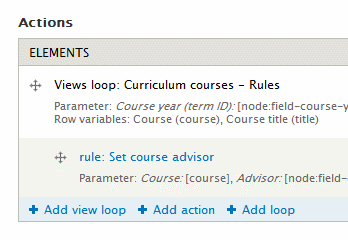
Provides Views directly as Rules actions and loops to seamlessly use view result data.
This module provides a "Rules" display in Views. The display allows configuration of Views contextual filters and fields as Rules parameters and row variables. Settings for each parameter or variable include: type, label, name.
This module also provides two types of elements in Rules, configured with a "Rules" view display:
- View loop
- A view loop is similar to a regular Rules loop, but allows looping over rows of view results.
- Collect view result rows (action):
- This action collects each variable in all view result rows into list variables for use in Rules.
How to use?
- Install the module (and make sure Rules UI and Views UI are both enabled)
- Configured Views
- Add a view (with some fields)
- Add a "Rules" display
- Configure row variables
- Save
- Configure Rules
- Add a rule
- Add the "Collect view result rows" action or add a view loop
- Select the "Rules" display
- Configure the parameters and variable names
- [Do what you want with the newly available variables]
Quick tip
When selecting the data type for variables in the view, if the field is an entity
identifier (e.g. Node ID), you can set the data type to the entity type (i.e. Node) to directly use the variable in Rules as an entity!
Common issues
#1777516: Doesn't seem to work on cron run
Difference from Views Bulk Operations
Views Bulk Operations (VBO) allows a rule to execute a view and vice versa. Views Rules makes Views data available in Rules, enabling intuitive rule configuration for dynamic data.
Sponsor
Development of this module is supported by PhpStorm Open Source license from JetBrains.
Project information
- Project categories: Automation
 3,199 sites report using this module
- Created by zhangtaihao on , updated
 Stable releases for this project are covered by the security advisory policy.
There are currently no supported stable releases.

