

 The 2026 Drupal Business Survey is open. Your response will help shape the future of the Drupal business ecosystem.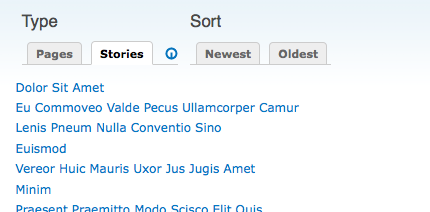
This project is not covered by Drupal’s security advisory policy.
Views Display Tabs exposes the displays of a view as tabs, making it possible to switch displays for a view using AJAX (though it degrades gracefully). This opens up the possibility to make a view even more useful as all overridable settings for a view can be stored in a display. This means that sorting, among many other settings a display can have, can now be exposed to the user through multiple displays with different settings.
New: Module doesn't require an AJAX-enabled browser and will work even with JS turned off, with the added advantage that search engine spiders will index the displays exposed through this module.
Examples of use
Thanks to the configurability offered by a view's displays, Views Display Tabs opens up a lot of possibilities and can be used in many different ways. Here are some ideas:
- A gallery page view that shows thumbnails or a simple list through separate displays using different style plugins.
- A sortable page view that has two displays, one with ascending and the other with descending sort.
- A page view that has one display showing just a few fields and another showing all fields, offering 'basic' and 'detailed' information.
- A page view that has one display that just lists content and another that offers search through exposed filters.
- A block view offering related information for a node through an argument handler, with a separate display for each content type.
How to install and use
- Download the module, extract it, then copy it your modules directory and enable it.
- Go to admin/settings/viewsdisplaytabs. You will see a list of views that have AJAX enabled. If there are no views in the list, make sure there's at least one view that has AJAX enabled. See instructions on the settings page for more information.
- Check the views you want to enable display tabs for and click Save.
- Your view's header will now list the displays as simple tabs. Clicking a display's tab will update the view and replace the current display with the one you clicked.
To learn how Views Display Tabs was used to build a Drupal site, check out this detailed blog post which applies to beta 3.
This module has not been tested with Views 3!
Development of Views Displays Tabs was sponsored by SF Bio and NodeOne.
Project information
 Seeking co-maintainer(s)
Maintainers are looking for help reviewing issues.- Maintenance fixes only
Considered feature-complete by its maintainers.  52 sites report using this module
- Created by solipsist on , updated
 This project is not covered by the security advisory policy.
Use at your own risk! It may have publicly disclosed vulnerabilities.


