

This project is not covered by Drupal’s security advisory policy.
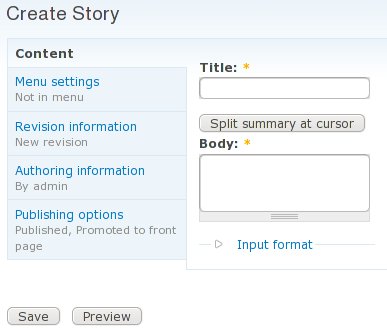
Vertical Tabs module allows you to output form (in our case, node form) fieldsets as vertical tabs. Vertical Tabs Default Tab advances this behaviour, allowing you to move remaining top level node form elements (including, but not limited to title and body) into default vertical tab, leaving only buttons below. This reduces height of node forms, greatly improving usability for complex content types with lots of fields/fieldgroups.
Contains code from #357300: Place all top level form elements into a default vertical tab group.
Usage
Install module as usual, then go to node type configuration page. You will see there "Vertical tabs default tab" fieldset, where you will be able to give a title for your default tab of this content type. Enter the title, and enjoy new look.
You may also implement hook_vt_default_tab_alter(&$exclude_keys, &$exclude_types, &$form) for precise control of what gets inside default tab. $exclude_keys is array of excluded top level form element names, and $exclude_types is array of excluded top level form element types.
Requirements
Troubleshooting
This module just creates another "default" fieldset. If your default tab shows as fieldset, you need to configure Vertical Tabs module so "default" fieldset becomes a tab.
Project information
 Seeking co-maintainer(s)
Maintainers are looking for help reviewing issues.- Maintenance fixes only
Considered feature-complete by its maintainers. - Project categories: Content display
 22 sites report using this module
- Created by crea on , updated
 This project is not covered by the security advisory policy.
Use at your own risk! It may have publicly disclosed vulnerabilities.

