

This project is not covered by Drupal’s security advisory policy.
Capture webform result as new leads in SugarCRM
Now Available - Version 5 for webform2sugar
Yes, I know this seems very soon for a major version update, however, I think there is good reason for this major version change. Version 5 is a rewrite of the module from the ground up and it fundamentally changes the way the webform2sugar module operates.
This version now follows the pattern of other webform module add-ons by simply creating a new tab in the webform section of webform nodes. There are a number of advantages to this approach, and this version sees a lot of changes that were not possible to accomplish with version 4 and before.
The major changes in this version are:
- Mappings are now stored in the database. This allows for a single webform field to be mapped to multple fields in sugar and for a single sugar field to have multiple fields mapped to it.
- Settings are now managed on seperate page inside of the webform tab.
- Each webform can now be sent to a different sugarcrm server
- Campaign Ids can now be overriden on the form so that a single form can go to multiple campaigns.
- Webform2Sugar now checks urls to be sure they are accessible before saving them to the database.
- Webform2Sugar now supports custom mappings without hacking the webform2sugar_fields.inc file.
- Webform2Sugar now uses the webform hooks to integrate with webform. Which means the following changes:
- Multi-Page forms now work in all cases.
- Webform2Sugar now sends the value of selectboxes and checkboxes, not the safe key.
- webform2sugar no longer "hijacks" the key values in the webform fields, so these can now be used for other purposes.
- Less likely that a webform version change will require changes to the webform2sugar module.
Version 5 only supports Drupal 7.x and Webform version 3.x.
Upgrade Path to Version 5
There is no Update Path, to Version 5, and there is none planned at this time. Version 5 is a significant change over version 4 in the way that data stored. It may be possible to find a way to convert the information to version 5, but considering that most sites only have a couple of webforms that map to sugar in, there is no plan to create an automation tool to convert the forms to version 5 of webform2sugar.
About Webform2Sugar
Webform2sugar extends the Webform module with the ability to capture webform results as a new lead in SugarCRM.
The difference with the existing sugarwebform module is that this module doesn't display any extra pages and doesn't need a http-refresh.
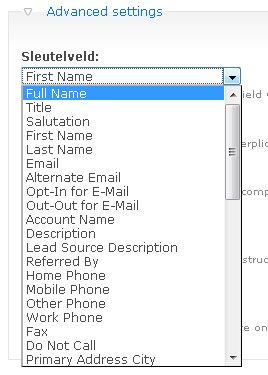
Besides, webform2sugar is more user friendly. You don't have to find out the SugarCRM fieldnames, but you can use the dropdown button to choose an available field.
Testing Needed
If this is a new installation, please use Webform2Sugar version 5. Also, please report back if you use any SugarCRM version other than those listed below, and can confirm that this module works with that version.
This module has been confirmed to be working with:
- Community Edition: Version 6.3.1 (Build 7095)
- Community Edition: Version 6.0.1 (Build 4143)
- Community Edition: Version 5.5.0 (Build 6653)
- Community Edition: Version 5.5.2 (Build 1224)
Requirements
- SugarCRM 5.1 and higher (uses the SugarCRM index.php?entryPoint=WebToLeadCapture)
- Webform module version 2 or higher. http://drupal.org/project/webform
Compatibility & Recommended Versions
| Drupal 5 | Drupal 6 | Drupal 7 | |
|---|---|---|---|
| Webform 2 | 5.x-1.0-beta1 | 6.x-3.0 | Not Supported |
| Webform 3 | Not Supported | 6.x-4.0-beta2 | 7.x-5.0-alpha2 |
| Webform 4 | Not Supported | Not Supported | 7.x-5.0-alpha2 |
Quickstart
- Download and install the webform module if you haven't already
- Extract the webform2sugar to your module directory and enable the module.
- Make a new campaign in SugarCRM and copy the record variable in the url. It should be something like 33101bfb-a773-3231-dc24-512187ae3daa. This is the unique Campaign id of SugarCRM.
- Paste the Campaign id you just copied in the 'Campaign id' field of your Drupal webform. After saving the webforms campaignID it is possible to bind all your input fields to available SugarCRM fields, using the dropdown button by each field setting(advanced settings).
- Create a webform in drupal
- Go to the webform tab of the webform and select sugarcrm:
- Enter the url of the sugarcrm server
- Enter the campaign-id, from above
- Set the send to sugar option to : True
- Map at least the last name field in sugarcrm to a field on the webform
Notice:
-You need at least to bind the SugarCRM field 'Last name' to one of your webform input field. Else SugarCRM doesn't save any lead!
Open Issues
- HTTPS has not been verified to work. It should in theory as it simply uses the drupal_http_request method which officially supports https; however, I have not been able to get it to work and there are open issues regarding https. If you require https and get it to work, please update the group with instructions or a patch.
Project information
 Maintenance fixes only
Considered feature-complete by its maintainers. 11 sites report using this module
- Created by robbertnl on , updated
 This project is not covered by the security advisory policy.
Use at your own risk! It may have publicly disclosed vulnerabilities.


