

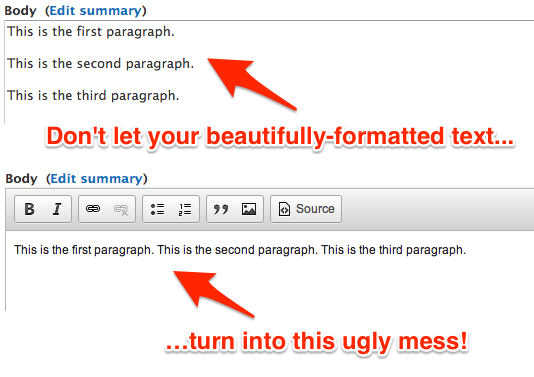
Wysiwyg Linebreaks allows users of wysiwyg editors to save and open markup from their website with linebreaks instead of <p> and <br /> tags.
You can choose between two different methods:
- Force linebreaks: Your content will always preserve whitespace/linebreaks around blocks of text, rather than paragraph and break tags.
- Convert linebreaks: Your legacy content will appear correctly in your WYSIWYG editor, then the content will be saved with the markup added by the editor).
The 'force' option is useful for sites where you would like to edit content both with and without wysiwyg editors (so you don't have to manually enter paragraph and linebreak tags everywhere).
Basically, you can edit content that was originally created without a wysiwyg editor (for instance, simply using Drupal's Filtered HTML format, a user may hit enter twice to create a new paragraph—no <p> tag wraps the block of text in this case), without having to deal with the headache of reformatting everything inside the wysiwyg editor.
This module can often be useful after a migration, for example from Drupal 7 to 11!
Dependencies
Drupal 8, 9, 10, 11
This module works with CKEditor and now CKEditor5 in core. No extra contrib modules required.
Drupal 6/7
This module requires the Wysiwyg module to do anything useful. It does not work with the standalone CKEditor or FCKEditor module, but works with those editors in combination with Wysiwyg.
Configuration
Drupal 8, 9, 10, 11
Install the module, then go to the Text formats and editors page (admin/config/content/formats), configure a format where CKEditor is being used, and choose a conversion method under the Linebreaks settings.
Drupal 6/7
Install the module. To enable this plugin, you need to edit one of your Wysiwyg profiles (admin/config/content/wysiwyg) and check either the 'Force linebreaks' or 'Convert linebreaks' option under "Buttons and plugins".
Pledges
#D8CX: I pledge that Wysiwyg Linebreaks will have a full Drupal 8 release on the day that Drupal 8 is released. Fulfilled!
Module created by Jeff Geerling of Midwestern Mac, LLC.
Project information
 Maintenance fixes only
Considered feature-complete by its maintainers.- Project categories: Content editing experience
 852 sites report using this module
- Created by geerlingguy on , updated
 Stable releases for this project are covered by the security advisory policy.
Look for the shield icon below.
Releases
released 5 September 2024
CKEditor 5 support.
Development version: 2.0.x-dev updated 23 Oct 2025 at 23:55 UTC
released 26 December 2022
Drupal 10 compatibility.
Development version: 8.x-1.x-dev updated 23 Oct 2025 at 23:23 UTC


