Experimental project
This is a sandbox project, which contains experimental code for developer use only.
Webmail integration for Drupal
- Integrates Roundcube as Webmail-Client
- Roundcube Integration as RC Plugin
- Automatic Creation of mailboxes for every Drupal user
- Block for displaying new messages with cache
What's Roundcube?
Roundcube webmail...
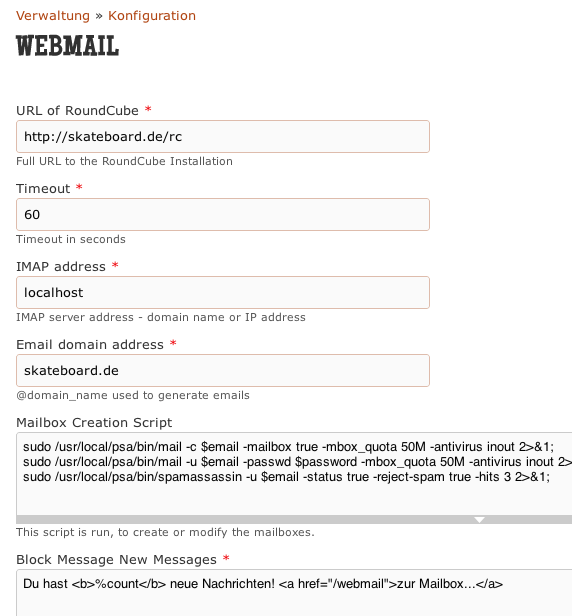
...is a browser-based multilingual IMAP client with an application-like user interface. It provides full functionality you expect from an e-mail client, including MIME support, address book, folder manipulation, message searching and spell checking.
Roundcube.net
It provides a very nice and conveniant AJAX Interface and lots of available skins / plugins.
How it works
This module connects your Drupal Installation with RoundCube.
To do so, it also includes a RoundCube Plugin, that calls a URL back to Drupal / this module, to check the credentials of this user.
If you click the "webmail" Menu in Drupal, the module will redirect the user to the RoundCube Installation, with eMail-Adress and a Call-Back URL in the URL.
The Roundcube Plugin will call this URL to verify the access of the user, and if ok, log the user directly into Roundcube. It will also redirect the user back to Drupal on clicking of the "logout" button in Roundcube.
How to Install
Install RoundCube
Install Roundcube into a subdirectory of your Drupal Installation, e.g. /rc/
Module Settings
Go to /admin/config/webmail3000 to access the settings page.
Most Settings explain them selves, see some more details about these:
Timeout
The Callback from Roundcube has a time limit, default 60 seconds.
The Mailbox Creation Script
This script is called on insert, update or login of a user. It created / updates the mailbox on the Mailserver.
This is the sample for PLESK with 50mb size of mailbox with Spamchecker and Virus-Checker on.
sudo /usr/local/psa/bin/mail -c $email -mailbox true -mbox_quota 50M -antivirus inout 2>&1;
sudo /usr/local/psa/bin/mail -u $email -passwd $password -mbox_quota 50M -antivirus inout 2>&1;
sudo /usr/local/psa/bin/spamassassin -u $email -status true -reject-spam true -hits 3 2>&1;
Note: the 2>&1 at the end makes the output readable by php.
It might be necessary to allow Execution of Script for apache, so Drupal can run the script above.
I recommend using SUDO. To do so, you must add the apache user (in this sample "apache", might be a different user on your Linux) to the sudoers list:
/etc/sudoers
Add:
apache ALL=(ALL)NOPASSWD:/usr/local/psa/bin/mail
apache ALL=(ALL)NOPASSWD:/usr/local/psa/bin/spamassassin
You might also have to comment this line out:
# Defaults requiretty
Otherwise apache will not be able to run any sudo commands…
If you find any problems, enable the debug output in the configuration page and check the log after loggin in and out with a user.
Enable the RoundCube Plugin
- copy drupal_login.php into /rouncbube_dir/plugins/drupal_login/drupal_login.php
- modifiy main.inc.php
- Add this line:
$rcmail_config['plugins'] = array('drupal_login');
Have fun!
Project information
- Project categories: Integrations
- Created by kingbbq on , updated