



Experimental project
This is a sandbox project, which contains experimental code for developer use only.
A javascript-plugin for CKEditor, enhancing it to incorporate support for the GeSHi Filter module.
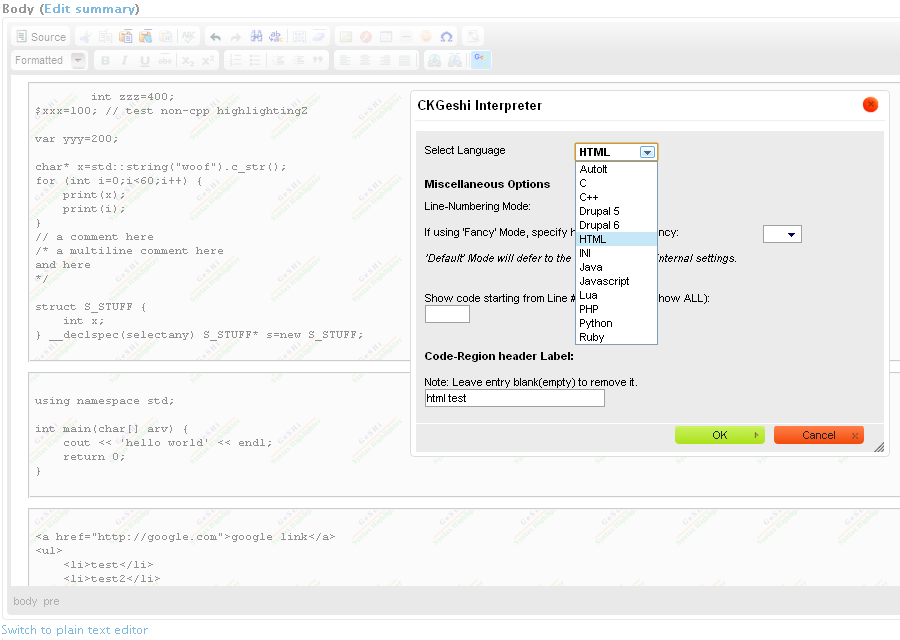
This module provides the included "ckgeshi" javascript-plugin the current settings from GeSHi Filter, so that CKEditor can create code-regions that will be highlighted by GeSHi Filter module. It supports both WYSiWYG mode and Source mode of CKEditor.
Sure you can switch to Plain-Text mode (exit CKEditor) or use your own Input Format without using CKEditor.
However this module enables CKEditor's WYSIWYG and Source modes to interact with GeSHi code-regions properly.
See the attached images for a quick overlook.
REQUIREMENTS:
CREDITS:
The following individuals / projects, were instrumental in the development of this module:
Peter Petrik: CKEditor and GeSHi Filter
PkLab: CKEditor Plugin
Reviewers & Testers: KrisBulman, rrbambrey, mitchell
INSTALLATION
See INSTALL.txt for detailed instructions; MUST be installed properly.
- Install & enable CKEditor module, and configure to your liking
- Install & enable GeSHi Filter module, and configure to your liking
- Install & enable this module. Please see the included INSTALL.txt for detailed instructions. Simplified:
- Text formats page: admin/config/content/formats/ - ensure ckeditor_geshi filter is placed before GeSHi filter.
Warning: If step #1 is not configured, code-regions saved by a form may become botched by CKEditor, & GeSHi Filter. - CKEditor administration page: /admin/config/content/ckeditor - enable the plugin for your profile, and drag the
 button to your toolbar.
- Text formats page: admin/config/content/formats/ - ensure ckeditor_geshi filter is placed before GeSHi filter.
Afterwards you will have a GeSHi button on your toolbar in CKEditor, and the plugin will format code areas you specify for GeSHi Filter to highlight.
You can change the style of code-areas, and other settings, at the ckeditor_geshi module's admin page under Content Authoring:
/admin/config/content/ckeditor_geshi
FEATURES
- GUI for inserting new and modifying existing Code-Regions that will be highlighted by GeSHi Filter
- Dynamically obtains available languages based upon GeSHi Filter settings (configured by GeSHi Filter module).
- Support for both Global Tag Styles, and per-input-format Tag Styles (configured by GeSHi Filter module).
- Support all current features of GeSHi Filter module: Title, Line-Numbering options, Fancy highlighting
- Admin page permitting customization of Input/Output tags, and their styles.
- Single-line and Multi-line indent/unindent (spacing is configurable) inside CKEditor, Enter / Shift+Enter key support, and paste support. Copy is on the to-do list due to browser-specific requirements.
- Context Menu used to adjust the code-region with respect to it's surrounding elements in CKEditor WYSiWYG mode.
- Configurable disabling/enabling of specific buttons while inside a "Code-Region" in CKEditor WYSiWYG mode.
- Works with AJAX forms that have CKEditor enabled
CAVEATS
- Hooks the
Drupal.ckeditorOfffunction provided by CKEditor, to add support for post-processing (see Issue Request). Potentially requires manual update if CKEditor changes this function dramatically in the future. - Uses regular expressions, which by their nature, have the potential to fail when attempting to parse HTML.
Project information
- Project categories: Content editing experience, Developer tools
- Created by lonewolfcode on , updated

