

 Come together with the global Drupal community in Rotterdam, 28 Sept – 1 Oct 2026. Sessions, contribution, connection, and Early Bird savings until 8 June.
Experimental project
This is a sandbox project, which contains experimental code for developer use only.
March 15 - 2014
The extension: https://github.com/jake-mw/CDNTaxReceipts - has had a beta release for some time. Closing in on an official release. Stay tuned!
September 05 - 2013
Update: we've arrived at the point where we are going to be transforming our CiviCRM CDN Tax Receipts Drupal module - to a CiviCRM extension. Thanks to my projects, and Jake's from Peaceworks and Lola's from Freeform we have been able to add a huge amount of functionality during 2013: e.g. Annual Tax receipts, Receipts issued in bulk, reporting, hooks which can be used to decide whether contributions are eligible or not to be receipted based on custom fields, based on amount, and soon to come: inject your own custom PDF letterhead/template as a background template). The added functionality has made it a popular module for CDN non-profits and the requests for a Joomla version are now persistent. So it makes total sense to transform this into an extension now. Work is already well on it's way! Stay tuned for updates.
January 23, 2013
A number of improvements have been introduced in the past 2 weeks... too many to enumerate! The most exciting might be the addition of Annual Tax Receipts, particularly useful for organizations that have monthly or recurring donors, as well as major improvements to the bulk receipt action (Find Contributions) which should take this functionality beyond 'alpha' stage.
I hope to add some more substantial documentation shortly, but in the meantime, here are the highlights of how to get the module up and running:
Prerequisites:
- Set up an email address to serve as your receipt archive -- something like taxreceipts@your.org.
- Install the Drupal Libraries module. Then download tcpdf and unpack it in sites/all/libraries
Consider disabling Geocoding for the moment (see this issue: 1895204.Fixed Feb 19/2013.
Tax receipt setup:
- Download and unpack the civicrm_cdntaxreceipts module in your sites/all/modules directory.
- Set up your Drupal "custom templates" and "custom PHP path" directories (Administer > System Settings > Directories).
- In the civicrm_cdntaxreceipts directory, you will find two directories: custom_php and custom_tpl. Copy everything under these directories to your custom php and custom tpl directories, respectively.
- Enable the civicrm_cdntaxreceipts module in the Drupal config pages
- Visit the CDNTaxReceipts configuration (Drupal Admin > Configuration > CDNTaxReceipts) and set up the various options.
- Visit the Drupal permissions page and assign the "issue cdn tax receipt" permission appropriately.
- Finally, run http://yoursite.org/civicrm/menu/rebuild?reset=1.
Reports setup:
Only necessary if you want to use the Tax Receipt reports:
- Go to Administer > CiviReport > Manage Templates
- Register New Report Template:
- Title: Tax Receipts - Eligible Contributions Not Receipted
- Description: Tax Receipts - Eligible Contributions Not Receipted
- URL: cdntaxreceipts/notyet
- Class: CRM_Report_Form_CDNTaxReceipt_ContributionsNotYetReceipted
- Component: CiviContribute
- Enabled: Yes
- Register New Report Template:
- Title: Tax Receipts - Receipts Issued
- Description: Tax Receipts - Receipts Issued
- URL: cdntaxreceipts/issued
- Class: CRM_Report_Form_CDNTaxReceipt_ReceiptsIssued
- Component: CiviContribute
- Enabled: Yes
Database setup
Some of the new functionality requires cross-database queries between your Drupal database and your CiviCRM database. Theoretically this setup is only required if you wish to use Annual Tax Receipts or the "Contributions Not Receipted" Report.
The cross-database queries are run via the Drupal database API. So, you need to tell Drupal how to find the civicrm_contact, civicrm_contribution, and civicrm_contribution_type tables.
In my case, I have two separate databases (jmw_drupal and jmw_civi) running on the same MySQL server. So, I was able to do the following in public_html/sites/default/settings.php:
203 $databases = array (
204   'default' =>
205   array (
206     'default' =>
207     array (
208       'database' => 'jmw_drupal',
209       'username' => 'jmw',
210       'password' => 'dddddd',
211       'host' => 'localhost',
212       'port' => '',
213       'driver' => 'mysql',
214       'prefix' => array(
215   'default' => 'jmw_drupal.',
216   'civicrm_contact' => 'jmw_civi.',
217   'civicrm_contribution' => 'jmw_civi.',
218   'civicrm_contribution_type' => 'jmw_civi.',
219
220       ),
221     ),
222   ),
223 );
Where to find functionality?
- To issue an individual receipt, find the contact, view the contribution, and click the "Tax Receipt" button. Follow on-screen instructions from there.
- To bulk-issue receipts for individual contributions, go to Contributions > Find Contributions, run a search, select one or more search results, and select "Issue Tax Receipts" in the actions drop-down. Follow on-screen instructions from there.
- To issue Annual Tax Receipts, go to Search > Find Contacts (or Search > Advanced Search), run a search for contacts, select one or more contacts, and select "Issue Annual Tax Receipts" in the actions drop-down. Follow on-screen instructions from there.
I think that's all! Enjoy!
A portion of this work has been sponsored by:
Update Dec. 07 - 2012
Instructions to install latest version 7.x - CiviCRM CDN Tax Receipts module:
0. Make a backup copy (or two) of your files as well as databases
1. git clone
git clone http://git.drupal.org/sandbox/semperit/1289724.git civicrm_cdntaxreceipts
2. Configure the module (upload your Organization details / Logo / Signature / Watermark)
/admin/config/civicrm_cdntaxreceipts/settings
3. Configure custom php and tpl directories for your CiviCRM install:
CiviCRM -> Administer -> System Settings -> Directories -> Custom Templates:
copy CDNTaxReceipts.tpl to /CRM/Contribute/Form/Task/
copy CDNTaxReceipt.tpl to /CRM/Contribute/Form/
CiviCRM -> Administer -> System Settings -> Directories -> Custom PHP Path Directory:
copy CDNTaxReceipts.php to /CRM/Contribute/Form/Task/
copy CDNTaxReceipt.php to /CRM/Contribute/Form/
4. Run updatedb (this version includes database updates)
Here are some changes to the what you may have seen in the past:
a. In-kind receipting fields are now auto generated (by checking the box to do so in the /admin/config/civicrm_cdntaxreceipts/settings
b. TCDPF is packaged with the module (for now)
c. The latest commit includes a first version of a batch receipting option (from the CiviCRM -> Contributions -> Find Contributions -> Search screen). Issue Tax Receipts is an Action.
Update Dec. 04 - 2012
Hi from CiviCRM Code Sprint in Toronto! Lola, Alan, Jake and myself have been working on this module a lot today - and have made lots of progress - if you plan to git clone - check with me as to the current state - we may be between versions.
Update Oct. 16 - 2012
The Mavericks in Calgary sponsored some development time to add the ability to receipt in-kind donations. For this to work you must configure CiviCRM as follows:
1. Create a Contribution Type: Name = In-kind
2. Create a Custom Data set: In-kind donation fields (used for: Contributions)
3. Create fields for this set: here's a screen shot:
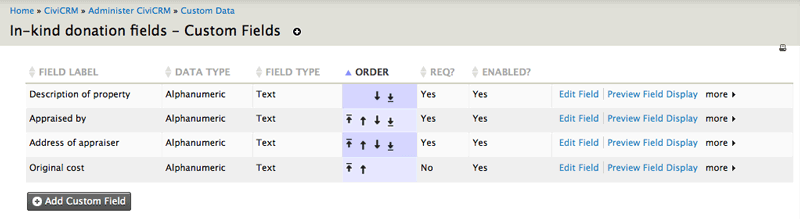
I recommend to add a help for Staff for the Original cost field: "Amount originally paid for the item. This item is needed for a special rule that applies if either something was purchased in the last ten years with the intent of making a donation, or if an item is donated within three years of being purchased. In both cases the amount that can be claimed is the lesser of the market value, and the amount paid for the item. This item is used to show the cost of the item donated (and the creditable amount) if either of those situations apply."
Merci again to Michel, LLLC's Accountant for his valuable input on CRA requirements and vetting this recent addition to the receipts that CiviCRM CDN TaxReceipts module produces.
Update July 20 - 2012
The layout of the tax receipt was adjusted to fit an A10 window envelope [sponsored by PACE Independent Living]. Addressee is in UPPER case as per Canada Post guidelines for bulk mail. The code now also checks to see that the contribution is not only tax deductible but also that its status = completed. Thirdly some more restructuring of the code that generates the tax receipt.
Update June 25 - 2012
For the 7.x branch, I've replaced UFPDF with TCPDF.
Instructions:
1.Download TCPDF from:
https://sourceforge.net/projects/tcpdf/files/
unzip it
2.drop tcpdf/ in:
/modules/civicrm_cdntaxreceipts/
3. AND rename it to:
this_tcpdf/
4. Make sure your webserver has permission to write to this_tcpdf/cache
eg chown apache this_tcpdf/cache
Update June 22 - 2012
I've added a 7.x branch. The 6.x branch is still called Master.
Update March 18 - 2012
New feature: the Issue Tax Receipt button in the CiviCRM View Contribution screen now has a Maple Leaf icon that is white if the Tax Receipt has NOT yet been issued and is red if the Tax Receipt already has been issued. Administrative Staff can press the Issue Tax Receipt button again - to issue a copy marked duplicate - but now they no longer need to check the Email archive to see if they already had issued a receipt previously.
Install file now includes a revised install and hook_update_N() so that pre-Drupal Sandbox versions of this module can now easily upgrade to the current version without having to rename Tables manually. Running updatedb will (in the CiviCRM database):
- copies contents of civicrm_pdfreceipts (if exists) table to civicrm_cdntaxreceipts
- renames civicrm_pdfreceipts to civicrm_pdfreceipts_archive
Full upgrade instructions:
go to /admin/build/modules:
- uncheck civicrm_pdfreceipts
- check civicrm_cdntaxreceipts
Save configuration
run updatedb - update 6100
go to /admin/settings/cdntaxreceipts
re-add your details and your graphics for the receipt (logo, signature and background watermark). Sorry about that -wasn't sure how to automatically pull that info from the previous configuration.
Save configuration
Other that the css and the icons to add the maple leaf icon to the Issue Tax Receipt button and the install/update hooks this revision includes a lot of restructuring and clean up of code as well as some more help in the configuration form for the module settings.
README.txt
This module creates Canadian (CDN) Tax Receipts for charitable donations. Receipts (for both offline and online contributions) are MANUALLY issued via a "Issue Tax Receipt" button in the View Contribution screen.
It was developed in close cooperation with a senior accountant (partner at a major firm) who consulted CRA on a number of occasions - though we are confident that the module is meeting CRA's current guidelines for Tax Receipts re: Charitable Donations, all users of this module should remain dilligent about keeping informed on CRA's guidelines as they may change in future.
For more on what and how, please see:
http://wiki.civicrm.org/confluence/display/CRM/Canadian+Charitable+Receipts
Drupal Installation:
---------------------
1. Unzip the module in your Drupal /modules
2. Enable the module in Drupal
3. Go to Admin > Site Configuration > CiviCRM CDN Tax Receipts
a. enter your Organization's details: including name/contact and address info and charitiable registration number
b. specify items for Receipt configuration: including Receipt Prefix, upload your organization's logo (.png or .jpg), upload a scanned signature (.png or .jpg) of someone authorized to sign tax receipts, upload a watermark (background image) (.png or .jpg)
c. enter the details for the Email message to accompany the tax receipt: including, subject and message, Email From: and also an Archive Email address
CiviCRM Setup:
--------------------
To configure tax receipts in CiviCRM:
1. Go to CiviCRM > Administer > CiviContribute > Contribution Types
2. Make sure any tax-eligible donation types are marked "Deductible"
(no PDF tax receipt will be sent for non-deductible contributions)
Use:
--------------------
This module adds a "Issue Tax Receipt" button to the View Contribution screen. When clicked a set of Tax Receipts are issued:
If the "Issue Tax Receipt" button is clicked again a second set of receipts - now marked "Duplicate Copy" will be issued. The Source field is printed ont he Tax receipt and can be used to eg add a note if this receipt replaces one that was issued previously.
Acknowledgments
Module originally contributed by Peaceworks Computer Consulting - modifications by Semper IT inc May-Sep 2011 - sponsored by http://www.LLLC.ca and Semper IT inc - http://www.semper-it.com
Project information
 Unsupported
Not supported (i.e. abandoned), and no longer being developed. Learn more about dealing with unsupported (abandoned) projects- Obsolete
Use of this project is deprecated. - Created by karing on , updated


