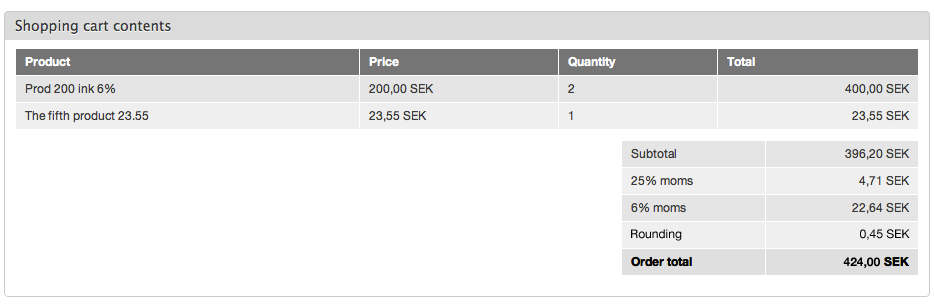
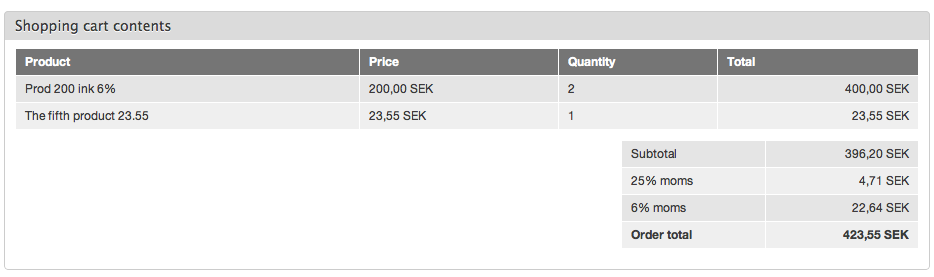
In Sweden, we've recently dumped our "cents" in terms of actual coins, although products can still be priced at the customary "9.95". Hence, in many cases, the grand total needs to be rounded up/down to the nearest "dollar" (actually "kronor", but you get the idea). This rounding amount needs to appear on the invoice/receipt. However, it's not a "product", and VAT shouldn't be applied to it. Preferably, I'd like it to be added as shown in the enclosed "Rounding" screenshot. Compare this to the "Before" screenshot, and you'll see what I mean.
What would be the best way to approach this? Should it be added as a separate rounding field on the "order", or as another kind of line item? Or perhaps as a "price component" somewhere? Any pointers on where to start addressing this would be most welcome.
.JM


Comments
Comment #1
rszrama commentedThe problem from a Drupal Commerce perspective is that we don't allow arbitrary alteration of the Order Total price field on its own - it's technically supposed to be a final representation of the total of every line item's total price data. To accomplish what you want, you'd need to have a new line item type to handle these rounding charges that uses a price component that would show up in the final order totals as "Rounding." For an example, you can see the Shipping 2.x module's implementation of shipping line items and price components. We don't show the shipping line item in the normal order view, but because it uses a custom Shipping price component type, it appears in the order totals display.
This isn't something for the core to add, as far as I'm concerned, but I'd love to see it created in a contributed module. : )
Comment #2
TheWizz commentedYes, I did eventually add it as a line item. That was the closest I could get, and it's OK for now (although not ideal form a layout/placement point of view).
-JM
Comment #3
rszrama commentedYou might check out the Shipping module, then. From a placement standpoint, all you have to do is make sure your order display Views filter out your Rounding line item type and that the custom line item type uses its own price component type so it shows up as "Rounding" in the order totals area.
Comment #4
Olvikolvi commentedIam new with Drupal Commerce and trying to get this rounding work as line item.. Can you give me any clue how to do this as you did? Thanks.
Comment #5
wojtha commentedI had the same problem, so I created the module for that using the suggestion of Ryan from comments #1 and #3.
So pls check http://drupal.org/project/commerce_rounding and give it a try :-)