

Closed (works as designed)
Project:
Entity reference
Version:
7.x-1.0-rc5
Component:
Miscellaneous
Priority:
Normal
Category:
Feature request
Assigned:
Unassigned
Reporter:
Created:
25 Nov 2012 at 13:06 UTC
Updated:
4 Jun 2025 at 07:38 UTC
Jump to comment: Most recent, Most recent file


Comments
Comment #1
haydeniv commentedUnder your content type click on the Manage Display tab. On the line with your entity reference field there should be a sprocket button on the far right column. Click on that and uncheck "Link label to the referenced entity"
Comment #2
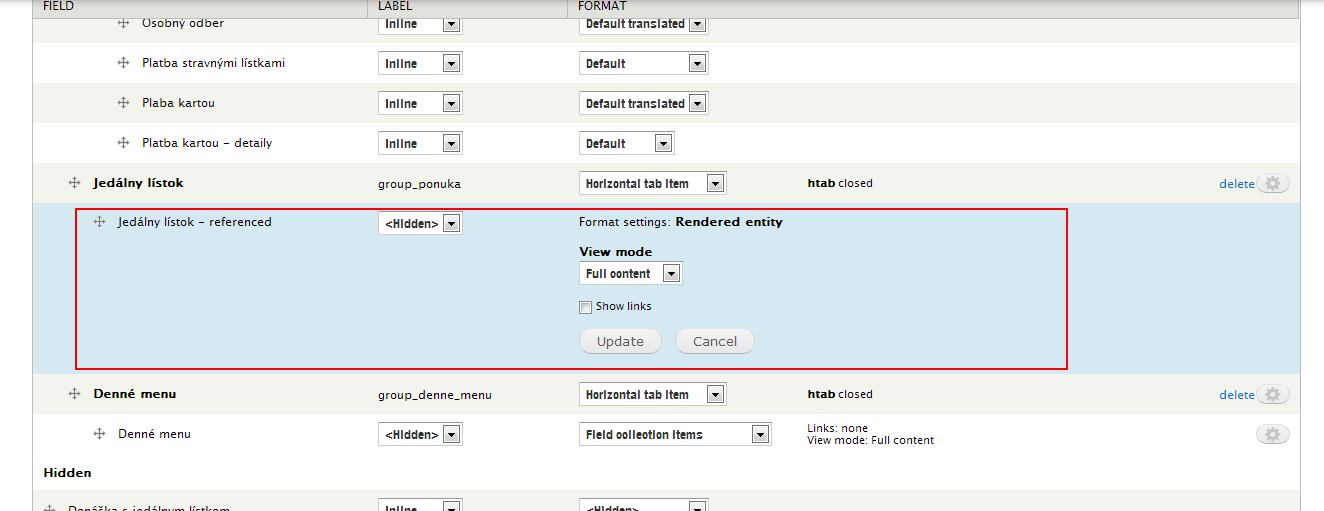
adelka commentedI don't have this option.. see enclosed printscreen.
Comment #3
haydeniv commentedChange the format to "Label" first instead of "Rendered Entity".
Comment #4
adelka commentedwell, its not the solution I am looking for.
I need to render entity, but without the link to reffered content.
Comment #5
haydeniv commentedAh I seem to have misunderstood what you are looking for. Entity Reference does not have much control on the way the entity is rendered. That is at the theme layer. Basically you are telling it to render the full node where that field is. ER assumes you want the title displayed when it calls entity_view() http://drupalcontrib.org/api/drupal/contributions!entity!entity.module/function/entity_view/7.
As a consequence $title is passed to node.tpl.php in your theme and renders the title according to your theme which most likely wraps the title in a link. To change that you will need to modify node.tpl.php in your theme. You'll probably want to include some kind of condition in there for the view_mode so that it does not link for full view but still links for teaser view, unless you don't care about the title linking in the teaser. There are many resources out there for how to override the node.tpl.php file. Hope that helps.
Comment #6
batigolixIndeed as explained in #5: when a entity reference is rendered as a full node than it will use node.tpl.php. That template contains a condition to check for the $page variable. If that is false than it prints the title of the node as a link.
The are various solutions (such as using a different view mode or tinkering with the tpl.php templates) but you can also clear the title using hook_node_view. On a page with a entity reference to a node this runs twice: once for the referencing node and once for the referenced node. It checks if the node is the same as the one returned by menu_get_object.
I have not seen any bad side effects, yet
Comment #7
Richard15 commentedNice solution but I still have the link under H2 :(
Comment #8
philsward commentedThis one took me a minute to figure out.
It will require the Display Suite module to pull it all together.
- Display Suite
- Display Suite UI
- Display Suite Extras (I think this is required? I can't remember)
You will want to edit the Manage Display of the content being referenced, not the node or paragraph where the content contains the reference field.
With Display Suite, you can expose the "title" to the Manage Display area after changing the "layout" of the View Mode. I usually just pick 1 Column.
Once the layout is added, it exposes Title. Drag Title up to the visible area and hit the sprocket to edit the field. This will give you a "Link" select list, choose "no", update, save and done.