

Closed (fixed)
Project:
CKEditor 4 - WYSIWYG HTML editor
Version:
7.x-1.x-dev
Component:
User interface
Priority:
Normal
Category:
Support request
Assigned:
Unassigned
Reporter:
Created:
7 Jan 2013 at 18:48 UTC
Updated:
21 Jul 2014 at 00:42 UTC
Jump to comment: Most recent, Most recent file


Comments
Comment #1
fossle commentedSo I guess the new skin is black and white icons. So those are working. However, I can't get the full version of the toolbar to appear. I can get the basic and advanced....
Comment #2
mkesicki commentedDefault CKEditor 4.0 looks like here: http://ckeditor.com/demo#full. You can also use old Kama skin, but you have to add it to CKBuilder before download or upload skin manually. Please check your toolbar at toolbar option in Editor appearance section of CKEditor profile configuration. Please also check if you use right input format (this one with full toolbar selected) during node creation/edit. Please remember that buttons that you can use in CKEditor depends from plugins that are uploaded with your CKEditor version. Did you use CKEditor from preset or custom build from CKBuilder ? The easiest way to get full CKEditor is download full package from http://ckeditor.com/download.
Comment #3
richH commentedHi,
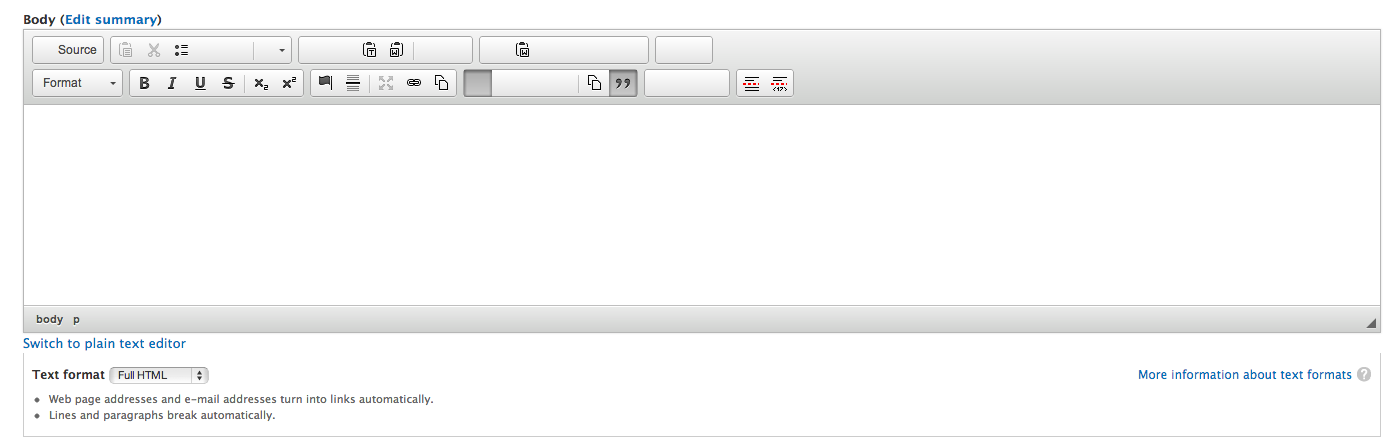
I have the latest version of this module, and the Full version of CKEditor 4.0.1. But I'm getting blank buttons on my editor as shown on the screen shot.
Anyone have some ideas how to fix this?
Thanks
Rich
Comment #4
mkesicki commented@richH,
please try clear Drupal & browser cache. After this refresh page and check if issue exists. If the problem will not gone please check in Firebug (Firefox add-on) console if you have any errors reported.
Comment #5
richH commentedHi,
ok, clearing the browser cache did the job.
Thanks a lot
Rich
Comment #6
natttan commentedI have the same problem. Did something help you? Thanks.
Comment #7
richH commentedHi,
I'd upgraded from the v3 to the v4 of CKEditor libraries when I got this problem. I cleared the drupal cache which didn't fully help. But clearing the browser cache did the trick.
On Chrome, this was under settings - show advanced settings - clear browsing data - empty the cache.
Cheers
Rich
Comment #8
natttan commentedI am sorry I wasn't accurate. I, actually, have the same problem as user fossle, not as you. But, thanks anyway :)
Comment #9
straszko commentedhello..
@natttan, had the same problem.. didn't notice though that version of the ckeditor i downloaded was a standard package.. make sure you get a full package version..
hope it helps..
Comment #10
giupenni commentedHi,
I can confirm what was said by ricH.
Chhers
Giuseppe
Comment #11
blobgrfrgngr commentedThank you Rich! #7 worked for me, after clearing Drupal's cache alone didn't.
Comment #12
johnathan.thwaites commentedHi there,
I think this might be the problem/solution. What has happened is you have installed the CK editor library as part of the drupal 7 WYSIWYG module. This only allows you to see this black and white editor.
http://johnathanthwaites.info/sites/default/files/toolbar.png
if you want the full editor including colour text, spell check and insert flash object etc etc. then you actually need to install CK editor as a module not as a library for wysiwyg. Then you get this one;
http://johnathanthwaites.info/sites/default/files/toolbar2.png
Ive done a full explanation here;
http://johnathanthwaites.info/Ckeditor