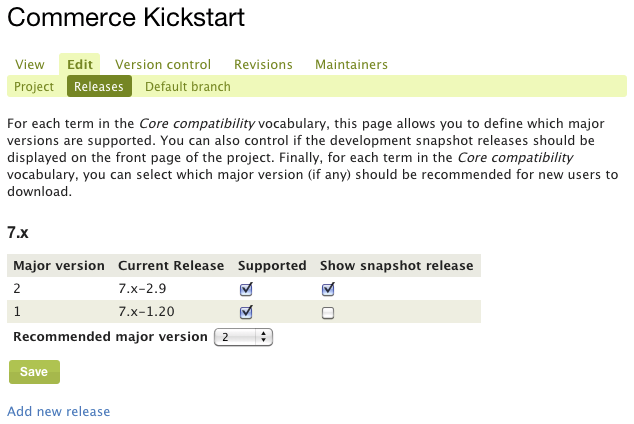
For Commerce Kickstart, I have both the 1.x and 2.x branches checked as supported versions, and until the D7 migration, my releases table on the project page showed them both with the 2.x highlighted in green as the recommended release for that branch. Now the 1.x release doesn't show in the table.
I checked on my Commerce PayPal releases, and if I were to mark the 1.x branch as supported it would show back up in the table. Thus, I'm not sure if this is affecting Commerce Kickstart specifically, distributions vs. modules, or some other similar parameter.
See attachments for the release settings and downloads table.


Comments
Comment #1
rszrama commentedComment #2
bart.hanssens commentedSimilar issue with OpenFed distribution: 1.1 is recommended release, but is not displayed anymore in the releases table, only dev snapshot is displayed (before D7 upgrade, both were displayed)
Comment #3
mpotter commentedI can also confirm this. The D6 release of OpenAtrium is no longer shown on projects/openatrium. Only the 7.x release and -dev versions are shown.
Comment #4
paravibe commentedConfirm. Almost the same with Apachesolr asset and Social comment but releases not shown at all.
Comment #5
maximpodorov commentedThe same issue for Panels Tabs module: newly created release 7.x-2.x is not shown in the project page.
Comment #6
manuelBS commentedSame issue for ERPAL. First we had only the dev snapshot and no alpha5. Then we had randomly changing links on the dev snapshot pointing to just another project. Now we dont have any link on the project page at http://drupal.org/project/erpal
Comment #7
kreynen commentedJust pushed an update to https://drupal.org/project/civicrm_starterkit and lost the links to the supported package too. I manually added a link now that #2125795: Update of project info by non-vetted user demotes full projects to sandbox status was resolved, but that's not completely obvious since it's not with the other downloads where users expect it to be.
Comment #8
jthorson commentedComment #9
agileadamI'm having the same issue with the first official release of my Commerce Product Clone module not showing in the downloads table. #2130571: New official release not showing in Downloads on project page
Comment #10
jthorson commentedOkay ... I think this should get the 'supported' and 'recommended' columns from the edit->releases table working correctly (though it still doesn't address snapshot releases).
Comment #11
jthorson commentedMinor improvement. Btw, this is a patch against 'Project' module.
Comment #12
jthorson commentedComment #13
jthorson commentedComment #14
jthorson commentedPotential temporary workaround: Edit and save a release node after manipulating the Edit -> Releases table.
Comment #15
dsnopekThe temporary workaround did it for me on two of my modules! Thanks, @jthorson!
Comment #16
agileadam@jthorson, this worked for me as well! It took me a minute to figure out what you meant...
1. Click "View all releases"
2. Click the link to the release in question
3. Click "Edit"
4. Reorder the files within "Release files" (not sure if this is required?)
5. Click "Save"
6. Refresh project page and find "Downloads" table updated
Thanks again!
Comment #17
gisleI am happy to report that the workaround in #14 has worked in all the three projects that I manage that were missing releases on the project page:
(I just added a spurious space to the release description before saving.)
Comment #18
jthorson commentedYou don't even need to change the node ... just re-save it. :)
Comment #19
drummmanuelBS - erpal 7.x-2.0-alpha5 is legitimately not recommended because it includes quicktabs, which has had a more-recent security release. I see you fixed this in dev recently. Please make a new tagged release.
Comment #20
drummquicktabs 3.4 specifically.
Comment #21
drumm(I'm just going through the linked releases one-by-one now. Please provide a link if something is still broken.)
maximpodorov - looks like 7.x-2.x is there now.
Comment #22
drummFor civicrm_starterkit and other distributions, they get the minimum update status from their packaged projects - 0 = current if they have the latest release of everything, 1 = not current if something is outdated, 2 = something has a more-recent security release.
Currently, the download table filters on = 0. The attached patch relaxes that to <= 1, so we are still making sure distributions package secure projects. It adds a filter on that release being recommended within the branch.
It looks good for my spot-checks on dev, but I want to do more checking on staging when I am more awake.
Comment #23
tvn commentedSeems this affects only distributions now.
Comment #24
bart.hanssens commentedHmz, work-around (re-saving project node) yields unexpected result for my distribution "ferry" (http://drupal.org/project/ferry).
Both the 1.0-rc3 and 1.0 version are displayed as recommend versions on the project page, while obviously I only want to show 1.0 as recommended release (tried re-saving 1.0-rc3 and 1.0 release nodes, but same result)
The edit/releases table only shows 1.0, so I cannot hide 1.0-rc3.
Comment #25
rszrama commentedfwiw, https://drupal.org/project/commerce_kickstart is not updated and was not helped by the manual workaround.
Comment #26
kreynen commentedSame w/ https://drupal.org/project/civicrm_starterkit. Tried resaving the release node and updating the supported versions. The dev releases would change, but I'm still not seeing the 4.4-rc4 release.
I am seeing usage https://drupal.org/project/usage/civicrm_starterkit, so something was fixed there. I have a backlog of updates I need to make https://drupal.org/project/cm_starterkit_moderate, so I'll see what happens w/ new releases today.
Comment #27
drummDeployed #22.
http://drupal.org/project/ferry no longer recommends 1.0-rc3 after re-saving.
https://drupal.org/project/commerce_kickstart now lists 7.x-1.20 under other after re-saving rules 7.x-2.3, which was incorrectly marked as insecure, and re-saving 7.x-1.20.
https://drupal.org/project/civicrm_starterkit now recommends 7.x-4.4-rc4.
I could be missing something, but I think this is fixed.
Comment #28
bart.hanssens commentedThanks, but apparently there is still an issue, now with http://drupal.org/project/openfed
I've re-saved the release node for 1.2 and changed the release table (edit/releases) several times, but only the dev snapshot shows up. 1.2 does not appear in the table on the project page, even though it is the current version in the release table ....
Comment #29
tvn commented1.2 release does not show up on the project page, because 2 of the modules it includes are marked as "Not secure". This is by design. Related discussion can be found here #2137095: Should supported releases be shown on downloads table even if it contains insecure modules? If so, how?
Comment #30
rszrama commentedPerhaps there should be some notice to maintainers as to why the release isn't showing? It could be in the releases table and only shown to maintainers with a link to the insecure projects, for example. Or, in the case of Commerce Kickstart, a release wasn't showing because a dependency had incorrectly been flagged as insecure. Is there a quick appeal process so we can do the checking and maintenance on our own instead of just being in the dark?
Comment #31
kreynen commentedThis is being more actively discussing in #2137095: Should supported releases be shown on downloads table even if it contains insecure modules? If so, how? now.
Comment #33
cameron tod commentedA few days ago I 7.x-1.2 of Menu Attach Block but it is still not showing on the main module page. Any ideas? I have tried resaving the release node a couple of times.
Comment #34
drummThe version after 7.x-1.11 is 7.x-1.12.
Comment #35
cameron tod commentedSo - I can't release 7.x-1.2?
Comment #36
drummYou can, and it is available for download directly on the release page. But 2 is less than 11, so it is 7 point releases ago when comparing version numbers.
Comment #37
cameron tod commentedBing! The penny drops. Thanks!
Comment #38
RavindraSingh commentedI have released two version of the modules. still can't see the download table is updated .
My Module is https://www.drupal.org/project/environment_libraries
Thanks,
Ravindra
Comment #39
drummThis is because the releases were marked as security releases. Those are not published without coordination from the security team. There is some help text which mentions https://www.drupal.org/documentation/releases/types when you check that box. In this case, the module only had a dev release up until today, so the module is not covered by the security team, see https://www.drupal.org/security-advisory-policy.
I'm a security team member, so I'll make those non-security releases and publish them.