

Closed (fixed)
Project:
Drupal.org security advisory coverage applications
Component:
module
Priority:
Normal
Category:
Task
Assigned:
Issue tags:
Reporter:
Created:
18 Nov 2013 at 06:59 UTC
Updated:
4 Jan 2014 at 21:20 UTC
Jump to comment: Most recent, Most recent file




Comments
Comment #1
asghar commentedComment #2
asghar commentedComment #3
asghar commentedComment #4
asghar commentedComment #5
asghar commentedComment #6
PA robot commentedThere are some errors reported by automated review tools, did you already check them? See http://pareview.sh/pareview/httpgitdrupalorgsandboxasghar2136427git
We are currently quite busy with all the project applications and we prefer projects with a review bonus. Please help reviewing and put yourself on the high priority list, then we will take a look at your project right away :-)
Also, you should get your friends, colleagues or other community members involved to review this application. Let them go through the review checklist and post a comment that sets this issue to "needs work" (they found some problems with the project) or "reviewed & tested by the community" (they found no major flaws).
I'm a robot and this is an automated message from Project Applications Scraper.
Comment #7
asghar commentedComment #8
neerajskydiver commentedFirst change git clone
git clone --branch 7.x-1.x asghar@git.drupal.org:sandbox/asghar/2136427.git jquery_clocksto
git clone --branch 7.x-1.x http://git.drupal.org/sandbox/asghar/2136427.git jquery_clocksThere is still a master branch, make sure to set the correct default branch: http://drupal.org/node/1659588 . Then remove the master branch, see also step 6 and 7 in http://drupal.org/node/1127732
And check
http://pareview.sh/pareview/httpgitdrupalorgsandboxasghar2136427git
Comment #9
asghar commentedComment #10
neerajskydiver commentedComment #11
asghar commentedComment #12
asghar commentedHi neerajskydriver
1. Change your site time zone then you will see that digital and analog time will change regarding to site time zone.
2. Fix thank to find this bug.
3. Done
4. Done
Comment #13
asghar commentedComment #14
shubhangibb commentedHi,
I have installed your module in my local site and also I have done all the configuration settings. I have enabled blocks. The time shown in clocks are user's m/c time the sites time. I have changed sites default time. But it is not reflecting into clocks.
Could you please check it once? Also i have reviewed code using coder module, it is not having error's. great work.
Thanks,
Shubhangi.
Comment #15
asghar commentedHi shubhangibb
Firstly thanks you have reviewed my module. I think you did not update your login user time zone settings . Please follow the steps.
1. Check user login time by editing user form.
2. If time is not same as you have configured it into default region setting then please update its configuration.
Note: Normally when we update the default region time zone settings then it does not impact already created users time zone settings.
Thanks
Comment #16
asghar commentedComment #17
asghar commentedComment #18
SuzhouKada commentedReview report:
Please modify:
Git: git clone --branch 7.x-1.x asghar@git.drupal.org:sandbox/asghar/2136427.git jquery_clocks
as
Git: git clone --branch 7.x-1.x http://git.drupal.org/sandbox/asghar/2136427.git jquery_clocks
Comment #19
asghar commentedComment #20
asghar commentedhi thanks .. I have updated the git path.
Comment #21
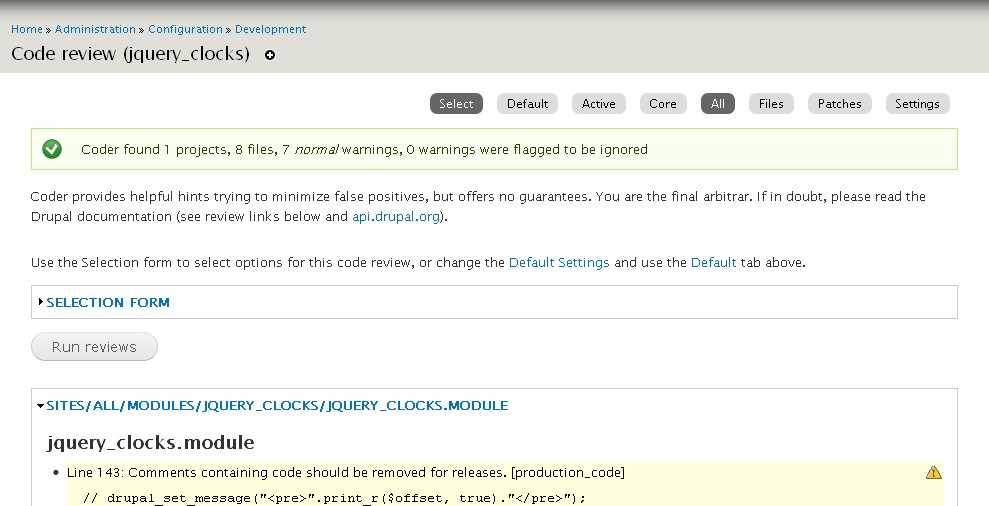
drupaldev@assyst commentedI got some warnings while review by coder. Please see the screenshot.
Comment #22
asghar commentedHi
Which version of coder module you are using because i am not able to see this warning message into my coder review. I have coder version 7.x-2.0. However i have fixed this by the help of your screen short.
Comment #23
asghar commentedComment #24
drupaldev@assyst commentedAs per the suggestion in coder project page, I have used latest dev version (7.x-2.x-dev).
Comment #25
asghar commentedThis is not a recommended version of the module so that we cannot trust on this.
Comment #26
asghar commentedComment #27
xiukun.zhou commentedReview of the 7.x-1.x branch:
This automated report was generated with PAReview.sh, your friendly project application review script. You can also use the online version to check your project. You have to get a review bonus to get a review from me.
Source: http://pareview.sh/ - PAReview.sh online service
Comment #28
asghar commentedi think there is no restriction for css and js files so that i have ignored these issues. Now i try to solve it.
Comment #29
klausimanual review:
Comment #30
asghar commented1. Done.
2. Actually i have modified these files so that i have placed these files in jquery_cloks module and i have also removed all extra files which i am not using into my module.
3. Done.
4. Done.
5. As i am using inline style so that i think code is fine https://api.drupal.org/api/drupal/includes!common.inc/function/drupal_ad....
6. Done.
Comment #31
basant commentedIn the project description you have mentioned "time will be shown based on site timezone", but it shows user time zone if set, otherwise site timezone. Please mention this in the description.
Its a suggestion, if possible add a link to drupal configuration page for your module setting page, you can take help from this link
http://drupal.stackexchange.com/questions/1757/how-to-add-module-to-admi...
There are some errors reported by automated review tools, please fix them
http://pareview.sh/pareview/httpgitdrupalorgsandboxasghar2136427git
You are using third party libraries, if possible avoid that, but as already mentioned that you have made some changes in those libraries, follow guidelines mentioned on and seek permission from drupal admin to use these third party libraries
https://drupal.org/node/422996
to contact site admin may be one of following can help you
https://drupal.org/site-maintainers
Your js libraries are under MIT license and according to drupal
"For any exception to be made, the 3rd party library MUST be licensed under GPL, GPL v2+ or have a broader license and can be re-licensed under the GPL."
I think MIT can be extended to GPL, but be sure as any violation may unpublish your project or revoke git access.
Please fix following
"The theme system, which controls the output of Drupal.
The theme system allows for nearly all output of the Drupal system to be
customized by user themes."
Please put meaningful comments here.
$options = variable_get('jquery_clocks_styles', array());
where as on line no 68
$options = variable_get('jquery_clocks_styles', '');
use same logic at both places.
Comment #32
asghar commented1. I have removed these jquery libraries from module directory and also mentioned these details on project page. Now user will download these libraries from their sites and then place these libraries into drupal libraries directory.
2. Done.
3. Done.
4. When i passed these into t() function i got the following warning messages into coder module.
then i leave these simple without t() function.
5. Done.
6. Done.
7. Done.
9. Done.
10. Done.
Comment #33
asghar commentedComment #34
asghar commentedComment #35
asghar commentedComment #36
asghar commentedComment #37
xiukun.zhou commented1. Creating jquery_clocks.admin.inc file and remove the configuration page form to jquery_clocks.admin.inc(jquery_clocks_config_page)
2.change jquery_clocks.info option configure to: admin/config/user-interface/jquery-clocks
Comment #38
th_tushar commentedHi asghar,
I have seen the installation instruction, where you have provided the instructions for downloading the libraries, but,
I think this should be more user friendly, providing the extra information to the user. Rest, its a good module.
Comment #39
asghar commented@xiukun.zhou
1. Done.
2. Done.
@th_tushar
I have placed the warning messages on configuration page.
Thanks
Comment #40
klausimanual review:
But otherwise looks RTBC to me.
Assigning to dman as he might have time to take a final look at this.
Comment #41
klausino objections for more than a week, so ...
Thanks for your contribution, asghar!
I updated your account so you can promote this to a full project and also create new projects as either a sandbox or a "full" project.
Here are some recommended readings to help with excellent maintainership:
You can find lots more contributors chatting on IRC in #drupal-contribute. So, come hang out and stay involved!
Thanks, also, for your patience with the review process. Anyone is welcome to participate in the review process. Please consider reviewing other projects that are pending review. I encourage you to learn more about that process and join the group of reviewers.
Thanks to the dedicated reviewer(s) as well.